Showing posts with label DSLR. Show all posts

December 9, 2010

Which Video DSLR?

On the AE-List, Jim Feeley recommended Philip Bloom's post Which… “Video DSLR” to buy?

Chris Meyer noted that digital video guru Adam Wilt recently ran tests on the Nikon D90, Canon 5D mkII & 7D, and Pansonic DMC-GH1, and "dropped a LOT of wisdom about using HDSLRs for real video work" in Overview: Several First-Generation Versacams.

See also last month's HDSLR Shopping? for some other round-ups.

November 14, 2010

HDSLR Shopping? Check out Prolost + Philip Bloom

Update: see more in Which Video DSLR?

Stu Maschwitz posted HDSLR Shopping? What You Want is a Canon 60D at Prolost. Stu compares DSLR cameras for HD video, and as always both the blog post and the comments are worth reading:


"Using a DSLR for video a compromise. In addition to the technical limitations we’ve discussed here at length, the time-honored form factor of the SLR just wasn’t made for movies. The 60D takes a big step toward fixing this. To me, this matters a lot. The 5D Mark II shot you blew because you couldn’t see the LCD well enough to focus is worth nothing compared to the 60D shot you wrangled from an angle.

If you’re already a Canon shooter, remember that while the 60D shares batteries with the 5D Mark II and the 7D, it uses SDHC cards instead of CF. I’ve put together a 60D Cine page on the ProLost store to help you get your kit going."

Update: Different opinions in a Mograph thread, and Cinema 5D noted this video on Three Canon HDSLR’s Compared 550D, 60D and 7D,


October 29, 2010

DSLR and 3D stereoscopic resources for Premiere

As part of an effort to head off new users going to Apple or Avid, Adobe posted useful DSLR video and 3D stereoscopic resource pages for Premiere.

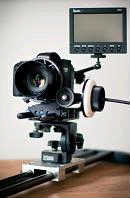
The Adobe TV on DSLR shooting and editing has a range of useful basic info, which extends beyond to Richard Harrington's training initiatives. Essential resources not in the Adobe HDSLR list include resources like Prolost by Stu Maschwitz (pictured), Oliver Peters, and Camera Log from Adam Wilt.

September 14, 2010

Adobe DSLR Video + Tapeless Workflow with FCP

In a new video embedded below, Adobe Evangelist Jason Levine explains DSLR Video Editing for Photographers (see also Importing, transferring, capturing, and digitizing in Premiere Help). It seems like a sensible market niche to target, since even youthful users in the Avid and Apple camps aren't taking the "BBC is switching" bait -- see responses from …A FINALCUTPRO USER'S BLOG and The Final Rewrite, and background in Final Cut Studio 4: a double scoop.

Meanwhile, Shane Ross is on a roll producing Final Cut video tutorials; see for example FCP: Tapeless Offline / Online Workflow and Tapeless Workflow with Final Cut Pro 7 on tapeless ingest workflows using Log and Transfer in Final Cut Pro 7and XDCAM EX, P2 AVCIntra, P2 DVCPRO HD, AVCHD, and Canon DSLR (5D, 7D).


June 5, 2010

'House' DP on Canon 5D MkII

Adam Wilt investigates how the DP used Canon 5D MkIIs on the “House” finale in HDSLR Revolution: Gale Tattersal Talks about “House:

'“Help Me”, the season 6 finale of “House”, was shot with Canon 5D Mk II HDSLRs using off-the-shelf Canon still lenses [similar to the one below from Adam]. This past week, Director of Photography Gale Tattersal quashed a few rumors about how the show was shot, and commented on what he liked about using the Canons as cine cameras.

Mr. Tattersal‘s comments were made on the Cinematography Mailing List, and I reproduce them here by kind permission of Mr. Tattersal and CML’s Geoff Boyle. I’ve made minor edits for formatting and readability, and added some links...'

May 27, 2010

Magic Bullet Grinder: Mac app for Canon DSLR conversion

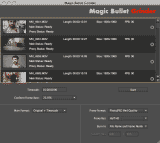
Magic Bullet Grinder (US$49) is a new standalone application for the Mac that batch processes footage from a Canon DSLR:

"It can convert to ProRes, add timecode, and even create low-res with window burn proxies for offline editing. You can also use it to conform (not convert, i.e. no frame blending or motion interpolation) a bunch of clips to one frame rate, so your 30p and 60p shots can become slow-mo clips at 23.976fps."

Update:
Stu Maschwitz responds to comments on his blog,

"Why did we make something to compete with all the free options [Mpeg Streamclip, EOS 5d FCP log and transfer plug-in, etc.] out there?

Grinder's strength is its singularity of purpose and its simplicity. Yes, there are many free ways to convert media files. Some are easier to configure than others. Grinder is a zero-config, drag-and-drop app with a few carefully-chosen options custom-tailored for the needs of HDSLR shooters.

It doesn't do much that's unique, but one feature it has that I like a lot is the parallel proxy rendering. I like to work with low-res offline clips with TC window burn and then master back to my camera originals. Grinder makes that a breeze.

Frame-rate conform is another biggie. I love that I can go shoot 24, 30, 50 and 60p and conform it all back to 23.976 without any effort. Makes slow-mo a simple thing.

Grinder is not expensive. It's for people who want something that works right every time with no fuss."

Plus, there's already a review on PVC.

Update 2: of course if you're using CS5, AE CS5 and Premiere Pro CS5 both natively support DSLR footage. Video backgrounders can be found in AEP posts Native DSLR Editing in Premiere Pro CS5 and Keying, Time Remapping, & Stills in Premiere CS5.

Update 3: there's a public beta of 5DtoRGB, which converts Canon EOS series video files to high-quality DPX sequences or ProRes QuickTime files.

May 19, 2010

Keying, Time Remapping, & Stills in Premiere CS5

The latest from Jason Levine is embedded below.

Note: the Time Warp effect from CS3 and CS4 was removed from Premiere CS5, but there's always Pixel Motion and Time Warp in After Effects if you need better results.


DSLR Workflow in Premiere Pro CS5 - Keying, Time Remapping & Stills from Jason Levine on Vimeo.

Update: Karl Soule added another on DSLR,

May 13, 2010

Premiere Pro CS5: 6 QuickTip videos

Evan Butson has several QuickTip videos at Vimeo on Premiere Pro CS5 features including Facial Recognition, Ultra Keyer, DSLR & RED Support, FCP Roundtrip, and Mercury Playback Engine.

Premiere CS5 QuickTip - Facial Recognition from Evan Butson on Vimeo.

For more: see Native DSLR Editing in Premiere Pro CS5, which also notes that the Premiere Tryout does not include all codecs in the actual software.

May 10, 2010

Preference mod widens CS5 CUDA acceleration

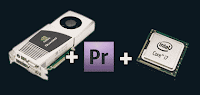
Some simple modification to a Premiere CS5 preference file and to Nvdia preferences can enable CUDA acceleration on more Nvdia cards, according to reports on Premiere forums. This is not driver modification (softmod) or overclocking, but it is unsupported.

The mod seems to have popped up at DVinfo.com in How to make Premiere CS5 work with GTX 295 and possibly all 200 GPUs by marvguitar/Martin Guitar, and spread elsewhere, including to the Adobe forum at Unsupported GPU for CS5.

On Windows, the "GPUSniffer.exe" looks at "cuda_supported_cards.txt" to match the named list of cards with your GPU, so it's just a matter of enabling your card and seeing what works. Adobe has made details on CUDA acceleration and supported cards pretty clear from the start in order to create a pipeline with higher performance, quality, and reliability guarantees. There are plans for more cards to be certified in future but it will take Adobe and Nvdia time and testing resources to deliver new certifications.

If people want to risk some incorrect renders and crashes -- including possible system instabilities on cards with less memory -- then they'll have to take responsibility themselves for testing and support. For jobs, using an untested uncertified card is not advisable, but you should be able to turn CUDA off and render in software. Having inexpensive hardware acceleration for a few layers with effects on DSLR footage has made some users pretty happy.

Some cards will work better than others, but to find out you may have to enter the confusing world of nVidia naming conventions and driver support for CUDA. Here's one list of cards (by no means exhaustive or accurate) that are reported to work:

GeForce GTX 260
GeForce GTX 275
GeForce GTX 285 ( "3 layer limit", Adobe, Mac)
GeForce GTX 280
GeForce GTX 295
GeForce GTX 470
GeForce GTX 480
Quadro CX (Adobe)
Quadro FX 3800 (Adobe)
Quadro FX 3700
Quadro FX 4800 (Adobe, Mac)
Quadro FX 5800 (Adobe)

Update: appearing in late June twitters were of an article by Studio 1 Productions, How to Unlock Adobe Premiere CS5 use almost any NVIDIA graphics card with CUDA acceleration.

Update 2: Premiere gets laptop support with the addition for the Quadro FX 3700M and the Quadro FX 3800M to the list.

Update 3: there are some instructions for the same on the Mac at Insanely Mac in How To Cuda / Mercury Engine on Premiere CS5 / Snow Leopard [ lower end graphic cards ].

May 1, 2010

Add anamorphic Optical Flares to video

FreshDV posted a note on Add Anamorphic Lens Flares to Video, an After Effects tutorial by Next Wave DV. Host Tony Reale uses flares from Video Copilot Optical Flares to show how and why to use flares:

"This is a great alternative to spending thousands of dollars on anamorphic lenses for your camera. The results are very realistic and highly customizable. I also show you how to add realistic handheld camera shake to your footage. This can be very important when working with DSLR footage since most DSLRs have rolling shutter problems that create a “jello-cam” effect when moved quickly."

NextWaveTV Ep 10: Add Anamorphic Lens Flares to Video from Tony Reale on Vimeo.


Note: for more on lens flares, see Breath life into stale Lens Flares if you don't have a good lens flare filter and Real world lens flare tests for tests of flares from actual lenses.

April 21, 2010

Fxphd term starts with 41 courses

The fxphd term has begun with 41 total courses on VFX, editing, motion graphics, compositing, roto/tracking, 3D, photography, math & scripting, and more. Members have access to a variety of higher end software over the fxphd VPN: Nuke X/Nuke v6, Smoke 2011 for Mac, Mocha/Mokey, Cinema4D 11.5, Maya 2010, PFTrack, Render, ManMassive.

Classes with After Effects are taught by Danny Princz, Mark Christiansen, Tim Clapham, Mark Coleran, and Lloyd Alvarez (Introduction to After Effects scripting). Stu Maschwitz is teaching DSLR Cinematography.

It's quite a deal if you can spare the money and time. They have a QuickTime movie that describes the details vividly.

April 11, 2010

CS5 Help is up: see What’s new

The Creative Suite 5 Help pages are up -- so see What’s new in After Effects CS5! in Help and in color at the main product pages!

Here's the Top new features in After Effects CS5, plus there's a ton of other enhancements:

And here's What's New in Premiere Pro CS5:

  • 64-bit and GPU-accelerated performance with the Mercury Playback Engine
  • Expanded native tapeless workflows
  • Script-to-screen workflow
  • Round-trip editing with Final Cut Pro and Avid Media Composer
  • Editing and production efficiencies from metadata features
  • CS Review for client and team reviews made simple
  • Simplified everyday tasks
  • Log footage from virtually any camera with Adobe OnLocation CS5
  • Ultra Key for fast, accurate keying—even on challenging footage
  • Streamlined encoding with revamped Adobe Media Encoder
  • Native support for DSLR cameras
  • Create searchable web-DVDs in Encore CS5
Update: Adobe-commissioned benchmarks for CS5 compared to CS4 can be found at http://www.adobe.com/products/creativesuite/pdfs/production_premium_cs5_benchmarking_report.pdf.

March 26, 2010

More After Effects news this week

Here are some other bits not mentioned earlier, topped by a few posts from Todd Kopriva. Todd reminds us that if "you're thinking about making the move from After Effects CS3 to After Effects CS5, don't forget about this other great stuff that comes along" from CS4. He also said that on April 12 that he'd "be publishing the entire After Effects CS5 Help document, which will include detailed information about all of the new and changed features. I'll also be accumulating links to other people's feature summaries, reviews, and such on this blog."

Todd also says that "64-bit Windows 7, 64-bit Windows Vista, and Mac OS X 10.5 or higher are the operating systems that After Effects CS5 will run on. ...The design of Mac OS separated the kernel address space from the client (application) address space, which is why Apple can fully support running a 64-bit program on a 32-bit kernel. On Leopard, this is the only option; and it's the default on Snow Leopard." If you're getting a new computer, it might be good to invest in an approved CUDA graphics card that works with the Mercury Engine in Premiere (GeForce GTX 285 is the cheapest), especially if you use DSLR or RED video sources according to Karl Soule.

There's more:
  • from PVC: "The Adobe User Research team is conducting a series of usability studies at NAB in Las Vegas from April 12 to 14. If you plan to go to Las Vegas for the 2010 NAB show and are interested in participating in our usability study, please take a few minutes to respond to the online survey. In order to participate in this usability study, it is not necessary for you to be currently using Adobe’s creative software."

  • motion graphics eXchange noted an After Effects tutorial on how to create a believable sunrise matte painting by CGSwat, the Switch Accepts Lights/Shadows Script, and an expression for random rotation in specific angles.
  • There's a new free project download from Eran Stern – Cinematic Intro, a ready-made opener courtesy of AEdude.com.
  • Spacescape is an Open Source tool for Windows that creates space skyboxes with stars and nebulas (via Lester Banks again). It seems like a decent idea for an After Effects filter.

March 23, 2010

PhotoLooks: Magic Bullet for Photoshop

Red Giant Software has released Magic Bullet PhotoLooks and Knoll Light Factory for Photoshop.

With Magic Bullet PhotoLooks you get the same easy-to-use interface with the Quick Drawer preset library and the editable graphic image-processing chain as you do with Magic Bullet Looks in After Effects.

[Later, Jack Tunnicliffe added "More importantly you can load a huge image into PS that will fail in AE" and then designer Stu Maschwitz explained why.]

Beside the advanced UI, which is like a the parent to the Video Copilot Optical Flares interface, you can work in the standalone version and also share work with the other products. Here's Red Giant Quick Tip #2 - Sharing Looks Between Apps with Aharon Rabinowitz showing you how to share your Look presets among Photoshop, After Effects, and Final Cut Pro.


Update: Magic Bullet Looks was mentioned (spot exposure for skin tones and grad exposure to bring the exposure of the foreground or background up or down) in Into the Haiti earthquake zone – Khalid Mohtaseb covers the aftermath on 5DmkII at DSLR News Shooter.

Update 2: see also Red Giant Quick Tip #5 - From Candid Photo to Work of Art:

March 15, 2010

No plug-in rolling shutter fix in After Effects

Lester Banks noted a rolling shutter fix in after effects, with no plugins by Mike Huetz, who has an After Effects tutorial and AEP using Nikon D90 footage (720, 24fps).

Plug-ins to fix rolling shutter problems (skew, wobble, and partial exposure caused C-MOSS sensors rolling shutters) include solutions by NewBlue Video Essentials III and by The Foundry [and later ProDAD Mercalli]. See the Prolost look at The Foundry Rolling Shutter plug-in, which also gives the Maschwitz opinion on 30p to 24p conversions. That opinion is now updated in a fresh post, Converting 30p to 24p..

Rolling Shutter Fix Tutorial from Mike Huetz on Vimeo.

January 24, 2010

Making DSLR movies [updated]

PrepShootPost has a few practical tips in Making Two-Camera 5D Movies. For more on DSLR video see also Prolost, Philip Bloom, and Vincent Laforet. Also check out the article/video The whole DSLR thing on MacVideo.

Update: Oliver Peters has a big well-illustrated post Easy Canon 5D post – Round II, his second summarizing a number of opinions and workflow tips from several 5D projects.

Update 2: Prolost adds Color Correcting Canon 7D Footage, with some tips (similar to those found in greater detail in The DV Rebel’s Guide) -- Shoot flat, Chose white balance wisely, Expose to the right, Do denoise, Work at high bit-depths, Sharpen last.

Update 3: see also Flatting the flat look at Eugenia’s Rants and Thoughts.

August 3, 2009

RollingShutter AE filter released

RollingShutter is the new plug-in for After Effects and Nuke from The Foundry that tackles image-distortion problems experienced by users of CMOS cameras. It's even on the VPN for Fxphd members. Here's the video introduction:


The Foundry adds:

"As parts of the image are recorded at different times, fast-moving objects, or objects that pass quickly through frame during camera whip-pans, become distorted with diagonal skews. Other typical distortions include image wobbles created when cameras are held-held, and exposure problems with flashing or strobing lights.

Along with being ungainly and unwanted, these image distortions also increase the difficulty of 3D tracking during VFX post production, as the tracking points themselves can be equally affected or not deliver accurate results. Using Local Motion Estimation technology, we can individually correct parts of the image that are moving relative to the camera, even if they are moving in different directions or at different speeds."

Update: Prolost looks at the Rolling Shutter plug-in, and gives the Maschwitz opinion on 30p to 24p conversions.

September 17, 2008

DSLR HD movie samples

If, like me, you've only been skimming the discussions of the new DSLR cameras' HD movie capabilities on the informative Prolost, on John Nack, Poynter, David Pogue at the New York Times, and through other blog posts listed on CrispyFeeds, you might have missed links to actual samples listed in comments.

Digital Photography Review posted movies from both the Nikon D90 (AVI/MJPEG and MPEG4) and the Canon EOS 5D Mark II (MOV/MPEG4). There's also movies on the Nikon and Canon sites.

The D90 has 3 sizes at 24fps: 1280 x 720, VGA (640 x 424), and QVGA (320 x 216). The Mark II does 30fps at 1920 x 1080 (38.6 Mbits/sec ~ 4.8 MBytes/sec) or 640 x 480 (17.3 Mbits/sec ~ 2.2 MBytes/sec). Below is a reported test from the Nikon D90.


Update: Apart from RED products there are more cameras along these lines. Prolost and others have discussed the Ikonoskop A-cam dII (see the MacVideo.TV report and another movie from IBC), and there's the Casio Exilim EX-FH20 can record up to 1200 fps movies although at small sizes. Now back to the pages of the camera geeks and gadget blogs.

Update 2: I was going to stop but Prolost posted about Reverie an impressive new video by Vincent Laforet on the Canon site (direct link).

Update 3: The EOS 5D Mark II: Full-Resolution Video Clips for Reverie were posted by Canon; Vincent Laforet’s Blog has the details at Original “raw” clips from “Reverie” Now Available for Download.