CS Next is CS 5.5 at PVC has details and links to videos and more. New features include Warp Stabilizer, Camera Lens Blur, stereoscopic 3D camera rig, light fall-off, source timecode, & more!
Continuing updates on CS 5.5 will be available at AE Portal on PVC.
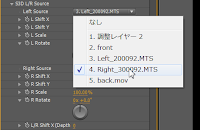
ISP 3D Stereoscopic is an After Effects plug-in (Mac/Win) from Japan that uses a 2D adjustment layer to help create stereo 3D images in a single composition. The main stereo 3D output formats are supported: Side by Side, Top and Bottom, Line by Line, Anaglyph.
Noted for the sake of completeness, this plug-in (YouTube demo) seems to be designed for use on postcards-in-space, Vanishing Point Exchange spaces, text, particles, etc.
Fxguide has updated its "Art of" piece on stereo 3D with Art of Stereo conversion: 2D to 3D, by Mike Seymour. It looks at current post production issues, tools, some case studies, and adds a timeline of recent major 3D movies.
The latest fxphd term is open with courses on VFX, editing, motion graphics, compositing, roto/tracking, color correction, 3D, photography, 3D stereo, and more. Members have access to a variety of higher end software over the fxphd VPN, and for an extra fee some past classes.
The overview movie is out and provides a comprehensive overview of the new term, in QuickTime on the blog orvia torrent.
Gadget Stereoscopic Preview is a new plug-in for After Effects CS 5 (Windows-only) that provides real-time 3D preview on a capable 3D display (NVIDIA® 3D Vision; Over/Under render on a 3D TV).
Below from AdoveTV, Dave Helmly walks you through a complete workflow for 3D stereoscopic editing in Premiere Pro CS5. In a little over an hour, Dave covers various rigs, 3D viewing options, realtime editing, and export. He also covers Neo3D, a new 64 bit CS5 plug-in from Cineform, and Active, Passive and Anaglyph viewing, as well how to play your videos on a consumer 3D TV.
Andrew Murchie of Enhanced Dimensions has added native After Effects 3D objects (the laptop and dice objects are new and the 3d glasses file is updated) to the Stereoscopic 3D downloads section of the site, which also includes support files and tutorials. The website says, "These items are free for you to use."
Update: of course these aren't 3D models but flat planes arranged in AE 3d space -- you'd need to import 3D models through Photoshop and import that into AE, or use try Zaxwerks Invigorator which supports a few formats.
RSS to Twitter delay, so let's call it Saturday...
Several tutorials, tips, scripts, and news items were mentioned around the web not discussed here at AEP. Here's some websites and resources with a different mix of news this week:
"Say no to presets and tutorials! All works end up looking the same. Realize that your weakness *is* your strength." -- a Zen Mind, Beginner's Mind type tweet from Peder Norrby of Trapcode (@rymden). [Later, a discussion ensued at Trapcode Facebook, and Peder explains Your weakness is your strength at the Trapcode blog.]
Stefan has been using the Optimized Anaglyph Filter, a free Pixel Bender filter for After Effects and Flash from David Shelton. This filter has not been checked here at AEP against the built-in 3D Glasses effect. See Wikipedia for more on anaglyph images, and click the tag Stereoscopic for more resources for After Effects
Here's Stefan Voigt, who also talks about stereo 3D rigs in Cinema 4D and 3DS Max on his blog:
Roto tools in After Effects CS5 could help speed "dimensional workflow" for 3D stereosopic projects with faster ways to change depth of field. Ok, that's not just for 3D.
Other discussions of 3D in CS5 and in AE were noted previously in 3D, Cineform, and CS5. And here's some fun via Tim Sassoon from a recent thread on the AE-List on 3D and its hype, 2D Theatre by Hungry Beast -- and something more like the future via the Twittersphere:
Update: Andrew Murchie has launched a four-part series of After Effects tutorials showing how to convert 2D footage to 3D. Each one focuses on a different technique with an increasing level of complexity. 2d to 3d After Effects tutorial, the first tutorial, covers a simple channel offset technique that will get you converting 2d to 3d.
Note: this web page is OLD, and the info likely outdated after 5 years and several app and codec releases. Please don't take the info too seriously -- now it's just an archive.
freshdv_nab10_cineform
Also, here's an excerpt from Adobe Conversations from the NAB Show Floor at PVC, by Dave Helmly aka DavTechTable, who's working a full workflow video on 3D: Attendee commenting on 3D: “I had no idea Adobe had a 3D workflow for Premiere Pro and After Effects. Being able to render effects and transitions and keep those processes as true Left and Right eye (Stereo) on a single timeline has a leg up on the competition. Their Export process was clean and simple, the whole process was really not that much different than editing standard video.”
My response: The credit here really needs to go to the mind-blowing development team at Cineform who always seem to keep Adobe Premiere one-step ahead in the latest high-tech trend in video. They’ve been a longtime developer partner for us and know our SDK inside out. Their new CS5 NEO3D plug-in works fantastic in 64 bit. I’ve been working on our 3D CS5 workflow story for while now with Cineform and I must say that what Cineform brings to Premiere and After Effects arrived just in time for all of the new 3D content that needs to be created to support the new 3D channels launching soon. This is a MUST SEE at NAB (I suggest heading to Cineform or NVIDIA to see it in 3D), as the attendee noticed, you can render the timeline in left and right eye in a single pass. Other workflows require you to export each eye separately and then Mux them back together and re-import--not fun!
Premiere does all of this in 1 step. You can even edit in CS5 with your 3D glasses on.I’ve been testing different monitoring solutions ranging from NVIDIA 3D VISION Active glasses (very clear) and various Passive 3D display monitors. (If you saw me on the plane coming to NAB , then you saw me with my paper anaglyph glasses from Shark Week a few years ago editing 3D in CS5 on my laptop). Cineform supports switching to and from all these modes including AJA SDI support. Cineform even has our Titler working in 3D!
I recently setup my first 3D Stereo camera rig using a pair of Canon cameras to shoot my hometown of Annapolis Maryland in 3D. I worked through the simple Cineform NEO 3D and CS5 workflow switching LUTs on the fly and was sold on the future of what 3D video will bring to the CS5 Editor. This is first new high-tech feature that can be used in a wide range of areas ranging from an event video to a Kiosk in a local mall or car dealership to broadcast and film. Seeing my footage in 3D that was shot hours before changed my opinion of this market entirely. There is money to made here for any editor looking for a leg up on the competition. Watch for a full workflow video coming to Adobe TV or my YouTube Channel (DAVTechTABLE).
Andrew Murchie of Enhanced Dimensions has added another section aimed at After Effects users to the Stereoscopic 3D downloads section of the site, including support files for various S3D tutorials plus AE 3D scenes or objects free for use in non-commercial videos.
Update: 5tu tweeted about a more reasonably-priced iPhone stereo 3D calculator app than RealD Pro Stereo 3D Calc -- IOD calc, which calculates the inter-ocular distance needed for each camera setup based on measurements from set.
Also, Toolfarm noted a Cineform tutorial on Muxing 2D CineForm clips for 3D "for those getting started with 3D. This explains how to take separate Left and Right eye CineForm AVI or MOVs and multiplex them into a single CineForm 3D clip."
the easiest way if the more expensive - Stereo 3D Toolbox plug-in from Noise Industries, and they have a couple of videos that show how to set up a simple stereoscopic composition structure
Update 4: Gadget Stereoscopic Preview is a new plug-in for After Effects CS 5 (Windows-only) that provides real-time 3D preview on a capable 3D display (NVIDIA® 3D Vision; Over/Under render on a 3D TV).
In Basic Stereoscopic 3d After Effects Tutorial (2 parts) "Enhanced Dimensions' Andrew Murchie introduces you to the basics of creating stereoscopic 3D images and animation for deployment as Anaglyph (Red-Blue glasses) and the cross-eyed side-by-side format (as used by YouTube 3D)."
To check out several other AEP posts on the subject, click on the tag Stereoscopic
 CS Next is CS 5.5 at PVC has details and links to videos and more. New features include Warp Stabilizer, Camera Lens Blur, stereoscopic 3D camera rig, light fall-off, source timecode, & more!