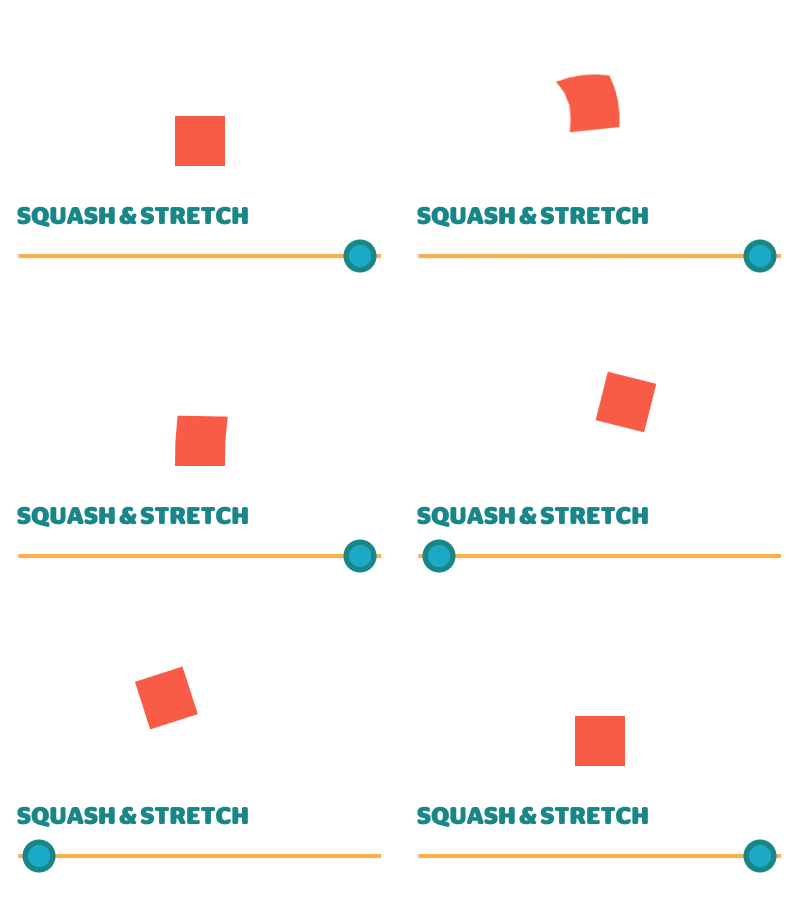
 Squash & Stretch is a smart keyframe assistant tool for Adobe After Effects from Mamoworld that comes in a Free version and a $99 Pro
version. It'll save you save time animating with its many
ready-to-use behaviors. Squash & Stretch creates simple
keyframes not expressions, so it's fast and easy to modify animations once you understand the toolset.
Squash & Stretch is a smart keyframe assistant tool for Adobe After Effects from Mamoworld that comes in a Free version and a $99 Pro
version. It'll save you save time animating with its many
ready-to-use behaviors. Squash & Stretch creates simple
keyframes not expressions, so it's fast and easy to modify animations once you understand the toolset.
Showing posts with label Animation. Show all posts
Showing posts with label Animation. Show all posts
November 16, 2017
Squash & Stretch, a smart Keyframe Assistant, has a free version too
Squash & Stretch is a smart keyframe assistant tool for Adobe After Effects from Mamoworld that comes in a Free version and a $99 Pro
version. It'll save you save time animating with its many
ready-to-use behaviors. Squash & Stretch creates simple
keyframes not expressions, so it's fast and easy to modify animations once you understand the toolset. 
December 1, 2014
ASCII Art & After Effects
 Easy-to-use scripts and other resources...
ASCII art, pioneered by Victorian female stenographers, has enjoyed brief periods of interest and cobbled together solutions for After Effects, but there's now easy-to-use AE scripts to speed solutions.
Read the article at PVC... ASCII Art & After Effects.
January 14, 2014
Secondary animation in After Effects – and the basic principles of animation

Read the rest on Pro Video Coalition: Secondary animation in After Effects.
August 14, 2013
Typewriter effects in After Effects
Typewriter effects in After Effects at PVC crashes the "typewriter week"
party of Video Copilot unfashionably early with a few tidbits on
typewriter or type-on effects in After Effects. Highlights include 2 Red
Giant plug-ins, 2 built-in presets, other free presets, and tutorials
of various levels of intricacy. The status of Right-to-Left writing systems like Arabic and Hebrew is also mentioned.

April 4, 2011
AE Preset: Back N Forth + animation aids

What this means is that with this preset, you can automatically make your layers move from side to side (or up and down) in a motion that is always equidistant from the center on both ends! This is different from using something like “Wiggle” in that wiggle is more or less random motion, whereas sin waves are constant and fluid.Author Neal Barenblat has another preset as well, Flicker On.
Back N Forth joins other recent expression-based presets as animation aids, like Gravity preset from Jesse Toula and Better Bouncing by Ian Haigh. See foundation basics and much more from JJ Gifford (plus harmonic motion) and Dan Ebberts.
Not disimilar is Ease and Wizz, a script to generate alternative keyframe interpolations for After Effects (especially to the sine-like Easy Ease). Looking at pictures by Chris Meyer is the fastest way to see what behaviors you get with this script. Author Ian Haigh has a nice demo on AE Scripts; here's a preview:
Continuing with tangents off sine animation are some tutorials for creating animation of sines:
- Creating sine animation with the Wave Warp effect by Aharon Rabinowitz
- Generate a Dynamic Morphing Background Design with Sinedots by Stefan Surmabojov at AEtuts+ (below). Sinedots is available free for CS5 and earlier from Philipp Spöth (deja vu).
Update: animationPATTERNS, by Markus Bergelt, is "a keyframe-based easing assistance, that allows you to edit and create new easing types. It comes with a dockable palette, a set of default interpolation methods like bounce, rubber, pendulum... and is very easy to use! !animationPATTERNS does not work with properties that already use expressions. They'll get replaced by clicking apply pattern."
March 21, 2011
Modifying Keyframes with KeyTweak
Mamoworld, home of Mathias Möhl and friends, has published a new quick tip tutorial (embedded below), Modifying Keyframes with KeyTweak. Mathias says that KeyTweak is a must-have when working with hundreds of keyframes, like in his stabilize motion tutorial. The new version is easier to use -- you can push around keyframes in the work area just using the Arrow buttons.
Mathias explains:
Although the new version of KeyTweak was published last December, I didn't have a tutorial about its new features (the new "local mode"), hence almost nobody discovered its potential so far. While the old version of KeyTweak (consisting only of the "global mode" of the new KeytTweak) had a somewhat confusing workflow (you needed to duplicate a property, delete all keyframes in it that you want KeyTweak to take care of etc), the new local mode is much more intuitive.
With a set of arrow buttons you just move around all keyframes in the work area, and also fade in/out those changes if you like. The old "global mode" remains still useful for properties that are not 2D, like transparency (local mode works only with 2d properties and mask shapes).
Mathias explains:
Although the new version of KeyTweak was published last December, I didn't have a tutorial about its new features (the new "local mode"), hence almost nobody discovered its potential so far. While the old version of KeyTweak (consisting only of the "global mode" of the new KeytTweak) had a somewhat confusing workflow (you needed to duplicate a property, delete all keyframes in it that you want KeyTweak to take care of etc), the new local mode is much more intuitive.
With a set of arrow buttons you just move around all keyframes in the work area, and also fade in/out those changes if you like. The old "global mode" remains still useful for properties that are not 2D, like transparency (local mode works only with 2d properties and mask shapes).
March 11, 2011
Another series on character animation in AE
 This post was erased by accident (undo, autosave), thanks to Blogger. There's an archive on Archive.org.
In any case, see the updated roundup Animate a character in After Effects: A survey of resources.
January 21, 2011
Kinetic Text Expressions for AE
Lester Banks notes an animation and expression on Vimeo by Danny D, Kinetic Text Expressions for AE (embedded below). Lester also points out a resource on another source on inertial bounce by Harry Frank (with downloadable presets), and by extension a thread on MoGraph.
Some related resources can be found at Motion Graphics Exchange and in recent posts here on presets and tutorials for gravity and bouncing (without the tweaks for rotation of course) . There's probably more on expression source AEnhancers. Here an example from Danny D:
January 18, 2011
Hand drawn animation with After Effects paint tools

Angie Taylor has quick video tutorial available from Adobe After Effects CS5 Learn by Video (co-authored with Todd Kopriva), Hand drawn animation with After Effects paint tools:
"The paint tools in After Effects are usually used for cloning or filling in mattes, but they can also be used to create stop-motion-style animation. In this movie you’ll see how they can be used to create a stop-motion style without the need for painful frame-by-frame tweaking of keyframes or drawings."For additional resources, see Paint tools: Brush, Clone Stamp, and Eraser in AE Help.
January 14, 2011
Lip Sync in After Effects
 Angie Taylor posted Lip Sync in After Effects, teaching a task that most animators will be asked to do at some point in their career.
Update: Lip Sync in After Effects: Some resources was updated and moved to ProVideo Coalition, It collects a few more lip sync video tutorials for After Effects. They're very similar in using time remapping, basic expressions or converting audio to keyframes, etc. and not CC Split, Reshape, or other.
January 5, 2011
Who needs After Effects when you have Google Docs?
Cool, and it only took 3 animators 3 days to do it ;). See The Epic Doc by Lauren Indovina at Motionographer for an interview and animatics from the creators.
January 1, 2011
Hidden Gems: Chapter 5 - Animation Assistance
 Chris & Trish Meyer's series of tips, tricks, gotchas, factoids, and shortcuts continues with Creating Motion Graphics with After Effects Hidden Gems: Chapter 5 - Animation Assistance, which covers some basics on Keyframes, Moving and Nudging Motion Paths, Truncated Motion Paths, Smoother KF Assistant, Auto-Orient Rotation.
December 26, 2010
Animating with the Puppet tool
 Angie Taylor shares a free tutorial from the After Effects CS5: Learn By Video DVD on how to use the Puppet tool in After Effects, Animating Characters with the Puppet tools.
For more, see Puppet tools overview and resources in AE Help, Animate a character in After Effects (with 3 links to detailed posts by Todd Kopriva), and other posts tagged puppet.
For many other examples from this DVD, see Todd Kopriva's free samples from After Effects CS5: Learn By Video, the DVD and book training set "designed to bring you from the beginner level to the intermediate level, as well as to warn and educate you about all of the common pitfalls and gotchas in After Effects."
December 25, 2010
Hidden Gems: Chapter 4 - Keyframe Velocity
Chris & Trish Meyer's series of tips, tricks, gotchas, factoids, and shortcuts continues with Creating Motion Graphics with After Effects Hidden Gems: Chapter 4 - Keyframe Velocity. Todd Kopriva provided links a few topics on AE Help for more on: the Graph Editor, keyframe interpolation, separating dimensions of Position.December 22, 2010
Better Bouncing in After Effects
 Ian Haigh posted EbbertBounce.ffx, a preset for basic bounces in Better Bouncing in After Effects. It's based on Dan Ebberts explanations on Motion Script, and is similar to Ian's Ease and Wizz -- but with sliders to adjust amplitude, decay, and frequency.
 For some related resources, see the recent AEP post Gravity preset, Unpack Precomp script + more, which notes a similar preset and a tutorial and other resources.
Update: Ease and Wizz is now offered through AE Scripts.
December 2, 2010
Shop Vac (kinetic typography animation)
This kinetic typography music video incorporates familiar brand shapes without really stepping on the brands themselves. Adobe people noted it, as it was created using Adobe Illustrator, Photoshop, After Effects, Premiere and Toon Boom Animate. A labor of love by Jarrett Heather, it took somewhere between 500-1000 hours to finish.
For tutorials and other examples, see Kinetic typography as storytelling.
For tutorials and other examples, see Kinetic typography as storytelling.
November 28, 2010
Gravity preset, Unpack Precomp script + more

@AdobeAE notes some free utilities by Jesse Toula, who has the new tutorial on Custom Shatter Maps. Among the templates and footage for sale are his Unpack Precomp script and a Gravity preset, Quick Gravity, and a separate tutorial.
[Update: didn't check to see if this was the same but Jesse Toula now has a Gravity in After Effects tutorial on Creative Cow.]
g = 1000; // gravitational constant
if (marker.numKeys > 0 && time > marker.key(1).time){
t = time - marker.key(1).time;
y = g*t*t/2;
value + [0,y]
}else{
value
}
Update: see also Better Bouncing in After Effects on a similar preset by Ian Haigh.
November 17, 2010
Pop-up books in After Effects
AEtuts posted Unfold A Magical Pop Up Book Simulation by Nicolas Plaire, an After Effects tutorial video in 2 parts. In part 1, the pop-up and 3D scene is built, then in part 2 trigonometry and more is used for interaction between layers to unfold elements with a minimal number of keyframes. Seems pretty cool and you can adjust the camera animation to taste.
Update: there was another pop-up book tutorial at Digital Arts, AFTER EFFECTS TUTORIAL: MAKE AN ANIMATED 3D POP-UP BOOK, written by Sam Hampton-Smith.
For something not completely different see Cross-processing look in After Effects + Flip-Book Effect.
For something not completely different see Cross-processing look in After Effects + Flip-Book Effect.
November 8, 2010
Rigit Script: character rigging for After Effects
@hypoly (James Chiny) notes a beta of a new script by Marcus Loeper, RigitScript, for character rigging in After Effects. See also Duik Tools tutorial (IK script for After Effects) and Animate a character in After Effects.
October 10, 2010
Automatic animation: a tutorial breakdown
 Todd Kopriva outlines details of the 2-part Motionworks tutorial on Automatic animation in After Effects in alternative animation techniques by John Dickinson. Todd also started an Adobe Forum thread on the topic.
See also Motionsworks' video specifically on Align and Orient in AE CS5. Todd's other in-depth breakdowns are also helpful; they include: CS5 videos for beginners, AE and 3D by Dave Scotland, character animation + from Robert Powers, Video Copilot Basic Training series, Steve Holmes Artbeats podcasts, and DSLR video with Premiere CS5 [and later Chris Zwar on After Effects features that most people don’t seem to notice].
Subscribe to:
Comments (Atom)