New on AE Scripts is ft-Cubic Lens Distortion, a Pixel Bender by Francois Tarlier, who's been actively releasing free filters this year. It's a port of the SynthEyes Lens Distortion Algorithm for matchmoving, with a Cubic Distort parameter for exact matching. The built-in filter CC Lens Distort doesn't seem to have a Cubic Distort parameter.
This is version 4.0 of this Pixel Bender; for background on previous versions see Cubic Lens Distortion filter for After Effects + Chromatic Aberration. Here's the AE Scripts demo:
July 6, 2010

iPhone 4 & Canon 7D movies + mobile video out
Here's an iPhone 4 film (via CNET) and an article and video Comparing Video Quality Between iPhone 4 and Canon 7D -- and a music video.
Update: see also Mobile Video Out Everywhere: iPhone 4, HTC Evo, and Droid X.
Also, Andy Beach notes What Video Codec does iPhone's FaceTime use? and Details on iPhone 4 video.
Update 2: here's the Apple iPhone 4 and HTC EVO 4G: side by side,
"Apple of My Eye" - an iPhone 4 film from Michael Koerbel on Vimeo.
iPhone 4 versus Canon 7D from Take Zero Productions on Vimeo.
Update: see also Mobile Video Out Everywhere: iPhone 4, HTC Evo, and Droid X.
Also, Andy Beach notes What Video Codec does iPhone's FaceTime use? and Details on iPhone 4 video.
Update 2: here's the Apple iPhone 4 and HTC EVO 4G: side by side,
TimeSpan: time tracker After Effects script
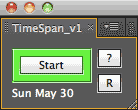 TimeSpan is a “Punch Clock” style time tracker, available as an After Effects script at AE Scripts. For more on scripting, see AEP's grab bag Expressions & Scripting Resources for After Effects.
Here's some of its features and a demo from author David Torno:
- Exports a .TXT (tab delimited) file to the folder of your choice.
- Can log by Client Name or Project Name.
- Logs your clock in time, clock out time, total hours, hourly pay rate and total pay
- Can log multiple entries per document.
- Reset button to clear accidental start time.
After Effects expressions: if/then/else statements plus do/while loops
 Chris and Trish Meyer posted the 7th of the 12-part series Deeper Modes of Expression, based on an extra in their book Creating Motion Graphics with After Effects. The 7th installment is Deeper Modes of Expression, Part 7: Making Decisions on learning how to craft if/then/else statements plus do/while loops that will open the door to a wide range of advanced techniques.
A 3D deck of cards in After Effects
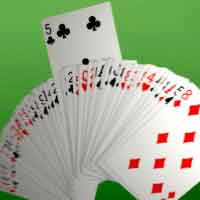 Jorrit Schulte has a new After Effects video tutorial on AEtuts, Control A 3D Deck of Cards Like Magic:
In this tutorial we’ll be creating a Card deck that unfolds and a chosen card that rises up. We’ll be creating lots of expressions and i will show you an handy trick that will show another image on the front and backfacing of a layer
July 5, 2010
“Right To Left” languages in After Effects
UPDATE: Creative Cloud incorporates RTL text in the release of June 2016 (Arabic video; Hebrew demo).
 UPDATE: Typewriter effects in After Effects at PVC (August 2013) updates the status of Right-to-Left writing systems like Arabic and Hebrew.
Saqib Naqvi shows off many tips for Accessing “Right To Left” Languages Within After Effects, a video tutorial at AEtuts:
'Right to left languages are widely used in After Effects, but traditionally these languages are not treated like text in After Effects. We have to instead covert them to vector graphics which limit many possibilities that are only possible with text layers. In this Quick Tip we will learn to enable languages and manipulate “RTL” text right within After Effects [and Photoshop and Illustrator].'
Simpler but limited solutions might be had by using After Effects scripts from AE Scripts: TextReverser (which reverses the direction of selected text layer), ArabicText (which maintains the integrity of Arabic medial letteforms), and RTL Animation Preset Typewriter-RTL. Hebrew users might look at this tutorial from Eran Stern for an alternate way to enter Hebrew into After Effects.
By the way, check out DecomposeText from AE Scripts, which breaks up text by character, word, or line into separate layers.
UPDATE: Typewriter effects in After Effects at PVC (August 2013) updates the status of Right-to-Left writing systems like Arabic and Hebrew.
~~~~~~~~~~~~~~~~~~~~~~~~~~~~~~~~
Saqib Naqvi shows off many tips for Accessing “Right To Left” Languages Within After Effects, a video tutorial at AEtuts:
'Right to left languages are widely used in After Effects, but traditionally these languages are not treated like text in After Effects. We have to instead covert them to vector graphics which limit many possibilities that are only possible with text layers. In this Quick Tip we will learn to enable languages and manipulate “RTL” text right within After Effects [and Photoshop and Illustrator].'
Simpler but limited solutions might be had by using After Effects scripts from AE Scripts: TextReverser (which reverses the direction of selected text layer), ArabicText (which maintains the integrity of Arabic medial letteforms), and RTL Animation Preset Typewriter-RTL. Hebrew users might look at this tutorial from Eran Stern for an alternate way to enter Hebrew into After Effects.
By the way, check out DecomposeText from AE Scripts, which breaks up text by character, word, or line into separate layers.
Free After Effects plug-ins: an inconvenient truth
 FilmmakerIQ posted a new list of 55 Free After Effects Plugins, but unless you already know something about AE filters it could be rather inconvenient. For example you may think about trying Red Giant Software eLin, but you may not know that it's now unavailable and mostly superfluous. None of the entries tell you if there's a Macintosh or Windows or a CS5 version -- or if the entry is a Pixel Bender or effect preset.
A list of free effects for platform and software version would be welcome, but right now you'll have to do some digging. You could check Toolfarm's CS5 Compatible 64-Bit Plug-ins, part of the Toolarm Plug-in Finder, but you may not find free filters for CS5 there, like Video Copilot Reflect and Sure Target 2. AE Portal has an overview of AE filters labeled free by vendor and platform, but it's out of date.
 Maybe the best bet is Mylenium's After Effects Plug-In Guide, which has an Alphabetical listing for Free. You can click on an entry to find what versions are available, though you're on your own finding the free filter through the vendor's main website. You may have to check the Discontinued list to see if it's been discontinued (like eLin). Mylenium also has a CS5 Compatibility listing, which can be missed if your browser page is not wide enough.
Even with Mylenium's help, you'd be missing some free "filters" if you skip the many free Pixel Bender, Custom Effects, or even Presets in After Effects.
By the way, if you haven't already noted them, check out FilmmakerIQ's 202 Adobe Premiere Pro Tutorials and 1001 Adobe After Effects Tutorials.
Update: see Free After Effects plug-ins for previous surveys of free filters before CS5. If you miss the Unmult filters, you might try Removing black or white from layer/footage, deMult/unMult at Motion Graphics Exchange.
Update 2: Unmult is now available for CS5, as is 'Alpha from Max Color', a Pixel Bender that ships with CS5.
Subscribe to:
Posts (Atom)