For a resources of various difficulty levels, see Leak object removal tutorial and other AEP posts tagged roto like Roto: removing unwanted objects, Basic Footage Coloring And Object Removal, Simple Object Removal in AE, and Stabilization and object removal with AE CS5 +tracking.
Showing posts sorted by relevance for query Object Removal. Sort by date Show all posts
Showing posts sorted by relevance for query Object Removal. Sort by date Show all posts
December 29, 2010
Some tutorials for removing logos and objects
A complete outline of the DVD training course Adobe After Effects CS5: Learn by Video can be found with the 20th free video, Removing a Logo from a Moving Image. (Streaming only on Video2Brain). A similar beginners' video is also available, Removing an Object with Clone Stamp (embedded below from a Peachpit podcast series).
For a resources of various difficulty levels, see Leak object removal tutorial and other AEP posts tagged roto like Roto: removing unwanted objects, Basic Footage Coloring And Object Removal, Simple Object Removal in AE, and Stabilization and object removal with AE CS5 +tracking.
For a resources of various difficulty levels, see Leak object removal tutorial and other AEP posts tagged roto like Roto: removing unwanted objects, Basic Footage Coloring And Object Removal, Simple Object Removal in AE, and Stabilization and object removal with AE CS5 +tracking.

December 24, 2010
Leak object removal tutorial
Mathias Möhl of Mamoworld is full of cheer, seeing a growing market in leak object removal (spurred by Wikileaks) in his Tutorial: WikiLeak Removal, which shows you how to:Stephen Colbert had a fun comment in December 15 show opening: "TIME's person of the year is Mark Zuckerberg. Sorry Julian Assange, I guess you didn't violate enough peoples' privacy." For some background, see Is What WikiLeaks Does Journalism? Good Question at GigaOM. [update: the NYT added interesting points aside from any politics in Banks and Wikileaks, and CBS News posted How WikiLeaks Enlightened Us in 2010 by Joshua Norman.]
- Verify the leak
- Track the leak with Mocha
- Remove the leak with After Effects
For more info on object removal in AE, see Roto: removing unwanted objects, Rotoscoping tips, and other posts tagged roto. Here's Mathias:
August 18, 2010
Stabilization and object removal with AE CS5 +tracking
Vfx Haiku explores Stabilization and Object Removal with After Effects CS5 in a new tutorial, stabilizing a piece of footage, “painting” out two unwanted objects, and ending with some quick color correction.
Update: Premiumbeat has something similar, taking "a look at the process of stabilizing footage using Adobe After Effects built in Stabilization feature. We will also look at how to apply a graphical element to the stabilized footage and then how to reverse the stabilization, to give a motion tracked effect to the graphics."
Update: Premiumbeat has something similar, taking "a look at the process of stabilizing footage using Adobe After Effects built in Stabilization feature. We will also look at how to apply a graphical element to the stabilized footage and then how to reverse the stabilization, to give a motion tracked effect to the graphics."
February 11, 2010
Basic Footage Coloring And Object Removal
If you have footage that's old and faded or in black & white, and you want to colorize it and take some junk out, take a look at the After Effects tutorial Basic Footage Coloring And Object Removal by Jay H. at AEtuts.
August 18, 2007
Simple Object Removal in AE
 FreshDV notes a Creative Cow video Simple Object Removal in AE. [Not] Needed extras: ObviousFX CopyImage plug-in from the ObviousFX website.
Jerzy Drozda Jr. the host of the tutorial, has several more at the impressive COW Library for After Effects.
September 3, 2007
CustomEffects and AE tutorials
 Maltaannon video tutorials are back up and there's several interesting tutorials available besides Simple Object Removal. Maltanon sometimes uses its own CustomEffects, presets with expressions that look and behave like standard plugins -- and require a DLL install.
Covering some of the same ground is Photoshop Prep for 3D Animation (Photoshop but oriented for Motion 3) by Mark Spencer.
Alan Shisko has a couple of video tutorials that explain basics of AE camera parenting and NTSC field order interpretation.
Yet another fresh resource is FreshDV Film School: The Art of Pulling Focus (Part 1).
February 10, 2010
Rotoscoping tips
 Via Joost van der Hoeven is 6 great rotoscoping tips from Imagineer Systems by TheBlackbox.org:
- There is no such thing as a perfect matte. Rotoscoping is an art form that takes into account the background image, the movement of the object, and the new elements to be composited in the background.
- Try to start your shape at its most complex point in time, where it will need the most control points.
- Break a complex shape into multiple simple shapes. If you are rotoscoping a humanoid form and an arm becomes visible, consider rotoscoping the arm as its own element, rather than adding extra points on the body that will serve no purpose when the arm is obscured.
- Imagine you are the animator who created the shot. What would your dope sheet look like? No matter the medium, whether CG, live action or otherwise, most movements are rarely linear. They normally move in arcs; they normally accelerate in and out of stopped positions. Try and understand the mechanics behind how things are moving in your shot. This will help you to minimize keyframes.
- Watch and study the shot before you start working. Where are the changes in directions? These will normally have keyframes. Where are the starts and stops? Are there camera moves that can be stabilized to make your work easier?
- Don’t be afraid to trash your work and start over. Beginning roto artists often make the mistake of trying to fix a flawed approach by adding more and more keyframes. Experienced roto artists learn to quickly identify an inferior approach and are unashamed to trash their work and start over, often many, many times. It is very difficult to get a good matte without a conscious effort to keep the keyframes to a minimum.
 Rotoscoping, roto for short, has been more fully explained by Matt Silverman of Commotion Complete fame in The Art of Roto at Fxguide [updated 2011] and by Commotion's creator and ILM alumni Scott Squires in blog posts and movies at his Effects Corner blog. More recently, Fxguide's The Art of Wire Removal covered some of the same ground.
And from the same talent pool is a handy summary of tips in Confessions of a Roto Artist: Three Rules For Better Mattes (PDF) by Scott Stewart (now a movie director), who did the roto tape for the out-of-print Masters of Visual Effects:
 While still missing key features, there's plenty of rotoscoping done in AE, and many good After Effects tutorials. Sean Kennedy takes you through Rotoscoping Tools in After Effects, and Pete O'Connell (now found under Nuke) has a tutorial movie Rotoscoping in AE and a DVD, Advanced Rotoscoping Techniques for Adobe After Effects, at Creative Cow. Also, there are several tutorials involving rotoscoping with Imagineer Mocha & Mocha Shape, some noted in AEP's More mocha tracking & roto, as well as several by Mathias Möhl using his AE script MochaImport. Digital Tutors has a course for CS4 too, Rotoscoping Techniques in After Effects.
Todd Kopriva has a few more tips (from Pete O'Connell) in his Rotoscoping in After Effects and in After Effects Help. And of course there were previous posts here at AEP, tagged roto.
Update: The Art of Roto: 2011 by Mike Seymour at Fxguide is a super update to previous surveys of rotoscoping. It includes an interview with Scott Squires, who created Commotion (a desktop roto/paint/com tool) while at ILM.
May 31, 2007
Enhanced photogrammetry
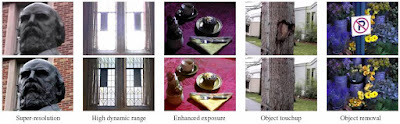
Mark Christiansen posted a great video and background info on high-res photogrammetry applied to enhance video resolution and exposure (as shown above), as well as object touch-ups and removal. It would be great to see these sort of advances in further versions of Photoshop's Vanishing Point tool, along with camera mapping and other 3D features.
You can view additional examples of photogrammetry used today at Studio Daily on Zodiac, Paul Devebec's site (PDF), RealViz, and DV Garage's Brain Dump Series: Photogrammetry.
Subscribe to:
Posts (Atom)