Showing posts with label presets. Show all posts

April 4, 2011

AE Preset: Back N Forth + animation aids

Back N Forth is a free sine wave generator preset for the position, scale, and rotation in every axis of your objects inside of After Effects:
What this means is that with this preset, you can automatically make your layers move from side to side (or up and down) in a motion that is always equidistant from the center on both ends! This is different from using something like “Wiggle” in that wiggle is more or less random motion, whereas sin waves are constant and fluid.
Author Neal Barenblat has another preset as well, Flicker On.

Back N Forth joins other recent expression-based presets as animation aids, like Gravity preset from Jesse Toula and Better Bouncing by Ian Haigh. See foundation basics and much more from JJ Gifford (plus harmonic motion) and Dan Ebberts.

Not disimilar is Ease and Wizz, a script to generate alternative keyframe interpolations for After Effects (especially to the sine-like Easy Ease). Looking at pictures by Chris Meyer is the fastest way to see what behaviors you get with this script. Author Ian Haigh has a nice demo on AE Scripts; here's a preview:


Continuing with tangents off sine animation are some tutorials for creating animation of sines:

Update: animationPATTERNS, by Markus Bergelt, is "a keyframe-based easing assistance, that allows you to edit and create new easing types. It comes with a dockable palette, a set of default interpolation methods like bounce, rubber, pendulum... and is very easy to use! !animationPATTERNS does not work with properties that already use expressions. They'll get replaced by clicking apply pattern."

February 24, 2011

Behavior presets intro

Trish & Chris Meyer have a new video snippet on Behavior presets in After Effects (embedded below). An excerpt on Presets from their book Creating Motion Graphics is also available. It's refreshing to see a tutorial that tells people to double-click the preset or drag it into the comp window -- most tutorials have people drag into timeline.

Another CS5 tutorial on presets by Chad Perkins also looks at the Behaviors presets (also below).

For more tutorials and resources on presets, see AEP posts labelled presets or Animation Preset. To get under the hood quick, see Building Effects From The Ground Up from Pro Juice, which shows how to create effects like Video Copilot Twitch with just built-in filters and Wigglerama.

Behaviors | After Effects Apprentice 04: Layer Control | by Chris Meyer and Trish Meyer
View this entire After Effects course and more at lynda.com.

December 22, 2010

Better Bouncing in After Effects

Ian Haigh posted EbbertBounce.ffx, a preset for basic bounces in Better Bouncing in After Effects. It's based on Dan Ebberts explanations on Motion Script, and is similar to Ian's Ease and Wizz -- but with sliders to adjust amplitude, decay, and frequency.

For some related resources, see the recent AEP post Gravity preset, Unpack Precomp script + more, which notes a similar preset and a tutorial and other resources.

Update: Ease and Wizz is now offered through AE Scripts.

December 11, 2010

Golden Ratio preset for After Effects


James Chiny is offering a free Golden Ratio preset for After Effects at HYPOLY. It generates an overlay of a Golden spiral and rectangles using a Stroke effect. Be sure to check out his other downloadables, like his Ellipse Tool Plus preset (noted in Ellipse Tool Plus from Hypoly).

See also Lightroom's Golden Ratio & Spiral guides, an earlier AEP post with some related resources.

December 1, 2010

Film Flash: free preset + tutorial for After Effects

Film Flash is a new free automated preset for After Effects "that bumps up the exposure of the footage to create a cool transition effects between two video clips. All you have to do is add a layer marker right at the point of transition, and Film Flash does the rest. The effect is highly customizeable and has many additional uses." (via @EdenExposito)

Created by Dan Ebberts and Aharon Rabinowitz, the preset is dynamic and requires no keyframes. It works with CS3 and later, doesn't require 3rd-party plug-ins, and works in any language version of AE. Here's a video tutorial; there's more from Aharon Rabinowitz on All Bets Are Off Productions:

November 28, 2010

Gravity preset, Unpack Precomp script + more


@AdobeAE notes some free utilities by Jesse Toula, who has the new tutorial on Custom Shatter Maps. Among the templates and footage for sale are his Unpack Precomp script and a Gravity preset, Quick Gravity, and a separate tutorial.

[Update: didn't check to see if this was the same but Jesse Toula now has a Gravity in After Effects tutorial on Creative Cow.]

There's probably more resources in AE Help, but you can also check out a script palette that's been shipping with AE called Gravity.jsx for a bouncing ball effect. For something similar with expressions, see Dan Ebberts' Bouncing Ball example on MotionScript, and his gravity expression triggered by a marker at Creative Cow (see also Expression example: Animate scale at each layer marker):

g = 1000; // gravitational constant

if (marker.numKeys > 0 && time > marker.key(1).time){
t = time - marker.key(1).time;
y = g*t*t/2;
value + [0,y]
}else{
value
}

Update: see also Better Bouncing in After Effects on a similar preset by Ian Haigh.

November 23, 2010

Spy Photo: free presets for After Effects

Spy Photo is a set of free presets for After Effects to help create the look of snapshots taken by a spy or private investigator. Created by Dan Ebberts and Aharon Rabinowitz, the presets are dynamic and require no keyframes. They work with CS3 and later, and don't require 3rd-party plug-ins.

Here's a video tutorial; there's more from
Aharon Rabinowitz on All Bets Are Off Productions:

November 22, 2010

Sliced breakdown template for AE

Jake & Dan posted a free Giveaway: AE Comp-Fan Template for VFX Demo Reels (via):

"In their demo reels, compositors and matte-painters basically have to demonstrate their ability to build up different layers to create the illusion of a realistic environment, depth and perspective. The easiest way to do this is what we call a Comp-Fan or “Sliced Breakdown”. We are giving away the template we’ve created in After Effects for that purpose... [though] the template can be used outside of a reel."

You may also like Mike Cardeiro's script
Trajectory and other 3D scripts at AE Scipts.

November 18, 2010

Graymachine: 17 free presets + tutorial

Here's an After Effects tutorial from Graymachine for Super Awesome Presets Volume 0001, a set of 17 free presets from Harry Frank (bullet formats, auto fade, pops, bounce, etc.):

October 19, 2010

Corner pin tracking magic

Video Copilot has a new After Effect tutorial video and project, #112. Magic Tracking:

"In this exciting new tutorial we will go beyond basic tracking with a new Video Copilot preset for utilizing corner-pin tracking data. This new preset allows you to create dynamic Null Objects based on corner pin data from Mocha AE. It’s a simple solution to getting precise control over your tracking data and the tutorial shows you all you need to know. The explanation is more complicated than the process!

The preset interpolates a specific point based on your corner-pin data so you can attach elements to an infinite plane of a moving shot to fake depth and parallax; without 3D tracking."

You can find more info and other approaches to Corner Pin effect, tracking & resources, and
mocha inside AE Help and via the post tags below.

Update: Andrew Kramer posted an add-on project, Magic Ball Tracking,

"In our recent Magic Tracking Tutorial, we used a new preset to help locate a specific point on a surface tracked with Mocha AE. This technique works well to establish objects onto a specific location like a sign but you can also slide objects on the surface as well. This example shows the ability to animate that point along the surface by keyframing the position of the NULL. For the boulder I used CC Sphere with some fast rotation and manually scaled the ball as it reaches the camera.

You can even download the project and see how I did the other effects as well but I encourage you to check the Magic Tracking tutorial to see how it works. There is no 3D tracking and it was all created within After Effects and tracked with Mocha."

October 7, 2010

The Expression Sampler template in AE

Andrew Devis follows up his look at Animation Presets built into After Effects with a video on Hidden Templates & Powerful Expressions:

"This video tutorial shows how to find and apply the hidden [project] templates in After Effects so that you can kick-start your work with a full project ready to edit. AND, you will learn how to apply the hidden Expressions in After Effects to your own layers to give them professional looking animations without having to know any expressions yourself!"

By the way, there are more example expressions in the Behaviors animation presets and in AE Help's Expression examples page. See also posts tagged expressions for other news and Dan Ebberts' After Effects expressions and scripting resource site MotionScript
.

October 6, 2010

3D in AE with FreeForm Enhancement Pack


Mettle, makers of DigiEffects Freeform, has a limited time offer for the FreeForm Enhancement Pack | The Mylenium Edition. You can get all 16 HD project files for $79 through Friday, October 15, 2010.

There's a render gallery and tutorials for previewing the project templates. Here's what Todd Kopriva had to say about this set (he also shared some resources on this filter from CS5):

"Chris gave me an early chance to play with these template projects, and I really enjoyed how easy it was to make 3D animations that look really cool, all inside of After Effects."

October 3, 2010

Kick-start AE projects with presets

Andrew Devis has an After Effects tutorial video on how to Kick-start your projects with AE presets at Creative Cow. He shows a bit how to edit them and how to combine the animate In and animate Out Text presets.

Another CS5 tutorial on presets by Chad Perkins (below) looks more at the Behaviors presets. Chris and Trish Meyer shared a PDF selection on animation presets (including behaviors and text presets) from their book Creating Motion Graphics with After Effects. See also John Dickinson's 2-part overview (1 + 2) of text animation presets on Motionworks.

For more tutorials and resources on presets (Adobe gallery), see AE presets & projects round-up, After Effects presets & templates burgeoning (on the new preset networks), AEP posts labelled presets or Animation Preset, and of course AE Help's page Animation presets overview and resources.

Note: Don't forget that presets, tutorials, and templates are just a starting point! See "Your weakness is your strength" for community discussion on this point.

September 22, 2010

Even templates have their own tutorials

Cassidy Bisher has several After Effects tutorial videos available on Vimeo (via Lester Banks) that support his AE templates at Dropdrop.com. One cluster is a series on "spy gadgets," which looks at tracking in AE and in Mocha for After Effects, all in support of his "Top Secret" templates (example below).

For some related tutorials and background, see Designing & Compositing a HUD and posts on tracking and Mocha. See also Resources for mocha for After Effects and Motion tracking overview and resources in AE Help.

September 7, 2010

Flocking Experiment with Trapcode Particular + new versions

Peder Norrby posted a flocking experiment done with Trapcode Particular; he says:

"In this first test I emitted 40K particles (using a large Box emitter) on the first frame and they are affected only by the Turbulence Field (a 4D perlin noise fractal that is used as 3D displacement). The "birds" are simple black circles.

All movement was made using Physics>Air>Turbulence with a rather large displacement of 4000 px. Then I set down Turbulence>Scale to 1.0 and increased Evolution Speed to 150. In this first test I emitted 40K particles (using a large Box emitter) on the first frame and they are affected only by the Turbulence Field (a 4D perlin noise fractal that is used as 3D displacement). The "birds" are simple black circles. Viemo's compression really doesn't like this clip, download the original file to see it without artifacts."


There more info including example starling flocking and a downloadable AEP at Trapcode Sharelog.

Starlings Study 01 from Peder Norrby on Vimeo.

Update: Najork on Vimeo has a Re-work of Peder Norrby's Starlings Study, with "polygon sprites." Plus version 2 from Peder is available, 'This time I used the "Sprite" particle type with a 20x50 px comp as particle; a small triangle. I used Orient to Motion to make the triangles point in their direction of flight. The number of particles was set down to about 4K.'

September 1, 2010

Docucam, another handheld camera AE preset

motion graphics eXchange posted on Docucam from Weave Creative, an "After Effects preset loosely based on the excellent Docucam in CS Tools for C4D. The preset simulates handheld camera moves and more." An example render is below.

Docucam is part of a number tools (others are by Andrew Kramer and David Torno) and tutorials for handheld camera moves; the others can be found in Camera shake from hand held track and Realistic Camera Movement using hand held track.

July 26, 2010

'Knowledge at your fingertips' for After Effects

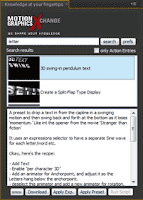
'Knowledge at your fingertips' for After Effects is a new script by Motion Graphics eXchange that let's you search for tutorials, expressions, scripts and presets within a dockable panel inside AE. Features include:
  • Direct access to all entries from www.motion-graphics-eXchange.com inside After Effects
  • Full-Text Search in our whole After Effects knowledge base
  • Run Scripts, apply Presets and Expressions live with our 'Action Entries'-Feature
  • Multi-Language on-the-fly translation for Expressions, Scripts and Presets (supported languages: en, fr, de, it, es, jp)
  • Auto correction and translation of ADBE Matchnames inside jsx-files
  • Thumbnails for every entry, incl. adjustable sizes
  • Dockable and resizable panel to integrate in your workspace
  • Fully CS3, CS4 and CS5 compatible
  • the trial version is fully functional for a 14-day test drive

Knowledge at your fingertips from motion graphics exchange on Vimeo.

July 23, 2010

Pie Chart, a custom effect preset for AE

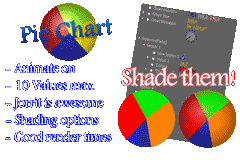
Via @aetuts is Pie Chart, a custom effect preset by Jorrit Schulte. It creates pie charts and has a variety of animation and shading options.

For similar stuff, see previous post Charts and graphs in After Effects.

July 22, 2010

Realistic Camera Movement using hand held track

AEdude.com posted a tutorial that uses the old technique of shooting hand held and tracking that for use in After Effects. Realistic Camera Movement is an opportunity to learn basic tracking and create realistic camera movement. One option not mentioned is shooting farther back and zooming in.

Andrew Kramer has something similar in his After Shake AE preset; it comes with a video demo that show how to change speed, intensity and rotation with slider controls. Also, there's the Handheld Camera Script by David Torno on PVC.

For more on tracking click the tag tracking and Motion tracking overview and resources in AE Help.

Update: see also Perfect Imperfection on tracking actual movement for animation, and from Dave Scotland of CGSwot, Camera shake from hand held track,

July 5, 2010

Free After Effects plug-ins: an inconvenient truth

FilmmakerIQ posted a new list of 55 Free After Effects Plugins, but unless you already know something about AE filters it could be rather inconvenient. For example you may think about trying Red Giant Software eLin, but you may not know that it's now unavailable and mostly superfluous. None of the entries tell you if there's a Macintosh or Windows or a CS5 version -- or if the entry is a Pixel Bender or effect preset.

A list of free effects for platform and software version would be welcome, but right now you'll have to do some digging. You could check Toolfarm's CS5 Compatible 64-Bit Plug-ins, part of the Toolarm Plug-in Finder, but you may not find free filters for CS5 there, like Video Copilot Reflect and Sure Target 2. AE Portal has an overview of AE filters labeled free by vendor and platform, but it's out of date.

Maybe the best bet is Mylenium's After Effects Plug-In Guide, which has an Alphabetical listing for Free. You can click on an entry to find what versions are available, though you're on your own finding the free filter through the vendor's main website. You may have to check the Discontinued list to see if it's been discontinued (like eLin). Mylenium also has a CS5 Compatibility listing, which can be missed if your browser page is not wide enough.

Even with Mylenium's help, you'd be missing some free "filters" if you skip the many free Pixel Bender, Custom Effects, or even Presets in After Effects.

By the way, if you haven't already noted them, check out FilmmakerIQ's 202 Adobe Premiere Pro Tutorials and 1001 Adobe After Effects Tutorials.

Update: see Free After Effects plug-ins for previous surveys of free filters before CS5. If you miss the Unmult filters, you might try Removing black or white from layer/footage, deMult/unMult at Motion Graphics Exchange.

Update 2: Unmult is now available for CS5, as is 'Alpha from Max Color', a Pixel Bender that ships with CS5.