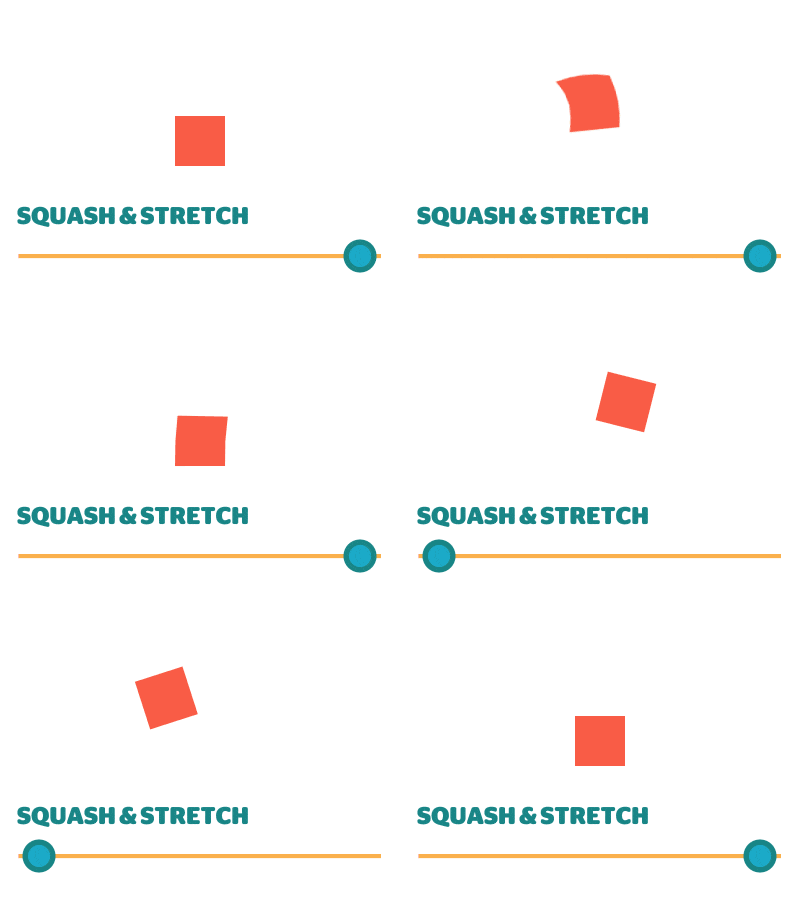
 Squash & Stretch is a smart keyframe assistant tool for Adobe After Effects from Mamoworld that comes in a Free version and a $99 Pro
version. It'll save you save time animating with its many
ready-to-use behaviors. Squash & Stretch creates simple
keyframes not expressions, so it's fast and easy to modify animations once you understand the toolset.
Squash & Stretch is a smart keyframe assistant tool for Adobe After Effects from Mamoworld that comes in a Free version and a $99 Pro
version. It'll save you save time animating with its many
ready-to-use behaviors. Squash & Stretch creates simple
keyframes not expressions, so it's fast and easy to modify animations once you understand the toolset.
Showing posts with label keyframes. Show all posts
Showing posts with label keyframes. Show all posts
November 16, 2017
Squash & Stretch, a smart Keyframe Assistant, has a free version too
Squash & Stretch is a smart keyframe assistant tool for Adobe After Effects from Mamoworld that comes in a Free version and a $99 Pro
version. It'll save you save time animating with its many
ready-to-use behaviors. Squash & Stretch creates simple
keyframes not expressions, so it's fast and easy to modify animations once you understand the toolset. 
March 21, 2011
Modifying Keyframes with KeyTweak
Mamoworld, home of Mathias Möhl and friends, has published a new quick tip tutorial (embedded below), Modifying Keyframes with KeyTweak. Mathias says that KeyTweak is a must-have when working with hundreds of keyframes, like in his stabilize motion tutorial. The new version is easier to use -- you can push around keyframes in the work area just using the Arrow buttons.
Mathias explains:
Although the new version of KeyTweak was published last December, I didn't have a tutorial about its new features (the new "local mode"), hence almost nobody discovered its potential so far. While the old version of KeyTweak (consisting only of the "global mode" of the new KeytTweak) had a somewhat confusing workflow (you needed to duplicate a property, delete all keyframes in it that you want KeyTweak to take care of etc), the new local mode is much more intuitive.
With a set of arrow buttons you just move around all keyframes in the work area, and also fade in/out those changes if you like. The old "global mode" remains still useful for properties that are not 2D, like transparency (local mode works only with 2d properties and mask shapes).
Mathias explains:
Although the new version of KeyTweak was published last December, I didn't have a tutorial about its new features (the new "local mode"), hence almost nobody discovered its potential so far. While the old version of KeyTweak (consisting only of the "global mode" of the new KeytTweak) had a somewhat confusing workflow (you needed to duplicate a property, delete all keyframes in it that you want KeyTweak to take care of etc), the new local mode is much more intuitive.
With a set of arrow buttons you just move around all keyframes in the work area, and also fade in/out those changes if you like. The old "global mode" remains still useful for properties that are not 2D, like transparency (local mode works only with 2d properties and mask shapes).
December 22, 2010
Better Bouncing in After Effects
 Ian Haigh posted EbbertBounce.ffx, a preset for basic bounces in Better Bouncing in After Effects. It's based on Dan Ebberts explanations on Motion Script, and is similar to Ian's Ease and Wizz -- but with sliders to adjust amplitude, decay, and frequency.
 For some related resources, see the recent AEP post Gravity preset, Unpack Precomp script + more, which notes a similar preset and a tutorial and other resources.
Update: Ease and Wizz is now offered through AE Scripts.
November 28, 2010
Gravity preset, Unpack Precomp script + more

@AdobeAE notes some free utilities by Jesse Toula, who has the new tutorial on Custom Shatter Maps. Among the templates and footage for sale are his Unpack Precomp script and a Gravity preset, Quick Gravity, and a separate tutorial.
[Update: didn't check to see if this was the same but Jesse Toula now has a Gravity in After Effects tutorial on Creative Cow.]
g = 1000; // gravitational constant
if (marker.numKeys > 0 && time > marker.key(1).time){
t = time - marker.key(1).time;
y = g*t*t/2;
value + [0,y]
}else{
value
}
Update: see also Better Bouncing in After Effects on a similar preset by Ian Haigh.
July 17, 2009
Time-Reverse Keyframes script
 Lloyd Alvarez answered a call for help on the AE-List today and posted his Time-Reverse Keyframes script (temp location 2014) on AEscripts.com. The Time-Reverse Keyframes Keyframe Assistant, found under the Animation menu, doesn't have a shortcut so running it on numerous layers can be tedious. This script runs the Keyframe Assistant automatically and can be assigned a shortcut.
Rather than creating the shortcut by editing text preferences manually, Lloyd's FAQ recommends the keyboard shortcuts editor KeyEd Up by Jeff Almasol, mentioned previously in Modify shortcut keys in AE and Additional Scripts for After Effects CS4 (2014, at Adobe Addons).
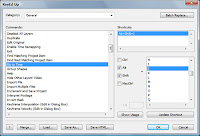 To add a shortcut for a script in KeyEd Up, go to (category) General > Run Script and pick the number of the script you renamed as 01 [name], etc as shown by Sébastien Périer in instructions for KeyEd Up in his Top 10 list of After Effects workflow enhancing scripts.
~~~~~~~~~~~~~~~~~~~~~~~~~~~~~~~~~~~~~~~~~~~~~~~~~~~~~~~~
Scripting and expressions can be intimidating, but using them isn't so much, especially with user community help. Lloyd Alvarez showed how scripts smooth workflows in his AENY presentation on AE scripting, while the Coleman and Ebberts videos on scripting talked (Flash) users through the basics. Chris & Trish Meyer's After Effects Apprentice Video Tutorial #5 provides a gentle introduction to expressions. An overview of the AE scripting scene can be found in the AEP roundup Expressions & Scripting Resources for After Effects.
Update: Lloyd added another script to his library, Add Parented Null to Selected Layers.
Earlier, Lloyd also explained How to install and run scripts:
Update 2: Lloyd has another new script, Layer Marker Rename and Number.
February 11, 2009
Ease and Wizz 2.0, now with Curvaceous
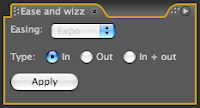 Update: Ease and Wizz is now offered through AE Scripts.
 Mentioned earlier was Ease and Wizz, an AE palette for new easing types. The script is basically the same in 2015, though with numerous incremental refinements. Here's the latest demo video:
Back in 2009, Ian Haigh announced the script on the AE-List:
I'm pleased to announce version 2.0 of Ease and Wizz, the After Effects palette for smoother easing. If you're not familiar with this script, it's an adaptation of Robert Penner's easing equations for Flash, and gives you more options when you're tweening values such as position, rotation, or scale.
The big change in this version is that now you can tween along a curved motion path, which was previously impossible (the expression would effectively ignore the bezier curves, and the resulting motion path would be linear). Also, you can now apply easing expressions to mask paths and shape paths. I call this monumental addition "Curvaceous" :)
It's available for (FREE!)
Note that when using Curvaceous, you will no longer have access to Back and Elastic tweening. The (slightly techie) explanation for this that rather than tweening the actual *value* of the property, Curvaceous tweens the *time* of the property, using the valueAtTime method. As the Back and Elastic easing types actually overshoot the original keyframes, Curvaceous has no way of knowing how to extrapolate the extra data to move past the last value. Simply turn off Curvaceous if you require Back or Elastic (the palette updates when you toggle Curvaceous, so you don't need to commit this to memory).
January 9, 2009
KeyTweak and Tracker2Mask: scripts with tutorials
An earlier post mentioned TrackerViz, a free script to work with tracking data that lets you animate masks using expressions and "average tracks together, correct drifting tracks, use averaged tracks to calculate rotation and scale, and it's the simplest, easiest way to apply tracking data to mask vertices EVER for After Effects!"
Now Mathias Möhl adds 2 scripts for tracking and masks, which can be used in combination with TrackerViz: KeyTweak and Tracker2Mask. There are also videos explaining them; here they have fullscreen controls, but you can get the HD versions if you watch at Vimeo.
Tracker2Mask allows for local modifications of masks and computes the movement of mask shapes based on the movement of track points so you won't need one track point for each mask point. An earlier tutorial explains the basics and shows how to animate speech bubbles. The 2nd tutorial shows how to rotoscope the shape of a moving car based on only four track points, though for simpler shapes often one track point is sufficient:
The other script by Mathias, KeyTweak, lets you quickly modify any keyframed property. You can modify a few keyframes by hand and KeyTweak will modify the keyframes in-between accordingly, to help modify drifting tracks, correct rotoscoping errors, or make non-uniform mask expansions. Like ones made using TrackerViz and Tracker2Mask. Here's the tutorial:
In a similar vein, recent videos by Aharon Rabinowitz might come in handy: Super Tight Junk Mattes (using Auto-Trace to refine garbage mattes) and RGTV Episode 4: Better Compositing Techniques (which leverages convenient Red Giant filters).
Update: Responding to a roto question Patrick Siemer and Chris Meyer mentioned these scripts later the same day on the AE-List, and pointed to further discussion and comparison on the AE Enhancers script forum; see Tracker2Mask: new tracker-assisted rotoscoping tool.
Now Mathias Möhl adds 2 scripts for tracking and masks, which can be used in combination with TrackerViz: KeyTweak and Tracker2Mask. There are also videos explaining them; here they have fullscreen controls, but you can get the HD versions if you watch at Vimeo.
Tracker2Mask allows for local modifications of masks and computes the movement of mask shapes based on the movement of track points so you won't need one track point for each mask point. An earlier tutorial explains the basics and shows how to animate speech bubbles. The 2nd tutorial shows how to rotoscope the shape of a moving car based on only four track points, though for simpler shapes often one track point is sufficient:
The other script by Mathias, KeyTweak, lets you quickly modify any keyframed property. You can modify a few keyframes by hand and KeyTweak will modify the keyframes in-between accordingly, to help modify drifting tracks, correct rotoscoping errors, or make non-uniform mask expansions. Like ones made using TrackerViz and Tracker2Mask. Here's the tutorial:
In a similar vein, recent videos by Aharon Rabinowitz might come in handy: Super Tight Junk Mattes (using Auto-Trace to refine garbage mattes) and RGTV Episode 4: Better Compositing Techniques (which leverages convenient Red Giant filters).
Update: Responding to a roto question Patrick Siemer and Chris Meyer mentioned these scripts later the same day on the AE-List, and pointed to further discussion and comparison on the AE Enhancers script forum; see Tracker2Mask: new tracker-assisted rotoscoping tool.
December 2, 2008
Ease and Wizz CS4, AE palette for new easing types
Ian Haigh announced CS4 compatibility for Ease and Wizz, a script palette for After Effects that gives you more ways to interpolate between values (mentioned earlier).Be sure to check out Alan Shisko's March post Easier Easing for gotchas and Ian Haigh's comments.
Update: Chris Meyer added other details in his PVC post, including a series of Graph Editor charts that show curves for some of the fun interpolations, like one for Bounce below.

March 21, 2008
Ease and Wizz, AE scripts for new easing types
Ian Haigh announced Ease and Wizz, a donationware set of scripts for After Effects that gives you more ways to easily interpolate between values. The easing types include Expo, Circ, Quint, Quart, Quad, Sine, Back, Bounce, and Elastic; some are shown in a short video example and in an interactive visualizer. Ian explains:"The obvious use is in motion, but they can be used on animated properties of any kind. They’re controlled with a After Effects-ish palette that can be docked, so it’s very easy to use. A while back, Flash guru Robert Penner created a suite of extremely useful easing equations that have been used to build thousands of websites worldwide. I've adapted these equations to work as expressions in After Effects."
Update: Alan Shisko adds, "There are two drawbacks to the script, both with workarounds. One, it only works on the first two KF's in an a given parameter. The workaround is to apply the script on multiple 'transform' EFFECTS instead of on to multiple keyframes on the 'transform' PARAMETER. And two, you can't view the resulting velocities in the Graph Editor (should you so choose) unless you select the KF's and go to Animation-> Keyframe Assistant-> Convert Expression to Keyframes. But I would surely recommend that you give it a try, I think you'll like it."
Subscribe to:
Posts (Atom)