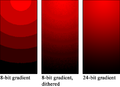
 It's a bit of a mystery why there's still so much banding in TV & web graphics. Maybe people can't preview in the appropriate color space or codec to see banding, which may be eliminated by adding the AE Noise filter (or Add Grain) at about 5% (maybe on an adjustment layer). The stuff on cable systems is subject to God knows what compression and recompression, so being conservative with gradients may be the better part of valor. Also, if you're using the Ramp plug-in increasing Ramp Scatter may help.
...read the rest of the updated article -- now on ProVideo Coalition.

No comments:
Post a Comment