Showing posts with label displacement. Show all posts
Showing posts with label displacement. Show all posts
December 19, 2010
Basic 'Predator' style camouflage effect
Jack Grundy posted AE Basics - 11. 'Predator' Style Camouflage Effect. It uses displacement of course; background is described on Vimeo:

October 13, 2010
Logo Distortion: displacement tutorial
 Eran Stern has a new After Effects tutorial video Logo Distortion:
"How to use displacement map techniques in After Effects to create distortion on a show open logo or looping background graphic."
September 25, 2010
3D from 2D using Freeform displacement
 In 3D from 2D Image Using Displacement Maps Tudor "Ted" Jelescu shows how to create 3D movement that rotates around the subject from a 2D image using displacement maps and the FreeForm filter in After Effects. He uses similar techniques and the same image as another recent Creative Cow tutorial, Advanced 2.5D Animation in AE by Mathew Fuller. It might be good to look at that one first.
Similar work and tools (Vanishing Point, camera mapping, scripts for AE 3D, etc.) are mentioned in posts tagged multiplane animation, camera mapping, and the AE camera. See also Animate the Splash Using Photoshop and After Effects by Corey Barker (up to the end anyway).
Mostly as a note-to-self, here's the demo of a script from Paul Tuersley, pt_Multiplane:
Update: here's some of real time slices with 52 DSLRs and some Macs,
September 9, 2010
Sky Replacement with AE CS5

August 23, 2010
Create water with displacement and particles
Dave Scotland has another After Effects Quick Tip on Premiumbeat.com, How to Create Realistic Water with Displacement Maps and Particles:
After Effects Quick Tip - Creating Realistic Water with Displacement Maps and Particles from Premiumbeat on Vimeo.
After Effects Quick Tip - Creating Realistic Water with Displacement Maps and Particles from Premiumbeat on Vimeo.
June 30, 2010
Freeform 3D displacement tutorial
Chris Heuer shows a bit of 3D displacement in Metal Man, a convenient 1st chunk of a 3-part tutorial on Digieffects Freeform, which shipped with After Effects CS5.
There's more news and tutorials on Freeform in previous AEP posts, and at Digieffects and Mettle. By the way, Digieffects on Facebook and Twitter said "Attn AE CS5 users - register your bundled copy of FreeForm and get Falloff Lighting for free!"
Metal Man 1/3 from digieffects on Vimeo.
There's more news and tutorials on Freeform in previous AEP posts, and at Digieffects and Mettle. By the way, Digieffects on Facebook and Twitter said "Attn AE CS5 users - register your bundled copy of FreeForm and get Falloff Lighting for free!"
Metal Man 1/3 from digieffects on Vimeo.
May 13, 2010
3D displacement and flag waving in CS5
There are several approaches to building a waving flag in After Effects, including old 2D tutorials by Brian Maffitt and Zaxwerks 3D Flag (not yet available for CS5). Now that Freeform is free in CS5, anyone can leverage existing flag tutorials, starting points really, by Ayato and the Creative Cow. An updated more modern tutorial should have a wide audience.
There's many more examples and tutorials on 3D displacement on the Digieffects and Mettle websites. The only other plug-in in memory that could do this was Cognicon TILT, built to use the defunct Quickdraw 3D from Apple (Red Giant's Sean Safreed was the Apple product manager). Here's an intro to Freeform displacement:
Freeform 3D Displacer - Overview from digieffects on Vimeo.
By the way, special pricing ends tomorrow Friday the 14th 12:00 pm E.S.T. on the FreeForm Enhancement Packs - Mylenium Edition. That's 10 HD Project Files for $79 ; regular price is $179.
 Update: Chris Bobitis added a free flag project using Freeform -- just add some texture or pre-displacement to the flag if you think it has too much starch.

There's many more examples and tutorials on 3D displacement on the Digieffects and Mettle websites. The only other plug-in in memory that could do this was Cognicon TILT, built to use the defunct Quickdraw 3D from Apple (Red Giant's Sean Safreed was the Apple product manager). Here's an intro to Freeform displacement:
Freeform 3D Displacer - Overview from digieffects on Vimeo.
By the way, special pricing ends tomorrow Friday the 14th 12:00 pm E.S.T. on the FreeForm Enhancement Packs - Mylenium Edition. That's 10 HD Project Files for $79 ; regular price is $179.
Update: Chris Bobitis added a free flag project using Freeform -- just add some texture or pre-displacement to the flag if you think it has too much starch.April 17, 2009
Wider aspect: directional content adaptive scaling
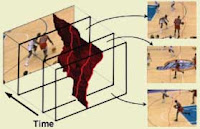 Future video-oriented versions of Content Aware Scaling might eliminate the need for "directional content aware scaling," if the problems encountered in scaling video can be solved.
It seems that the Food Network, HGTV, and other HD channels sometimes use a lens adapter or other technique to stretch SD content to HD. You can especially see the scaling in pans, where the center holds but the sides are stretched.


A post on the FCP-List mentioned that Teranex conversion and conditioning hardware executes a "center spread." Teranex (at NAB 2009, Booth SU5025) calls it "directional content adaptive scaling" and explains:
"Working with Turner Networks, Teranex developed a method of aspect ratio conversion using a non-linear anamorphic function. This technique, named FlexView, performs its aspect ratio conversion by leaving the picture information in the center of the image relatively undisturbed and then applies progressively more ‘stretch’ to the image as it gets closer to the edges. This process, while largely done in the horizontal domain also has a vertical component to help maintain correct geometry.
The basic premise is that most of the important content in a scene (the material that your eye is drawn to) is in the center of an image and the information on the edges is generally less important. Flexview leaves the center portion undisturbed and stretches the image most aggressively around the edges where there is less important material."
For more on this see the Flexview Application Note from Teranex.
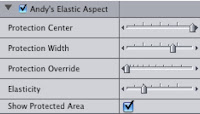 You can do this right now with a free Final Cut filter (via The Editblog) from Andy Mees called Andy’s Elastic Aspect.
 And it seems like you might do this without too much trouble in After Effects or Premiere Pro with an appropriate gradient and a Displacement filter. Premiere with CUDA has better scaling quality, but the drawback is that the lower quality algorithms in popular software are unlikely to measure up to patented multipurpose hardware like Blackmagic Teranex.
For other options, see the nice thread on Creative Cow.
Note: It might even be possible to use the Protect options in Content Aware Scaling in later versions of Photoshop.
Shatter and disintegration: techniques for our time
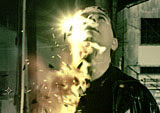 A few recent After Effects tutorials feature memes for our time: shatter and disintegration. Using the Shatter filter built into AE is Design a Breathtaking Body Shatter Effect by Lloyd Alvarez and expanding into another direction is After Effects: The Dark Knight by John Dickinson.
 Going beyond a previously noted 'Knowing' dead planet is Disintegration by Andrew Kramer, which uses displacement, turbulence and the built-in Particle World filter. The foundational tutorial by pioneer Brian Maffitt could not be located.
Update: see also Procedural dispersion with Trapcode Particular from AE tuts and Procedural Disintegration: 3D layer to particles from Quba HQ.
Update: it's not the tutorial referred to above but check out the Shatter plug-in tour from Total Training vault.
February 26, 2009
Tutorial fix
 Just a reminder that you might get a tutorial fix by scanning VisualFXtuts.
I didn't know about the Scott Frizzle presets and projects for Trapcode Particular that include impacts, splatters, novas (shockwave), and sperm.
By the way, Andrew Kramer uses 2D displacement along with AE's built-in Particle World since there's no Turbulent Field as in Particular; see Particle Turbulence.
Subscribe to:
Posts (Atom)