Showing posts with label Shatter. Show all posts

October 1, 2014

Shattering glass in AE


Shattering glass is not that easy if you're looking for realism.

The quickest way to simulate shattered or broken glass in After Effects is with Shatter, but there are other options available if Shatter doesn't work for your needs. For a roundup of resources to create this effect in AE, see Shatter glass in After Effects at PVC.

July 27, 2013

The Shatter Effect in AE: updated

...at PVC rounds up resources on Shatter, an older 8-bit plug-in that ships with After Effects. Originally developed by Brian Maffitt under the Atomic Power banner, Shatter is mostly used for shattering glass, brick walls, puzzles, and so forth (they're presets), but also used to generate 3D text or shape blocks. Brian moved on to form Total Training, but he released his original training video for this effect.

Of course, you can shatter objects with combinations of other built-in tools, and with the Voronoi Shatter script and with Video Copilot Element 3D.

...read the rest at The Shatter Effect in After Effects.

April 4, 2011

Procedural Crumble and other Shatter resources

Procedural Crumble is a new tutorial from Video Copilot:
Build a procedural crumble effect in After Effects using the Shatter plug-in in a unique way. We also composite dust elements from Action Essentials 2 and talk about following your dreams.
You can also download the project files.

For more info on the Shatter Effect, see this sample of resources:

    March 26, 2011

    3D Text in After Effects (updated)

    Read the rest of the updated roundup at PVC... Creating 3D Text in After Effects.

    Creating 3D text in After Effects has long been a cottage industry, generating many workarounds and 3rd party plug-ins.

    Adding to the parade is one of the big new features in After Effects CS6, the extrusion and material options in the Ray-tracing renderer, which almost requires an Nvidia GPU. Many will benefit from beautiful renders with the new features, though many will get bogged down by requirements, render times, or inadequate features, and turn to older methods surveyed here.


    Update: Despite some optimism, in the summer of 2014 Adobe appeared to be leaning heavily on a single 3rd-party app for future 3D. For more and major current tool options, see the above roundup and AEP's Comparing 3D type options for After Effects, where you'll find that Ray-traced 3D was declared (walking) dead by Adobe. Ray-traced 3D still works, but it will be retired in some future release.
    January 23, 2011

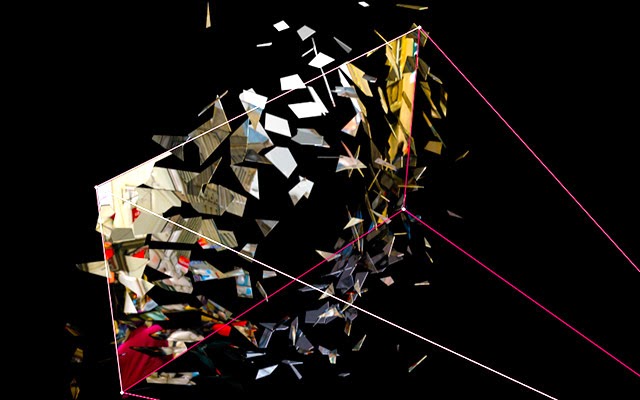
    Shatter plug-in tour from Total Training vault

    Total Training is opening the vault to free some classic tutorials by Brian Maffitt with a comprehensive tour of the Shatter plug-in. Brian says that "Shatter has since been updated to use comp cameras as well. Everything else should still work fine!"

    Additional info on Shatter [originally from Atomic Power] and related plug-ins can be found on AE Portal and Motionworks, see:

    Here's Brian (the creator of Shatter) with a 45-minute intro; catch the other 5 parts on Youtube:

    November 28, 2010

    Custom Shatter Maps for After Effects

    Jesse Toula has a new video tutorial on Custom Shatter Maps for the Shatter effect in After Effects.

    Additional tips can be found in AE Help, in Design a Breathtaking Body Shatter Effect by Lloyd Alvarez on AEtuts, and Planet Explosion from Video Copilot.

    There's also a good thread with some info derived from Brian Maffitt (who originally designed this "Evolution" filter) [and update: maybe the definitive explanation in Chapter 5-6 of Brian's classic tutorial, via Shatter plug-in tour from Total Training vault].

    Update: Jesse adds extra detail and corrections to his tutorial,

    'I recently got some notes on my tutorial, "Custom Shatter Maps" from the creator of the "Shatter" effect, Brian Maffitt. He tells me that there are a couple little things I misinterpreted.

    1) Shatter maps do not "ignore" black, they ignore transparency. In my case, the background was set to black, so what I was calling black was actually transparent.

    2) "Cyan, Magenta, Yellow, Blue, Green, Red, White, and Black. Those are the only important colors to consider when making a Shatter map, and anything else will be "clamped" to those colors inside Shatter. You can turn off "interpolate palette" in Colorama to force the primaries in the shatter map, which will give you an excellent visual preview of the results."

    So there are a couple notes straight from the creator. Keep them in mind when you are making your shatter maps.'

    May 11, 2010

    Artbeats tutorials: transform fire + shatter

    Artbeats has a couple of new After Effects tutorials:

    Firestarter by Steve Holmes is a new written tutorial, demonstrating After Effects keying and animated masking techniques to turn a simple fire clip into a looping, swirling, boiling mass of fire that can be composited over any background.

    Cleft, an After Effects tutorial video by Eran Stern, uses AE and Boris Continuum Complete to create a 3D logo, incorporate stock footage and sound, and add shatter effects for idiosyncratic opener.

    March 29, 2010

    Shatterize: AE Pixel Polly + expression tutorial

    Video Copilot posted a new After Effects tutorial using CC Pixel Polly, (ships with AE), Shatterize:

    "In this tutorial we will be creating a progressive shatter effect using the Pixel Poly plug-in and some simple expressions. This 20 minute tutorial is an expansion to the 3D Ball Dispersion technique for offsetting animated layers, to achieve a unique burn-away look."

    Update: There's another project example of Pixel Polly by Ayato/Hindley, and another use by Andrew Kramer in Video Copilot #98: Particle World explosion.

    August 19, 2009

    Unplugged 5: interview with Brian Maffitt

    Motionworks interview Unplugged 5 features Brian Maffitt, co-founder of Total Training and Atomic Power Corporation. Maffitt's Atomic Power filters Shatter, Foam, Vegas, Colorama, Radio Waves, Wave World, Card Dance, Caustics, Psunami, etc. were mostly absorbed into After Effects.

    Update: Unplugged 5: Brian Maffitt (Part 2) is out Aug 23.

    May 17, 2009

    Reverse shatter effect without plug-ins

    Harry Frank also has a new 45-minute tutorial of a shatter effect without filters. It’s mostly expression-driven, and uses Illustrator to break up a layer into pieces, then expressions to automatically make the pieces move randomly into place. Look for the tutorial on Graymachine on Monday; here's the result:


    Reverse Shatter Effect from graymachine on Vimeo.

    Update: Harry Frank posted the Reverse shatter expression.

    May 8, 2009

    Invigorator and other AE 3D extrusion options


    John Dickinson just posted a collection of some of his Zaxwerks 3D Invigorator/ProAnimator Tutorials. But if you don't have a currently functioning version of Invigorator, which shipped with After Effects for a few versions, there are other options if you're looking for what Invigorator did best -- basic extrusion.

    Some of these options, like the Shatter filter and techniques involving duped layers on Z-axis, were discussed in previous AEP posts Extrude AE text into 3D redux, Maltaannon extrudes AE Shapes, and Rick Gerard's Advanced Extrusion with Shatter. Aharon Rabinowitz covered much of the same ground in his podcast, Creating 3D Extruded Text.

    [Update] MaxAfter has good example of duped layers on Z-axis in his Text Formation. [end update]

    Yet other options include extrude & deform with 3D object filters in Boris Continuum 6, and using Photoshop 3D text, which itself can be extended (like Zax beyond Illustrator) with Swift 3D PS. While both Gerard and Maltaannon consider strokes to make up for the lack of bevels found in Invigorator, these last 2 options have built-in bevel options.

    As VideoCopilot noted last year, observing the many tutorials on the Net, "don’t forget to make it look cool." Graphic Mafia today added similar advice in the context of sport graphics and links to Chad Perkins' explanation of the the Shatter filter technique, show below.

    April 17, 2009

    Shatter and disintegration: techniques for our time

    A few recent After Effects tutorials feature memes for our time: shatter and disintegration. Using the Shatter filter built into AE is Design a Breathtaking Body Shatter Effect by Lloyd Alvarez and expanding into another direction is After Effects: The Dark Knight by John Dickinson.

    Going beyond a previously noted 'Knowing' dead planet is Disintegration by Andrew Kramer, which uses displacement, turbulence and the built-in Particle World filter. The foundational tutorial by pioneer Brian Maffitt could not be located.

    Update: see also Procedural dispersion with Trapcode Particular from AE tuts and Procedural Disintegration: 3D layer to particles from Quba HQ.

    Update: it's not the tutorial referred to above but check out the Shatter plug-in tour from Total Training vault.

    July 14, 2008

    Advanced Extrusion with Shatter

    Rick Gerard at AE Tips and Tricks has a video tutorial on using the built-in After Effects filter Shatter to extrude text. For now the link has a typo, so in the link replace the "c" with a "d."

    It's not a complicated procedure but I don't remember seeing a tutorial on this since Brian Maffitt originally released the filter. There are several as it turns out though, like Roland's Adding Z-Depth to your Logo at Creative Cow, at Adobe Exchange by G. Chen, at Video Copilot, and Maltaannon.

    Update: on the AE-List Roland Kahlenberg added, "If you're using Shatter you'll want to apply the effect on a Solid that is twice as large as your final output. Then scale it down accordingly. The scaling down reduces the aliasing issues which may become obvious on certain types of geometry."

    Update 2: There's detail and other more references on the Shatter filter in AE Help.