CS6 dominates news, but there were still new scripts and a plug-in, and assorted tutorials... @ PVC.
Note: the roundup is replicated here as a backup...
Here’s another summary of the last few weeks or so of news on After Effects— this time CS6 dominates, but there were still new scripts and a plug-in, and assorted tutorials.
AEMap from AE Scripts "creates equirectangular projection maps with 286 separate countries (masks on solids) under 177 jurisdictions (pre-comps). It comes with the 'AEMap Utilities' which contains tools for dealing with a bunch of layers and nested comps." The elements are "continuously rasterized" so they may work in CS6 extrusion and ray-tracing.
cm_Barndoors, new from AE Scripts, lets you "apply a set of barndoors to existing lights, or create a new light with barndoors attached. Each set of barndoors gets a Grip layer that gives you control over each barndoor’s rotation, the entire barndoor assembly rotation and the softness of the barndoor shadows."
Dark Energy for Adobe After Effects is a new Windows-only plug-in that features de-noise and film simulation modules for images up to 1920×1080. It's sold now at a pre-release pricing. Some of these features, leveraged using Nvidia GPUs, are available in the plug-in:
James Zanoni shows background and multiple machine rendering with AERender, droplet for OS X, in Terminal (command line on the Mac) in After Effects. In reality, that droplet just uses aerender, the executable program in the same folder as the After Effects app that has a command-line interface with which you can automate rendering. You can find details in Automating rendering with aerender in AE Help, and in Background rendering with After Effects. If you want an interface that leverages aerender, see BG Renderer, a script with UI at AE Scripts. Here's James Zanoni:
Trent Armstrong posted an article called Auto-Typing for Expressions, which discusses how he uses auto-typing apps to store and access commonly used expressions.
In an article at .net.com, Kinetic typography techniqueswith After Effects, Angie Taylor shows how to use Photoshop and Adobe After Effects for kinetic typography - combining text and motion to express ideas in the form of animation. For background, see Kinetic typography as storytelling; here's the intro for Angie's series on the subject:
In An A to Z of Building Projections - Part 2, Chris Zwar "takes a detailed look at the After Effects workflow used to create the animations for the Melbourne projections, and how the ZBorn Toy and Freeform plug-ins were used." Here's the performance itself:
In a recent trailer for Ridley Scott’s new film Prometheus, we got a peak of some laser-like sweeper technology; now in Episode 76: Promethe-esque Security Sweeper, Seth Worley shows you how to create your own:
Automatic Lip Synch Of Cartoon Mouths (Papagayo to After Effects) " is a short video to demonstrate the new Adobe After Effects javascript... This javascript reads the MOHO.dat file format, generated by the open source Papagayo software." Another approach by iaian7 using Papagayo was mentioned earlier in the roundup Lip Sync in After Effects. Atom on Vimeo describes his new script:
The new features of After Effects CS6 (ships with same version as AE CS 5.5) also include changes concerning mocha, disabling launching Mocha from AE. Mamoworld details the advantages of using MochaImport+ in MochaImport+ and CS6. Here's the basics of this recently updated script:
As usual, Todd Kopriva has detailed "what’s new and changed" for the CS6 versions of After Effects (Global Performance Cache, 3D Camera Tracker, ray-traced extruded text and shapes, variable-width mask feather, new Cycore (CC) effects + more) and Premiere (revised UI & trimming, OpenCL, monitoring, extended multi-cam + more). Colin Stefani did the same for Audition. Photoshop CS6 resources were covered earlier in Photoshop CS6: public beta resources.
You can continue to look to Adobe blogs and AdobeTV for further feature summaries and links to new tutorials. Among many reviews, see particularly the in-depthAfter Effects CS6 (P)Review by Chris and Trish Meyer.
Nvidia posted a cluster of web pages and demo movies on CS6 acceleration. They want to sell the better graphics cards, but like CUDA and Premiere (which added support for certain OpenCL cards on the Mac), After Effects lets you edit the ray-trace supported preference file to test unsupported setups. Another source of acceleration could be Fusion ioFX, a PCI-type card that extends RAM instead of speeding the disk subsystem like SSD, which could complement AE's new cache system [as could Intel’s SSD 910; see Finally a PCIe SSD from Intel]. For more on that see Steve Forde's Steve, Rob, Vince and Me and some event highlights, plus a good talk with Fxguide (at 1:06:00):
There's also a growing number of other great tutorials and reviews that were listed AE CS6 and Production Premium Revealed [updated] when you want to dig deeper. Here's few with unique video:
MotionBoutique shared several experiments with Newton's physics and the ray tracer in AE CS6:
Peter Salvia and Steve Crouch introduce SpeedGrade CS6 in FCProse Ep6 - FCP to SpeedGrade via Premiere CS6 (from Red Scarlet at 4K, transcoded to ProRes LT and cut in FCP 7, to conforming to native RAW .R3D material inside of SpeedGrade CS6 for a full 4K DI finish). Also below is a nice interview with the Speedgrade team by Fxguide.
Gary Adcock really likes Speedgrade CS6 - "...truely Native support for raw camera formats, not just RED's R3D, but how about working in native ARRIRAW ( with presets included) from Alexa directly in PPro, and oh yeah, the app that made use of all of that power is now also part of the CS6 Suite of Tools. Speedgrade is here, maybe not for everyone, but certainly for this user, I am glad it is back."
This kinetic typography music video incorporates familiar brand shapes without really stepping on the brands themselves. Adobe people noted it, as it was created using Adobe Illustrator, Photoshop, After Effects, Premiere and Toon Boom Animate. A labor of love by Jarrett Heather, it took somewhere between 500-1000 hours to finish.
Lester Banks notes an animation and expression on Vimeo by Danny D, Kinetic Text Expressions for AE (embedded below). Lester also points out a resource on another source on inertial bounce by Harry Frank (with downloadable presets), and by extension a thread on MoGraph.
Some related resources can be found at Motion Graphics Exchange and in recent posts here on presets and tutorials for gravity and bouncing (without the tweaks for rotation of course) . There's probably more on expression source AEnhancers. Here an example from Danny D:
Posted last week on AEtuts+. AE Portal continues at PVC...
It has seemed oddly slow in the updated world of After Effects CS 5.5. One bright spot was recent word on Newton: a 2D physics engine for After Effects. But actually there has been much more -- a steady stream of new resources on AEtuts+, ProVideoCoalition, AdobeAE Facebook, and elsewhere.
The Mac version of Freeform Pro was also delayed (problem with Apple's old ATI driver). But the Windows version is available (just as I migrate back to the Mac). There are a number of cool tutorials and presets already available, including the Folding Cube Preset by Mylenium. Tutorials include one now in 2 parts (and one more coming) by Tudor Jelescu on how to make 3D tunnels in AE using FreeForm Pro, and another by Ben Griggs on enfolding morphing 3D, Freeform Pro Gener8tor. Here's some example renders from the latter:
AE Portal @ PVC featured surveys on "looks" in After Effects, recent AE scripts, new basic training sets, text animation, effect demos, moving After Effects plug-ins to CS5.5, and more.
Plexus, the newish After Effects plug-in from Satya Meka and AE Scripts, was revved with 8 new strong features. Here's the feature tour from Satya:
Red Giant QuickTip #41: Adding Life to Interview Footage by Aharon Rabinowitz shows you how to remove noise and add life to interview footage through color correction. The demo is in After Effects, but works for users of Final Cut Pro and Premiere Pro (you can substitute filters though perhaps with less favorable or timely results).
Rounding out this collection are some additional resources on stills & video:
Stu Maschwitz was way more than Mostly Coherent on TWIT's Mostly Photo show (in audio and video), which featured talk about shooting stills and video, post-processing, and video gear. Especially worthwhile was the discussion of color contrast and the split-tone controls in Adobe Lightroom.
at PVC is a quick look at TypeMonkey, a new AE script that generates complex kinetic type animations. TypeMonkey
takes away some of the drudgery to organizing and animating text, which should let designers have more time to sketch out ideas.
The special 45% off intro price is ending soon -- it lasts until Aug 26, 2013 at aescripts + aeplugins. If you want to give a spin, the trial version has a 7-day limit and allows for a maximum of 10 words.
[update: Toolfarm is having a Video Copilot Sale -- 30% on ALL Video Copilot products Wednesday and Thursday, May 26 & 27, 2010 only.]
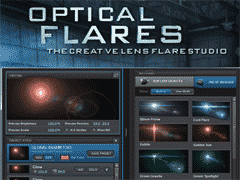
Video Copilot has released CS5 compatible versions of their After Effects filters -- free upgrades (OF, others, + update) from the previous versions. The standout among these is Optical Flares, a newer plug-in that leapfrogs longtime industry leader Knoll Lens Flare Pro in interface and features for about 1/3 the price. Here's a demo:
Andrew Kramer and company have taken a page from the Magic Bullet Looks approach to create a powerful and easy-to-use interface. The custom interface offers drawers full of visual presets and detailed control over individual flare elements, as well as a large adjustable preview of the composite or the flare alone. The advanced UI along with GPU acceleration allows users to build, edit, and manage unique and complex lens flares with speed and simplicity.
All of these features and more are built into this one plug-in:
3D lens flares with AE Lights
2D + 3D occlusion or obscuration
edge flare-ups
auto-tracking
auto-animation
textures
matte box
In the latest release for CS5, the preset drawer has been dropped in a favor of an exposed browser panel, but new abilities to rearrange, resize, and toggle window panels are nice. The best way to evaluate Optical Flares yourself is to review the profusion of video intros and tutorials at the Video Copilot website -- there is no eval or trial version. Owners of Optical Flares get access to even more training, so there's no need to purchase extra training. There's also the VideoCopilot Preset Network and filter forums for help and inspiration.
Knoll Lens Flare Pro (which is not available for CS5 until summer 2010) has offered most of the same features with the addition of public beta releases, but without the integrated visual interface. Perhaps KLF's sole remaining advantage is that in addition to the main filters, 19 lens elements are also included for minute control over parameters, though you should be able to get similar control in Optical Flares using presets. For now, Optical Flares is an After Effects-only filter, but it is said that versions for NLEs, Photoshop, Fusion, and Nuke are under consideration.
If you don't have a dedicated lens flare filter, and there are only two in this league, you're in for a treat. Overuse of lens flares is common though -- but with a filter like Optical Flares, you can rise above the common cliche of the Photoshop default (at left). Individual flare elements can be used as the base, as seen almost everywhere, or as elements of design.
Use in more realistic shots may take some extra observation and self-control. Tony Reale recently introduced ideas on using lens flares in edits in his After Effects tutorial Add Anamorphic Lens Flares to Video. There's a lot going on beyond the basics with lighting, camera filters and lenses, etc. and lens flares can become obsessions to avoid, create, or recreate. One good resource for study is a cache of QuickTime movies of real world lens flares by Claudio Miranda.
Another obvious resource is J.J. Abrams' "ridiculous" use of kinetic halos in the latest Star Trek movie (Andrew Kramer did the titles). See various discussions of these mostly in-camera effects done by cinematographer Dan Mindel in Where No DP Has Gone Before at ICG Magazine, and more about ILM custom matching "SunSpot" CG in Back on Trek (Flare Madness) at Millimeter & Star Trek Returns at Post Magazine.
Update: Kevin McAuliffe wrote a substantive review of Optical Flares for ProVideo Coalition.
Update: Johan Romera shared Nuke2AE Optical Flares Gizmo, a Nuke script that corverts 3d data to 2d position to create AE keyframe data for Optical Flares.



 [update: Toolfarm is having a Video Copilot Sale -- 30% on ALL Video Copilot products Wednesday and Thursday, May 26 & 27, 2010 only.]
 If you don't have a dedicated lens flare filter, and there are only two in this league, you're in for a treat. Overuse of lens flares is common though -- but with a filter like Optical Flares, you can rise above the common cliche of the Photoshop default (at left). Individual flare elements can be used as the base, as seen almost everywhere, or as elements of design.
 As a sort of an addendum, it's interesting to see how the idea grew for 3D lens flares in After Effects. From at least 2004, there were forum requests for help to go beyond parenting to a 3D layer. AE expression guru Dan Ebberts provided examples at MotionScript and explained a bit more about layer space transforms, which were also discussed by Chris Meyer not long ago at PVC. A few years later Mylenium's Building a Lensflare with Expressions (and Trent Armstrong's Making Light Disappear & Reappear Behind Objects Using Expressions) appeared at Creative Cow. Then in 2009, Andrew Kramer spread the idea further in Lens Flare on 3D Lights? and the race was on to incorporate 3D lens flares into an After Effects filter.