There's a new tutorial at VFX Haiku, Simple Compositing Techniques with Adobe After Effect, which takes a look at a few tips and tricks that author Kert Gartner used to make pixel art look like it’s part of a filmed plate.
Simple Compositing Techniques with Adobe After Effects from Kert Gartner on Vimeo.
March 31, 2011

Fairytale Lighting in After Effects
In Fairytale Lighting in After Effects (below), the prolific Harry Frank shows you how to "how to take a regular, run-of-the-mill shot and turn it into something beautiful and moody, straight out of a fairytale. You'll learn how to set up a down-and-dirty 3D track, add volumetric light and dust to a live action shot, and then finish it with some simulated camera lens blur."
Harry generously notes some alternatives to Red Giant and Trapcode effects he used. But wait, there's more:
Red Giant QuickTip #39: Fairytale Lighting in After Effects from Red Giant Software on Vimeo.
Harry generously notes some alternatives to Red Giant and Trapcode effects he used. But wait, there's more:
- Tilt-shift blurring alternatives to MB Looks can be found at AE Portal.
- Replacing Shine will require a bit of extra work with the built-in Light Burst effect; Harry's previous tip and an alternative can be found in 3D volumetric lights with Shine or Lightburst.
- Dust particles can be generated with AE's built-in tools; Eran Stern offers a free project that creates floating dust using CC Particle World. Additional perspective can be found in 'Light Transmission' + 'Natural Light Effects' by Trish and Chris Meyer.
Red Giant QuickTip #39: Fairytale Lighting in After Effects from Red Giant Software on Vimeo.
March 30, 2011
DV Rebel Tools for free
 Note: Red Giant released Colorista Free, which is pretty much Colorista 1.
~~~~~~~~~~~~~~~~~~~~~~~~~~~~~~~~~~~~~~~~~~~~~~~~~~
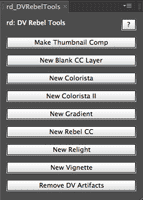
Prolost is celebrating the release of e-versions of The DV Rebel’s Guide (review) by giving away updated versions of the DV Rebel Tools scripts included with the original edition of the book. For many more details, see Rebel's Guide on your iPad or Kindle, DV Rebel Tools For Free.
Here's Stu's tutorial for DV Rebel Tools and a recent color correction session that also features their use (and still hoping for Colorista Free):
Forget Madge, here's (old) Ballmer
This was suggested after following a link to the famous words of Madge... Soak up a big taste of Steve Ballmer, who's given so much over the years:
March 29, 2011
Compositing and Color in AE and Premiere with RGS

He covers keying, compositing, color correction, and visual effects in After Effects and Premiere. In this tutorial he features uses of Red Giant tools along with plenty of other tips.
After Effects A-Z: Brightness & Contrast

Beyond that we can note that in Photoshop, Brightness & Contrast is much improved, though those improvements haven't trickled down to Afters Effects and Premiere. In AE the effect even seems different than the Legacy option in Photoshop, thought it hardly matters since you're better off with Levels or Curves anyway. For a good illustrative look at limitations (using the waveform levels monitor in Premiere), see Color Correction 1: Brightness & Contrast by Andrew Devis.
For an in-depth intro to controlling color in AE with the standard Adobe tools, see Adobe After Effects CS5 Visual Effects and Compositing Studio Techniques by Mark Christiansen. It's really the best place to learn how to use these tools in AE, and builds the foundations for mastering procedural mattes for compositing.
If you need a free option, happily there's videos at Lynda.com from Photoshop CS4 One-on-One: Advanced by Deke McClelland, with a whole section that covers the basics of Level, Curves, and related effects in detail. See also the free infographics Levels Quick Reference Guide (thanks for the picture) and Curves Quick Reference Guide by John Dickinson, as well as some useful tutorials at Cambridge in Colour.
To go a bit deeper see AE Portal references Waveform, vectorscope, and basic color correction and White balance + more with Color Finesse.
For an in-depth intro to controlling color in AE with the standard Adobe tools, see Adobe After Effects CS5 Visual Effects and Compositing Studio Techniques by Mark Christiansen. It's really the best place to learn how to use these tools in AE, and builds the foundations for mastering procedural mattes for compositing.
If you need a free option, happily there's videos at Lynda.com from Photoshop CS4 One-on-One: Advanced by Deke McClelland, with a whole section that covers the basics of Level, Curves, and related effects in detail. See also the free infographics Levels Quick Reference Guide (thanks for the picture) and Curves Quick Reference Guide by John Dickinson, as well as some useful tutorials at Cambridge in Colour.
To go a bit deeper see AE Portal references Waveform, vectorscope, and basic color correction and White balance + more with Color Finesse.
The 100th Monkey and the future of post
Is it April Fools already? The Editblog on PVC notes opposing "expert" opinions on the future of post-production and a movie edited on Final Cut by a chimp or some monkey with ESP.
Reports don't go far beyond YouTube, so you knows if "JT" really did it:
Reports don't go far beyond YouTube, so you knows if "JT" really did it:
Dot Pixels plug-in: $5 dollar spring promotion
The Dot Pixels plug-in from Satya Meka is only $5 dollars -- a limited-time spring promotion at AE Scripts.
"... pixelate your image into circles and rings. Highly useful to create LED screen effect or a porous surface effect. Can also be used to create new abstract, artistic version of images and footage. It has optional shading that helps you to simulate spherical and torus objects."Here's a tutorial:
Pseudo or custom effects in After Effects

"Pseudo Effects, sometimes called 'custom effect controls' and 'custom expression controls' allow you to put all of your controls into a single 'effect'. You can set your own defaults and value ranges so that users can use the reset button to return to the defaults you chose. There are many more advantages to using Pseudo Effects, and this tutorial will go over all of them as I walk you through creating one from scratch. The creation of these controls is done in an .XML file, so for those of you how do not feel comfortable writing your own code, or just want to speed up the process, I also end the tutorial by showing you a way of creating all of the XML without doing any programming by hand."
Custom effects are similar to Animation presets and to the more specific but limited examples in the Behaviors Presets in AE. "Pseudo effects" is the name originally given by Charles Bordenave (aka nabscripts at AE Scripts), who posted an "Effect Creator" script at AEnhancers in 2006.
Maltaannon popularized and deployed custom effects in a variety of ways starting around 2007. See his What CustomEffects are for an introduction to his tutorials and products.
AEtuts had a series on custom effects in late 2009, along with others posted since. You can wade through the search results at AEtuts (or Google) for all the posts. Here's a smattering of some other custom effect resources:
AEtuts had a series on custom effects in late 2009, along with others posted since. You can wade through the search results at AEtuts (or Google) for all the posts. Here's a smattering of some other custom effect resources:
- Create Your Own Custom Effects! by Momcilo Stojkovic is the opener for a week of custom effects at AE Tuts. This text tutorial shows you how to modify and reimport PresetEffects.xml, so you can group and save expression controls as a unique filter/preset in After Effects.
- AE Tuts posted a cool preset and tutorial with Distribute Your Layers in 3D – Custom Effect by Rob Schofield. This preset effect is similar to part of RGS Plane Space (was 3D Assistants) and Create3DShapes and 3D Layer Distributor from AE Scripts.
- Topher Welsh rounded up 17 Custom Effects at AE Tuts; see also the AEnhancers library
- Pie Chart, a custom effect preset for AE by Jorrit Schulte (he collected his others with a video at Video Copilot)
- Ellipse Tool Plus from Hypoly (James Chiny)
- Eran Stern has a Creative Cow AE podcast, Markers Leaks, an introduction to his preset and Custom Effect which he uses to trigger actions using layer markers inside of Adobe After Effects.
ft-MarkerExporter: reuse layer markers

ft-MarkerExporter is a new After Effect script from Francois Tarlier that "exports layer markers to a XML file which can then be reimported and applied to an existing layer, a new layer or even a new comp."
Stringy hair-like Trapcode Form
AEtuts is hosting Super Stringy Hair-Like Logo Reveal, a Trapcode Form tutorial by Michael Fawke. It looks like fun, covering:
... the basics of setting up Trapcode Form, and using alpha channels to control its effect… allowing you to discover some pretty cool effects which can be easily manipulated to create all kinds of craziness.
Free After Effects webinar April 5

"Join creative director Marcello Grande, from WESTERNIZED Productions, and host of SFMOGRAPH, as he walks you through some recent projects and shows you how to save time and have fun creating visual effects using GenArts Sapphire in After Effects.This free webinar is sponsored by GenArts, and is planned for Tuesday, April 5 from 12:00 p.m. - 1:00 p.m. ET / 9 a.m. - 10:00 a.m. PT.
Marcello will be explaining how to use Sapphire Textures, Convolve, Defocus and Z Glow. He will also be showing some 3D relighting techniques that take advantage of Light 3D, a Sapphire tool that allows you to relight a 3D model within After Effects to make on-the-fly decisions based on your AE scene. Ask him questions about his technique and workflows during a live Q+A at the end of the tutorials."
March 28, 2011
Premiere and After Effects teams at NAB
 Todd Kopriva shares information on the Adobe Premiere Pro and After Effects teams at NAB:
We’re gearing up for a big show at NAB 2011 and Post | Production World, and we hope to see you there. ...We’ll be posting a lot of news and information the week of the event (and after that).
Read the rest...
March 26, 2011
3D Text in After Effects (updated)

Creating 3D text in After Effects has long been a cottage industry, generating many workarounds and 3rd party plug-ins.
Adding to the parade is one of the big new features in After Effects CS6, the extrusion and material options in the Ray-tracing renderer, which almost requires an Nvidia GPU. Many will benefit from beautiful renders with the new features, though many will get bogged down by requirements, render times, or inadequate features, and turn to older methods surveyed here.
Update: Despite some optimism, in the summer of 2014 Adobe appeared to be leaning heavily on a single 3rd-party app for future 3D. For more and major current tool options, see the above roundup and AEP's Comparing 3D type options for After Effects, where you'll find that Ray-traced 3D was declared (walking) dead by Adobe. Ray-traced 3D still works, but it will be retired in some future release.
March 25, 2011
Vignettes in After Effects [updated]
 Vignettes have become more popular, and especially in After Effects since the release of the DV Rebel's Guide
by Stu Maschwitz. Of course there's numerous ways to make vignettes,
and it looks like the topic is quite well-covered now, thank you.
Vignettes have become more popular, and especially in After Effects since the release of the DV Rebel's Guide
by Stu Maschwitz. Of course there's numerous ways to make vignettes,
and it looks like the topic is quite well-covered now, thank you. An updated roundup of some tools & tutorials on the various options for Premiere and AE can be found at PVC, Vignettes in Premiere & After Effects: A plethora of resources.
AE Lounge: new community chat channel

AE Lounge is a new Convore channel on After Effects if you want to chat realtime about AE, problems, solutions, etc... There's also e-mail summaries and an iPhone app.
According to Forrest Maready, Convore is an indexable, searchable group chat. So, rather than ask a question on a forum, hopefully you can get immediate feedback on something if your stuck. An AE group chat could be fun if there's enough people around who not already totally engulfed by Twitter or Facebook and older lists and forums.
March 21, 2011
BS Compositing Bundle: free plug-ins

They're from Bartek Skorupa (no BS), who has a demo explaining the purpose and features of the new filters at AEtuts, Enhance Your Workflow: BS Compositing Bundle – Plug-ins Presentation. The filters are replacements for Set Matte, Compound Arithmetic (adding color correction), and Tint but with extra features and 32-bit processing oriented towards compositing passes from 3D apps.
Edit & update: the BS_CompositingBundle is now available at AE Scripts.
Modifying Keyframes with KeyTweak
Mamoworld, home of Mathias Möhl and friends, has published a new quick tip tutorial (embedded below), Modifying Keyframes with KeyTweak. Mathias says that KeyTweak is a must-have when working with hundreds of keyframes, like in his stabilize motion tutorial. The new version is easier to use -- you can push around keyframes in the work area just using the Arrow buttons.
Mathias explains:
Although the new version of KeyTweak was published last December, I didn't have a tutorial about its new features (the new "local mode"), hence almost nobody discovered its potential so far. While the old version of KeyTweak (consisting only of the "global mode" of the new KeytTweak) had a somewhat confusing workflow (you needed to duplicate a property, delete all keyframes in it that you want KeyTweak to take care of etc), the new local mode is much more intuitive.
With a set of arrow buttons you just move around all keyframes in the work area, and also fade in/out those changes if you like. The old "global mode" remains still useful for properties that are not 2D, like transparency (local mode works only with 2d properties and mask shapes).
Mathias explains:
Although the new version of KeyTweak was published last December, I didn't have a tutorial about its new features (the new "local mode"), hence almost nobody discovered its potential so far. While the old version of KeyTweak (consisting only of the "global mode" of the new KeytTweak) had a somewhat confusing workflow (you needed to duplicate a property, delete all keyframes in it that you want KeyTweak to take care of etc), the new local mode is much more intuitive.
With a set of arrow buttons you just move around all keyframes in the work area, and also fade in/out those changes if you like. The old "global mode" remains still useful for properties that are not 2D, like transparency (local mode works only with 2d properties and mask shapes).
March 20, 2011
The Parallel Worlds of 3D in After Effects
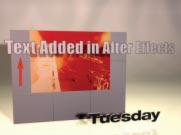 Chris and Trish Meyer posted CMG Hidden Gems: Chapter 16 - Parallel Worlds on PVC. It's an introduction to the "Parallel Worlds" of special cases and gotchas that crop up when you try to combine 3D layers in After Effects, live Photoshop 3D layers, plug-ins that render 3D images onto 2D layers, renders from 3D programs, Adobe Repoussé (Photoshop), and Digieffects FreeForm (included in CS5).
This "Hidden Gems" summary covers:
- Rendering Bins (3D layer groups) and Breaks (2D layer pipelines)
- Casting 3D Shadows Onto 2D Layers
- 3D Effects and 2D Layers
- Making Photoshop 3D Layers More Interactive
- Displacement Mapping with FreeForm
You can find more on these topics in 3D layer interactions, render order, and collapsed transformations in AE Help and of course in Creating Motion Graphics with After Effects 5th Edition (reviewed earlier on AEtuts+). There's also extras from CMG itself -- an excerpt from the Parallel Worlds chapter with some extra stuff not covered in the current summary, as well as an Integrating with 3D applications excerpt on importing 3D info from Maya, Cinema 4D, 3ds Max, and other 3D apps.
After Effects for documentaries + cutting rhythms
Richard Harrington notes some Useful Videos About Documentary Editing, including An Overview of After Effects for Documentary Editors, a presentation by Steve Audette and Mark Dugas given at a PBS conference. Embedded below, it's pretty basic but very effectively shows how a little bit of AE can add a lot of style. Harrington also notes other videos by Audette like "Thoughts on Documentary Editing."
 For similar resources to liven up static content, see Animate a Photo Mosaic in After Effects, The Ken Burns Effect — and beyond, and other AEP resources for multiplane animation.

 For similar resources to liven up static content, see Animate a Photo Mosaic in After Effects, The Ken Burns Effect — and beyond, and other AEP resources for multiplane animation.
Also interesting is Todd Kopriva's notes on free chapters from Karen Pearlman’s Cutting Rhythms and podcasts available through the Art of the Guillotine, a very useful aggregator website on editing.
March 18, 2011
NAB 2011 free access code + AE sessions

The NAB Show has shared a special registration code for free access to the 2011 exhibit floor, the Opening Keynote and State of the Industry Address, Info Sessions, Content Theater, Exhibits and PITS - a $150 value. Just visit http://bit.ly/NABRegSM06 to redeem, or register at http://nabshow.com/register with the code SM06.
This year the conferences are through April 9 – 14, 2011 and the exhibits are April 11 – 14 in Las Vegas. There's a number of packages available that include conferences and extra classes, and Eran Stern is offering another code for those, as well as info on classes he'll be teaching on tracking and simulation effects in After Effects.
Update: there plenty more free offers, especially coming from presenters for AE seminars,vendors, etc.
PVC book review: Color Correction Handbook

This is a MUST read for those interested in color grading and a SHOULD read for everyone else.
Peachpit offers a butchered sample chapter online but the Amazon preview is a better experience if you can't gets your hands on a hard copy to peak at latest in color correction (including DaVinci Resolve). Scott says to read both this one by Van Hurkman and The Art and Technique of Digital Color Correction
 by Steve Hullfish -- the expanded version of a Hullfish book reviewed at AEtuts that offers deep analysis with professional colorists.
For more on the authors, see the Colorist Interview Series: Hullfish & Van Hurkman on The Tao of Color. For some practical resources for After Effects, see Monitoring And Correction With Color Finesse on AEtuts+, How to talk to a Colorist, and posts tagged color on AE Portal.
For fun, here's an extremely abridged version of the documentary Visions of Light,
March 17, 2011
Mercury Playback Engine & MacBook with ThunderBolt
Adobe's Dave Helmley demos the Mercury Playback Engine & Apple's new MacBook Pro 17" w/ThunderBolt. (embedded below). On his blog he says:
With newer processors like Intel’s Sandy Bridge processor (8 Threads), the CPU can now take on a lot more tasks. WeWith newer processors like Intel’s Sandy Bridge processor (8 Threads), the CPU can now take on a lot more tasks. We can now even use laptops to playback native Red files in ¼ mode instead of 1/8 mode. This was previously only possible on a desktop system. I was completely caught off guard – this was really impressive to see Intel giving us this type of performance in a laptop. Native DSLR (Canon 5D) and RED editors will totally dig this.
Bottom line, if you need to edit on a system that has a fast processor and an AMD/ATI, or other non-supported CUDA cards, give it try. Chances are you’ll be pleasantly surprised.We have a ton of surprises in in the works.
Update: see also Thunderbolt! to find Terence Curren and Philip Hodgetts debating this and more on episode 22 of the Terence&Philip show.
With newer processors like Intel’s Sandy Bridge processor (8 Threads), the CPU can now take on a lot more tasks. WeWith newer processors like Intel’s Sandy Bridge processor (8 Threads), the CPU can now take on a lot more tasks. We can now even use laptops to playback native Red files in ¼ mode instead of 1/8 mode. This was previously only possible on a desktop system. I was completely caught off guard – this was really impressive to see Intel giving us this type of performance in a laptop. Native DSLR (Canon 5D) and RED editors will totally dig this.
Bottom line, if you need to edit on a system that has a fast processor and an AMD/ATI, or other non-supported CUDA cards, give it try. Chances are you’ll be pleasantly surprised.We have a ton of surprises in in the works.
Update: see also Thunderbolt! to find Terence Curren and Philip Hodgetts debating this and more on episode 22 of the Terence&Philip show.
Tutorial gap: water drops, stereoscopic 3D, paper cutouts

Anyway, AEtuts has had some good tutorials recently. Here's just a few:
- Paper Cut-Out Stop Motion Animation Effect by Matt Freeth
- Convert Regular Footage To Stereoscopic 3D by Jorrit Schulte
- Rendering Photorealistic Water Droplets – AE Premium by Arie Stavchansky
Customizable After Effects Toolbar: another tutorial
Francois Tarlier posted a tutorial for his script ft-Toolbar on AEtuts, Enhanced Your Workflow: ft-Toolbar A Customizable Toolbar Script.
Too bad Premiere doesn't use these scripts. There's updates and info on AE Scripts; here's the original video demo by Lloyd Alvarez:
Too bad Premiere doesn't use these scripts. There's updates and info on AE Scripts; here's the original video demo by Lloyd Alvarez:
March 15, 2011
A Brief History of Title Design
The Art of the Title posted a video made for SXSW, A Brief History of Title Design. For more info on titles and design see the titles tag, and the Hollywood Movie Titles tutorial series on AEtuts+.
 Update: An extended look at titles not mentioned in previous posts here is IFC's The 50 Greatest Opening Title Sequences of All Time: Index.
Update: An extended look at titles not mentioned in previous posts here is IFC's The 50 Greatest Opening Title Sequences of All Time: Index.
Render After Effects with Adobe Media Encoder +
Graymachine takes a quick look in a new tutorial, Rendering AE Projects with Adobe Media Encoder.
AME has some newer advantages (the H.264 codec is a win), though you'll have to determine the best options for your particular circumstance. One would hope that someday AME will mimic the AE Render Que more (or the long defunct Movie Cleaner Pro), and expose finer control over codec settings, especially for H.264.
Don't forget that you can background render AE projects using Adobe Media Encoder -- but you have to drag projects directly into the AME render list [even in CS6]. Here's Harry:
Also, Topher Welsh notes that AME also give you the render file size if that a concern, and you can skip about the presets to find an appropriate size,
For more options and info on rendering in After Effects, see Background rendering with After Effects and other posts tagged render and background rendering.
Note: Kevin Monahan posted some new info and resources in Exporting media using Adobe Media Encoder CS5, CS5.5 and CS6, as did Todd Kopriva in Adobe Media Encoder CS5.5: What’s new and changed and (for CS6) Which version of my composition or sequence is used for export using Adobe Media Encoder?.
See also Tutorial: Adobe Media Encoder CS6--UPDATED! by Jan Ozer at Streaming Media, who doesn't even plug his course at Video2 brain, Producing Great Video with the Adobe Media Encoder. Here's a sample:
AME has some newer advantages (the H.264 codec is a win), though you'll have to determine the best options for your particular circumstance. One would hope that someday AME will mimic the AE Render Que more (or the long defunct Movie Cleaner Pro), and expose finer control over codec settings, especially for H.264.
Don't forget that you can background render AE projects using Adobe Media Encoder -- but you have to drag projects directly into the AME render list [even in CS6]. Here's Harry:
Also, Topher Welsh notes that AME also give you the render file size if that a concern, and you can skip about the presets to find an appropriate size,
For more options and info on rendering in After Effects, see Background rendering with After Effects and other posts tagged render and background rendering.
Note: Kevin Monahan posted some new info and resources in Exporting media using Adobe Media Encoder CS5, CS5.5 and CS6, as did Todd Kopriva in Adobe Media Encoder CS5.5: What’s new and changed and (for CS6) Which version of my composition or sequence is used for export using Adobe Media Encoder?.
See also Tutorial: Adobe Media Encoder CS6--UPDATED! by Jan Ozer at Streaming Media, who doesn't even plug his course at Video2 brain, Producing Great Video with the Adobe Media Encoder. Here's a sample:
Viral videos capture devastation in Japan
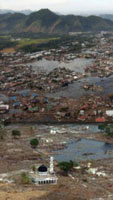 If you saw the recent 1st-person video from the Japan tsunami (embedded below; watch the whole thing), you may be interested in more of them. This disaster so far pales compares to the Indonesia tsunami (left) and Haitian earthquake (and US-related wars) where the death tolls were each over 200,000 -- but the nuclear monster is not yet contained. See The Rachel Maddow Show for balanced info on the nuke angle.
Check out 2 from Viral videos capture devastation in Japan below (there's more at CitizenTube):
March 14, 2011
Export After Effects to iPhone, HTML5 + sneak peeks

Of course HTML5 is one of the general thrusts of Adobe development, as seen at Adobe Labs. Converting Adobe Flash FLA files into HTML and reach more devices is the point of "Wallaby," codename for experimental technology that converts artwork and animation contained in Flash (FLA) files into HTML. For more news of how this all might work, keep an eye on Adobe’s web pro team at SXSW in Austin this week.
Update: Adobe posted some 2011 sneak peeks on AdobeTV. Here's one:
After Effects sneak preview at AENY March 31st
AENY is hosting new After Effects product manager Steve Forde for some "cool sneak previews of #AE stuff" in NYC on March 31st.
The Rotation Problem explained
The Guerrilla CG Project website is down by restricted access but some of the video lives on Vimeo. In honor of Pi Day, below are a couple of videos on rotation by Andrew Silke, The Rotation Problem and Euler Rotations Explained:
Euler Rotations, the most common method for orienting objects in 3d. It's by-product "gimbal lock" can cause headaches for animators because the animated motion can move in strange ways. Here we learn how euler's "rotation order" is a bit like hierachies, and how changing this order can help us to avoid gimbal problems. This is demonstrated with a solution to a common camera problem, by finding the correct rotation order.
Chris and Trish Meyer explain this (Euler XYZ vs. the quaternion Orientation) and related issues for After Effects in Creating Motion Graphics. There's more of course in AE Help. Here's Andrew Silke:
The Rotation Problem from The Guerrilla CG Project on Vimeo.
Euler Rotations, the most common method for orienting objects in 3d. It's by-product "gimbal lock" can cause headaches for animators because the animated motion can move in strange ways. Here we learn how euler's "rotation order" is a bit like hierachies, and how changing this order can help us to avoid gimbal problems. This is demonstrated with a solution to a common camera problem, by finding the correct rotation order.
Chris and Trish Meyer explain this (Euler XYZ vs. the quaternion Orientation) and related issues for After Effects in Creating Motion Graphics. There's more of course in AE Help. Here's Andrew Silke:
The Rotation Problem from The Guerrilla CG Project on Vimeo.
Fixel LightIT, Contrastica, EdgeHancer + Coloritivity
AE Scripts recently released 3 Pixel Bender plug-ins from Fixel: LightIT, Contrastica, and EdgeHancer. These sorts of image-processing filters are always interesting, though in some cases it's hard to determine advantages over the plethora of filters already built into Adobe tools.
For example, it's not clear how Edgehancer differs from Sharpen Edges unless you give it whirl. Unfortunately there's no trial version. There is a difference though, when you find you want fine control and don't want to mess with a gaggle of procedural masks made with Find Edges and other filters. It is clear that Fixel tools are all 32-bpc, GPU-accelerated, and compatible with both After Effects and Photoshop CS4+.
Below are some descriptions based on the promotional materials, plus a quick demo video below for each filter.
Fixel LightIT is a local color correction plug-in with a novel algorithm that's based on non-linear masking to identify the shadows in the image. LightIT applies an optimized operation for correcting the colors in the shadows regions, without affecting the other tonal ranges.
Fixel Contrastica, which also features a novel algorithm, can enhance and boost local & global contrast. Contrastica enables you to control the contrast all over tonal range (Shadows & Highlights) to reveal hidden details.
Fixel EdgeHancer too uses a novel algorithm, which unlike “classic” sharpeners, emphasizes the edges exclusively instead of increasing the contrast of the surrounding pixels.
Update: Fixel has added another Pixel Bender, Fixel Coloritivity, a 5 way tinting filter.

Update: Topher Welsh gives them a shot in a review at his website,
-- and later Fixel summarizes benefits of their filter in an AEtuts comment, "By default, Adobe chooses the simple way to do things.
Shadows / Highlights – Simple linear masking + Curves.
USM – Apply Gaussian Blur and subtract.
Contrast – Linear Function coefficient.
I can go on… We tried to do things differently with superior method for each solution.
LightIT isn’t linear, hence it creates less “Halos” and has more subtle and natural result.
Contrastica has a special function to add contrast, try its extreme values to see different it is. You can also use it to add saturation to colors very differently from the classic saturation slider.
EdgeHancer uses special Algorithm both for detecting edges and enhancing them. Sharpeners work on the pixels to the right / left of the edge. This one works on the edge itself."
For example, it's not clear how Edgehancer differs from Sharpen Edges unless you give it whirl. Unfortunately there's no trial version. There is a difference though, when you find you want fine control and don't want to mess with a gaggle of procedural masks made with Find Edges and other filters. It is clear that Fixel tools are all 32-bpc, GPU-accelerated, and compatible with both After Effects and Photoshop CS4+.
Below are some descriptions based on the promotional materials, plus a quick demo video below for each filter.
Fixel LightIT is a local color correction plug-in with a novel algorithm that's based on non-linear masking to identify the shadows in the image. LightIT applies an optimized operation for correcting the colors in the shadows regions, without affecting the other tonal ranges.
Fixel Contrastica, which also features a novel algorithm, can enhance and boost local & global contrast. Contrastica enables you to control the contrast all over tonal range (Shadows & Highlights) to reveal hidden details.
Fixel EdgeHancer too uses a novel algorithm, which unlike “classic” sharpeners, emphasizes the edges exclusively instead of increasing the contrast of the surrounding pixels.
Update: Fixel has added another Pixel Bender, Fixel Coloritivity, a 5 way tinting filter.
Update: Topher Welsh gives them a shot in a review at his website,
-- and later Fixel summarizes benefits of their filter in an AEtuts comment, "By default, Adobe chooses the simple way to do things.
Shadows / Highlights – Simple linear masking + Curves.
USM – Apply Gaussian Blur and subtract.
Contrast – Linear Function coefficient.
I can go on… We tried to do things differently with superior method for each solution.
LightIT isn’t linear, hence it creates less “Halos” and has more subtle and natural result.
Contrastica has a special function to add contrast, try its extreme values to see different it is. You can also use it to add saturation to colors very differently from the classic saturation slider.
EdgeHancer uses special Algorithm both for detecting edges and enhancing them. Sharpeners work on the pixels to the right / left of the edge. This one works on the edge itself."
SF Cutters March 16: 11th Anniversary
 SF Cutters is meeting March 16th -- the 11th Anniversary of the 1st ever FCPUG. Back then Sharon Franklin presented on the Option key in Final Cut; Adam Wilt was an audience member.
This meeting is planned for 6:30 PM - 9:30 PM at Adobe in San Francisco. Tickets available online; capacity is limited. Here's the current agenda:
- AE guru Matt Silverman of Bonfire Labs
- Jeff Way of AJA ( Ki Pro and Ki Pro Mini) and Michael Gee with the Panasonic AF100
- an Adobe presentation
- Raffle prizes
- 6:30 - 7:00, Pizza and Drinks
- Sponsor and vendor tables
March 13, 2011
'10 Things I've Learnt in AE'
 Adobe AE notes 10 Things I've Learnt in AE That I Wish You to Know Before it's Too Late by David Alex Wanganju. If you get into it be sure to follow up with the comments on AdobeAE Facebook.
The Particular After Effects of After Effects
 Note to self on perspective: this little psunami video from Japan, if you watch the first 3 minutes only it's like "oh whatever" -- but stick with it. Via @seanbonner, @petebw, etc. Plus, a state of emergency at five nuclear reactors! The Atlantic has pictures of the aftermath. Godzilla is an interesting metaphor, and those mocking Japan now about Pearl Harbor (see Ignorant and Online) aren't immune to natural disasters.
 Ok, Carpal tunnel's not as bad a tsunami, but still these cartoons hit home. There's another one as well...

Update: hiding beneath the funny... the "Bear" dies, and via Andrew Sullivan, an analysis of the recent NPR takedown by James O'Keefe (more), infamous for his manipulation of video on ACORN. Does raw video of NPR expose reveal questionable editing & tactics? is from "The Blaze, a Web site owned by Glenn Beck and edited by Scott Baker, a co-founder and former editor of Breitbart.tv..."
Hidden Gems: 3D, Cameras, Lights, Photo Filter

CMG Hidden Gems: Chapter 13 - 3D Space covers the basics of working with 3D layers in After Effects and includes moving, rotating and animating layers in 3D space, offsetting their anchor point in Z, as well as auto-orientating layers along a 3D path. Also covered is using the Composition’s 3D Views, View Layouts, and Axis Modes, along with the rendering order when mixing 2D and 3D layers.
CMG Hidden Gems: Chapter 14 - Camera covers creating and animating a camera, including creating camera rigs and taking advantage of auto orientation, as well as showing how to cut between multiple cameras. They conclude by discussing the camera’s parameters in more detail, including how to fake focus and depth of field effects.
CMG Hidden Gems: Chapter 15 - Lighting in 3D discusses the different types of lights and their parameters, how lights interact with layers and their Material Options, the many secrets of shadows, creating gels and gobos, faking reflections, adjustment lights, projection lights, and using 3D lights to re-illuminate already-shot 2D footage.
This last article has a bonus movie on the Photo Filter effect (more in AE Help).
March 12, 2011
Blurs: Effects A-Z & Beyond

Host John Dickinson leverages A Tale of Three Blurs, a Prolost article from 2006, to illustrate the key differences between Box Blur, Fast Blur, and Gaussian Blur.
Here's a few more resources to explore blurs further:
- Chris and Trish Meyer have 17 movies on feature pro & cons of the Blur filter category in their Lynda.com series After Effects: Insight into Effects. Lynda.com has various free trial offers if you want to dig in.
- Motionworks previously posted on the Bilateral Blur filter, with guest host Eran Stern demonstrating Bilateral Blur.
- AE Help, of course, and posts tagged blur on AE Portal, where you can also survey previous tutorials in the A-Z series.
- Premiere actually has a Convolution Kernel effect with a 3x3 matrix if you miss KPT Convolver and want to roll your own blur, emboss, sharpen, etc.
- See FreshDV for Specular Highlights and Bokeh Primer(s). Andrew Kramer fanatics already know about the Lens Blur filter from the old tutorial 15. 2D Depth of Field. Virtual Cinematography in After Effects 7.0 is an excerpt on some blurs from the great book on AE by Mark Christiansen.
- Less exact than Motionworks' quicktip but branching to other territory is Blur 100: Introduction to Blurs, a video by Vfx Hauiku. He doesn't talk about Frischluft Lenscare, an AE filter used by many power users, but he does discuss related filters in Eyeon Fusion (see the AEtuts intro).
Blur 100: Introduction to Blurs from Kert Gartner on Vimeo.
March 11, 2011
Another series on character animation in AE
 This post was erased by accident (undo, autosave), thanks to Blogger. There's an archive on Archive.org.
In any case, see the updated roundup Animate a character in After Effects: A survey of resources.
March 10, 2011
Better compression on the Mac with x264
Jim Geduldick (@FILMBOT) has an new x264 Encoder Tutorial for as an alternative to the QuickTime codec for producing H.264 files on the Mac (embedded below).
This video tutorial is on Already Been Done, a skateboarding resource. As usual, there's are other tutorials, for example one by Satya Meka, Quick Tip – Better Compression With X264. And there were tips and utilities before that, some found in More on Quicktime’s H.264 gamma bug at AE Portal.
Jim Geduldick: H.264 files / x264 Encoder Tutorial from Already Been Done on Vimeo.
This video tutorial is on Already Been Done, a skateboarding resource. As usual, there's are other tutorials, for example one by Satya Meka, Quick Tip – Better Compression With X264. And there were tips and utilities before that, some found in More on Quicktime’s H.264 gamma bug at AE Portal.
Jim Geduldick: H.264 files / x264 Encoder Tutorial from Already Been Done on Vimeo.
March 4, 2011
Fog City Mavericks
From Muybridge and Farnsworth through the 20th century, Fog City Mavericks explores Bay Area filmmaking. It's a bit repetitive for some but free on Hulu:
After Effects for the iPhone + cookies
They used to laugh at an HD iPhone. And before that, at the launch of the iPod Photo, Steve Jobs claimed photos were the future:
"If you look at what our competition is doing, they are moving towards video, but they are too big, too heavy and the screens are too small... We think that video is the wrong way to go."
Via Aharon Rabinowitz, RT @holaboyperu: After Effects for the iPhone. http://twitpic.com/46284r,

Update: seems to go together with keyframe cookies, via AdobeAE Facebook:

"If you look at what our competition is doing, they are moving towards video, but they are too big, too heavy and the screens are too small... We think that video is the wrong way to go."
Via Aharon Rabinowitz, RT @holaboyperu: After Effects for the iPhone. http://twitpic.com/46284r,
Update: seems to go together with keyframe cookies, via AdobeAE Facebook:
March 3, 2011
Five H.264 encoding tools compared
Jan Ozer posted a video comparing the performance, quality, and H.264 controls of Adobe Media Encoder (AME), Apple Compressor, Microsoft Expression Encoder, Sorenson Squeeze, and Telestream Episode Pro. The best quality was produced by 3 apps that license the Main Concept codec.
Adobe's AME (bundled with Premiere) is the fastest, produces about as high quality as others, though the controls are limited. Also embedded below is a demo of AME by John Dickinson.
Adobe's AME (bundled with Premiere) is the fastest, produces about as high quality as others, though the controls are limited. Also embedded below is a demo of AME by John Dickinson.
March 2, 2011
Flame 2012 new features: solid lights, way more
The latest Fxguidetv episode #103 covers the 2012 Flame release from Autodesk, with a brief list of other Autodesk program updates described in another article. There's also another two hours of additional and unedited overview videos by Autodesk product designer Philippe Soeiro. A few of the numerous new features are available as 3rd party plug-ins for After Effects, but this stuff is native.
Here's solid lights with a custom "smoker" feature:
Here's solid lights with a custom "smoker" feature:
Some kaleidoscopes in After Effects
Aharon Rabinowitz has a new QuickTip on Creating 3D Kaleidoscopic Effects:
Of course most people are familiar with 2D kaleidoscopes in AE, and although there's noise, there's not depth of coverage for this type of effect.
CMD has a tutorial (below) on creating 2D kaleidoscopes in After Effects. As many have, instead of the built-in CC Kaleida, they used PetesPlugins, which is no longer developed. You could also use Sapphire Kaleido, AIST ProFX Xkaleido, or the unique Omino Kaleidoscope from the free Omino After Effects Suite (demo below).
You can also create kaleidoscopic elements from Shape Layers; see the excerpt Motion Graphics with Adobe Creative Suite 5 Studio Techniques: Designing Backgrounds for some discussion.
Here's something from reanimatr, who used Particular 2 to create something different:
Of course most people are familiar with 2D kaleidoscopes in AE, and although there's noise, there's not depth of coverage for this type of effect.
CMD has a tutorial (below) on creating 2D kaleidoscopes in After Effects. As many have, instead of the built-in CC Kaleida, they used PetesPlugins, which is no longer developed. You could also use Sapphire Kaleido, AIST ProFX Xkaleido, or the unique Omino Kaleidoscope from the free Omino After Effects Suite (demo below).
You can also create kaleidoscopic elements from Shape Layers; see the excerpt Motion Graphics with Adobe Creative Suite 5 Studio Techniques: Designing Backgrounds for some discussion.
Here's something from reanimatr, who used Particular 2 to create something different:
Tutorial for KeyED Up, the shortcut editor
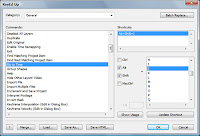 François Tarlier has a video quicktip on how to enhance your workflow with KeyED Up.
You can edit mapping of AE shortcut keys in a preference file but this script by Jeff Almasol gives you a UI to modify shortcut keys in After Effects.
For more on shortcuts in After Effects, click the tag shortcuts.
March 1, 2011
ISP 3D Stereoscopic: AE plug-in from Japan
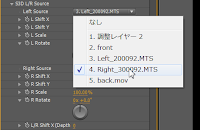 ISP 3D Stereoscopic is an After Effects plug-in (Mac/Win) from Japan that uses a 2D adjustment layer to help create stereo 3D images in a single composition. The main stereo 3D output formats are supported: Side by Side, Top and Bottom, Line by Line, Anaglyph.
Noted for the sake of completeness, this plug-in (YouTube demo) seems to be designed for use on postcards-in-space, Vanishing Point Exchange spaces, text, particles, etc.
Subscribe to:
Posts (Atom)