
ft-MarkerExporter is a new After Effect script from Francois Tarlier that "exports layer markers to a XML file which can then be reimported and applied to an existing layer, a new layer or even a new comp."

 Chris and Trish Meyer posted the 6th of the 12-part series Deeper Modes of Expression, based on an extra in their book Creating Motion Graphics with After Effects. The 6th installment is Deeper Modes of Expression, Part 6: Managing Time, Layer Numbers, Speed, and Velocity:
 Also, Eric Alba posted pictures of his vfx tracking markers, including a free PDF template.
 Eran Stern has a new Creative Cow AE podcast, Markers Leaks, an introduction to his new preset and Custom Effect which he uses to trigger actions using layer markers inside of Adobe After Effects.
 Composition markers and layer markers are used to to mark important times or to store comments and other metadata in a composition or layer. In Creative Suite they may go under different names and have different functions than the apps you know best, but markers and their metadata can be transferred between Adobe apps. For more on this, see Sharing markers with After Effects, Encore, and Flash in Adobe Premiere Help.
 XMP (Adobe, Wikipedia) data in CS4 can be used in a variety of ways: in media capture, search, and with Speech transcriptions for edit and animation timing in Premiere and After Effects (AdobeTV demo video). Also, Layers Markers shared among video apps can be converted to Cue Points to trigger events in Flash (video). A metadata workflow overview by Mark Christiansen is on Adobe.TV.
"When you render and export a composition, you can write XMP metadata to the output file that includes all of the XMP metadata from the sources for that composition. This includes all of the composition markers and layer markers in the composition, all of the XMP metadata from the source files on which the layers in the composition are based, comments from the Comments columns in the Timeline panel and Project panel, and the project-level XMP metadata for the project in which the composition is contained. XMP metadata from nested compositions is recursively processed and included in the output.
[...] In addition to storing XMP metadata in After Effects project (.aep, .aepx) files and source documents used by Adobe applications (for example, .psd), After Effects can write XMP metadata directly into the files for many container formats [like MP4] ."
Of course this aspect of metadata piques the interest Flash developers like Brooks Andrus (Yes, the h.264 Specification is Freely Available), who shares some screencams from looking at MP4 files inside the Flex Debugger in The XMP Revolution is Here:
"...using XMP extends beyond standard file info and saving a video file’s editing history. Case in point, Premiere Pro CS4 has a killer 'speech to text' transcription feature. The transcription text is stored as XMP within the video file. This allows Premiere and other tools to accurately search for this data within a file (powers the search feature inside of Premiere and Bridge). As a special bonus, Flash Player 10 provides the same data in its onXMPData callback."
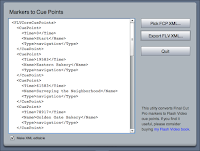 While not a problem for Premiere and AE users, Final Cut Pro markers don't work well as cue points in a Flash video file, while the UI for scrubbing and setting cues in Adobe's Flash CS3 Video Encoder is unwieldytiring of this, John Skidgel built an AIR utility to convert FCP XML to FLV XML, which you can import into Flash CS3 Video Encoder. You can pick up the app and check out the walk-through at Free AIR application: Convert Final Cut Pro Markers to Flash Video Cue Points.
 John has also made available a few more tutorials from his Focal Press book Producing Flash CS3 Video: Techniques for Video Pros and Web Designers.
