Showing posts with label templates. Show all posts

October 25, 2011

77 free color grades for AE


Unseen here, Facebook users can "like" Dropdrop.com to get the free template "Cassidy Bisher's Color Grades for AE." The package includes 77 comps; just drop in video underneath the adjustment layers + effects, or substitute a video placeholder.

Cassidy also has many After Effects tutorial videos available on Vimeo that support his AE templates at Dropdrop.com. Here's an example of his work that was liked by Particular creator Peder Norrby:

November 28, 2010

Gravity preset, Unpack Precomp script + more


@AdobeAE notes some free utilities by Jesse Toula, who has the new tutorial on Custom Shatter Maps. Among the templates and footage for sale are his Unpack Precomp script and a Gravity preset, Quick Gravity, and a separate tutorial.

[Update: didn't check to see if this was the same but Jesse Toula now has a Gravity in After Effects tutorial on Creative Cow.]

There's probably more resources in AE Help, but you can also check out a script palette that's been shipping with AE called Gravity.jsx for a bouncing ball effect. For something similar with expressions, see Dan Ebberts' Bouncing Ball example on MotionScript, and his gravity expression triggered by a marker at Creative Cow (see also Expression example: Animate scale at each layer marker):

g = 1000; // gravitational constant

if (marker.numKeys > 0 && time > marker.key(1).time){
t = time - marker.key(1).time;
y = g*t*t/2;
value + [0,y]
}else{
value
}

Update: see also Better Bouncing in After Effects on a similar preset by Ian Haigh.

November 13, 2010

'Movie Magic' template tutorial

Aharon Rabinowitz posted a Movie Magic Template Tutorial that breaks down his free Red Giant People template "Movie Magic" so you can alter the template for your own projects.

Movie Magic Template Tutorial from Aharon Rabinowitz on Vimeo.
October 7, 2010

The Expression Sampler template in AE

Andrew Devis follows up his look at Animation Presets built into After Effects with a video on Hidden Templates & Powerful Expressions:

"This video tutorial shows how to find and apply the hidden [project] templates in After Effects so that you can kick-start your work with a full project ready to edit. AND, you will learn how to apply the hidden Expressions in After Effects to your own layers to give them professional looking animations without having to know any expressions yourself!"

By the way, there are more example expressions in the Behaviors animation presets and in AE Help's Expression examples page. See also posts tagged expressions for other news and Dan Ebberts' After Effects expressions and scripting resource site MotionScript
.

October 6, 2010

3D in AE with FreeForm Enhancement Pack


Mettle, makers of DigiEffects Freeform, has a limited time offer for the FreeForm Enhancement Pack | The Mylenium Edition. You can get all 16 HD project files for $79 through Friday, October 15, 2010.

There's a render gallery and tutorials for previewing the project templates. Here's what Todd Kopriva had to say about this set (he also shared some resources on this filter from CS5):

"Chris gave me an early chance to play with these template projects, and I really enjoyed how easy it was to make 3D animations that look really cool, all inside of After Effects."

September 22, 2010

Even templates have their own tutorials

Cassidy Bisher has several After Effects tutorial videos available on Vimeo (via Lester Banks) that support his AE templates at Dropdrop.com. One cluster is a series on "spy gadgets," which looks at tracking in AE and in Mocha for After Effects, all in support of his "Top Secret" templates (example below).

For some related tutorials and background, see Designing & Compositing a HUD and posts on tracking and Mocha. See also Resources for mocha for After Effects and Motion tracking overview and resources in AE Help.

April 30, 2010

20 After Effects Template Websites

Topher Welsh has just rounded up some missing pieces of the view of the AE ecosystem with 20 After Effects Template Websites at AEtuts.

Background on templates and presets in After Effects can be found in earlier AEP posts After Effects presets & templates burgeoning and AE presets & projects round-up.

April 23, 2010

After Effects presets & templates burgeoning

Note: Don't forget that presets, tutorials, and templates are just a starting point! See "Your weakness is your strength" for community discussion on this point.

Presets and project templates for After Effects are growing rapidly in number and quality. Of course most tutorial authors offer free projects and presets. Motion Graphics Exchange leads the pack offering free collection and referrals with their attractive library, and hopefully we'll see another initiative from them soon. Additional background and free resources were listed earlier in AE presets & projects round-up.

There are at least 16 sites already selling templates and presets, just waiting for a Topher-style roundup [update: a week later Topher Welsh added 20 After Effects Template Websites].

And now, bigger entities are moving in. Red Giant Software just released 7 "Guru Preset" add-on packs for their software titles, and announced Red Giant People (later that day, more) presumably a trading post akin to the old Trapcode People website. Video Copilot also started selling presets and offers a Video Copilot Preset Network for Optical Flares.

Another entrant is the intriguing FreeForm Enhancement Pack- Mylenium Edition, created by Chris Bobotis and Lutz Albrecht (Mylenium.de). Here's a cool example from a somewhat mysterious post by Mylenium, Fun with Displacements:

ah, here... FreeForm Enhancement Pack - Mylenium Edition from mettle com on Vimeo.

July 24, 2009

AE presets & projects round-up

AETuts has a roundup by Topher Welsh outlining 25 or so Presets/Project Files to Wet Your AE Whistle, which points in directions of many more presets. Topher also has a tag for posted tutorials with presets on VisualFxTuts.
A key point was made by one reference: "Some of the files have errors in them and you cannot open them up directly. The workaround is to import that After Effects project file into an existing project file."

Of course most tutorial authors offer free projects and presets, but there are a few additional resources for projects and presets:
  • XScriptorium has a searchable database of AE scripts, expressions, presets and projects
The presets built into AE can be an undiscovered country too, like the cool Behavior Preset 'Fade Out Over Layer Below' mentioned recently by Lee Stranahan. Behavior Presets in AE are specifically discussed by Trish & Chris Meyer in Creating Motion Graphics (excerpt on Presets) and After Effects Apprentice.

For a video tutorial on working with effects, Animation Presets, & Brainstorm, check out Chris Meyer's take on CS3 at the Adobe Video Workshop, and a newer intro in After Effects Apprentice Video Tutorial #2 (Taking advantage of the Effects & Presets panel). BTW, to prevent Presets or filters (or folders of them) from loading, you can add “~” or use parentheses () on both Mac & Windows.

Also, there's a tutorial by Ko Maruyama on creating previews for AE animation presets for Bridge: Previews for AE animation presets. And of course, there's presets mentioned in AEP posts labeled presets or Animation Preset.

Update: AEP Project is a website made for Adobe After Effects Japanese users that publishes projects, presets, resources, tutorials, and many another tips. AE.Info is a similar effort from Japan. For additional resources on presets see After Effects presets & templates burgeoning.

Update: John Dickinson of Motionworks has tutorial on (mostly text) presets; see After Effects: Creating magic from presets – part 1 and part 2.

July 11, 2008

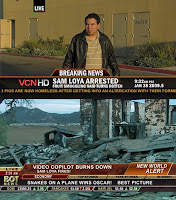
Free templates for TV news-style lower thirds


These might come in handy... Video Copilot has some free templates for TV news-style lower thirds.

This post has been expanded and updated, see Free lower thirds and tutorials: Leverage Photoshop, Premiere, and After Effects at PVC.