January 7, 2011

Spirals and After Effects

Spirals are used as design guides and elements or paths for text, shapes, and particles. Here's a few resources for using and creating spirals in After Effects and other Adobe applications.

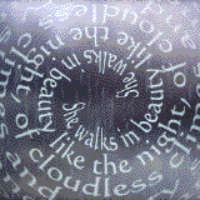
Think outside the box (or rather inside the sphere) with A 5-Part Exploration Of After Effects Spiral Filters by Brian Maffitt -- the grand daddy of spiral tutorials (pictured). This is from an era before the Path Text plug-in and the Textacy text engine!

3D Type QuickTip by Ko Maruyama presents some similar ideas, but with some new approaches available in CS3. The finished project file (tornado_3d.zip) is available. While Creating 3D Ribbon Text by David Langley looks similar, it instead relies heavily on expressions, as does How to make a Text Stream using Expressions by Joe Chao.

James Chiny offers a free Golden Ratio preset for After Effects at HYPOLY. It generates an overlay of a Golden spiral and rectangles using a Stroke effect. Be sure to check out his other downloadables, like his Ellipse Tool Plus preset (noted in Ellipse Tool Plus from Hypoly). See also Lightroom's Golden Ratio & Spiral guides, an earlier AEP post with some related resources.

Taming the Spiral at AE Portal shared a few references for creating spirals in Illustrator.

After Effects: Spiral Text by John Dickinson is a free project that "uses a simple index expression to offset the text layers and nulls to control the distribution using Expression Control sliders. This allows them to be freely distributed with one null while setting keyframes for Y-Position and Rotation with another."

Using Motion Sketch to build a Spiral Path in 3D Space by Fang Xiang does what it says.

The Wonderful World Of Shapes In After Effects at AEtuts includes some spirals.

Among many similar examples is Animated Swirls in Adobe After Effects by Steve Holmes at Layers.

Spirograph designs are a popular use of expressions; see Spiral shaped motion paths, Spirograph-style pattern generator in AE by Chris Zwar (inspired by the spirograph tutorial from Ayato), and Dan Ebberts on spirograph expressions. Along those same lines but using Particular and expressions is Generate Your Own Splendid Spirographical Designs by Christopher Kirkman on Aetuts+. Variations on spirograph patterns can also be made in After Effects with standard tools. Tutorials by Satya Meka (on AEtuts) and others were referenced in A few spirographs in After Effects.

Several projects by Tom Beddard can also be leveraged: Guilloché Patterns, Harmonograph, and especially the Pixel Bender filters Fractal Explorer and Droste Effect. Carl Larsen even has an After Effects tutorial for the Droste Effect. Omino Spindala, another free Pixel Bender filter, has spiral controls. There's even an iPad/iPhone app that creates similar graphics, Vectoria.

Ewan Smith's video for AETuts, QuickTip – Creating Circular And Spiral Motion Paths, used a light, a simple expression, and Trapcode Particular. Motion Graphics Exchange wrote out the expression for you in Creating Circular And Spiral Motion Paths.

Send A Happy 2011 New Year Card uses Trapcode Particular to create a spiral Christmas tree, on AEtuts originally Dec 30, 2009. A similar result is produced by ParkourProduction on Youtube in After Effects Tutorials-Spiral Particles. Coyote37 (Pierre Saugrain) shows how to do something that also looks similar in 03. Xmas tree with particular festival.


Peder Norrby shows you how to use Trapcode Form to make a spiral shape in Form Spiral - Quick Tutorial. Also, Mylenium provides some free spiral projects for Delirium and Form (this also) plug-ins.

Tornado Text, a video tutorial by Eran Stern, shows how to use per-character 3D text animation to animate text along a path in the shape of a 3D tornado.

There was an example tornado that shipped with a version of the CC Particle World plug-in at one point, which really boiled down to changing 2 or 3 parameters from the default. There may still be one in the demos from Cycore. It was close to what Andrew Kramer started in his Energy tutorial. SuzTV has a preset that may also get you started, Tornado preset for Particular 2 in After Effects.

Last and not least, spirals are often used to create motion aftereffects.

Update: Trapcode Sharelog posted a movie and project for Particular, Space Swirls.

2 comments:

Brian Maffitt said...

Good lord, where did you dig this up? This tutorial actually predates the 'web... I originally designed and distributed it in DocMaker, a Mac-only hypercard program, via AOL!
Kinda fun that it all still works...

Rich said...

It comes from Digital Producer, and I was happy to find it. I just noticed you said "pre-compify"!

Hey, have you considered opening the vaults on tutorials for the Atomic Power and CC plug-ins that now ship with AE?

I think they'd be popular and useful. They haven't changed that much that adding updated comments, in text or more, would be involved or even necessary.