Showing posts with label transitions. Show all posts

June 30, 2016

Red Giant Universe 2.0 - no more free lunch

You probably already heard, but...

Red Giant Universe had been a consistently-updated mix of free and subscription effects for Adobe After Effect, Premiere Pro, and related apps like Hitfilm Pro, Final Cut Pro X, and DaVinci Resolve. With the new Universe 2.0, Red Giant removed the less popular plug-ins -- and will no longer offer free tools! 

There more at PVC in Red Giant Universe 2.0: Hud, Mograph, Stylized Damage & Looks, Transitions

November 15, 2014

Whip (swish) pans in After Effects & Premiere


re-post of some tools and tutorials


A whip or swish pan describes the motion of a fast camera move, as in following a passing train or spaceship. Because of motion blur, it's most often used to smooth transitions between abrupt cuts of shots or scenes. While this is often done in post, Adobe doesn't include dedicated tools for this effect, so here are some 3rd-party filters and tutorials you can use to construct whip pan transitions in After Effects and Premiere Pro.

Read the rest in Whip (swish) pans in After Effects & Premiere at Pro Video Coalition.

Here's an example from a newer FREE tool from Red Giant Universe:


November 11, 2010

After Effects-customized transitions for NLEs

Rob Mize has a new After Effects tutorial video on how to Create Customized Transitions for editing systems like Final Cut Pro, Premiere Pro and Avid. Rob uses Auto-Trace and the "Puppet Tool to animate a bug graphic; then uses CC Particle World to duplicate and control the graphic for the transition."

May 19, 2009

Whip Pan & Transporter tutorials for AE

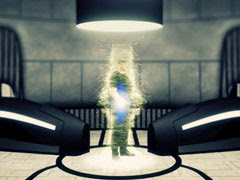
Eran Stern works with Red Giant plug-ins in a new video tutorial, Creating a Transporter Effect. There's another transporter effect tutorial, with particleIllusion via Toolfarm.


The content on whip or swish pans has been updated in Whip (swish) pans in After Effects & Premiere at Pro Video Coalition.