Yesterday Adobe announced the public beta of the Adobe Stock Contributor website, a new platform where you can sell photos, illustrations, videos, and vector graphics directly to the world’s largest creative community. By contributing to Adobe Stock, you can showcase your work to millions of creatives right inside Creative Cloud apps. The platform is fully functional but still in beta, so feedback is welcome through the Adobe Stock Contributor forum.
One major new feature is auto-keywording, a time-saving feature that uses machine learning to automatically generate the first five keywords of each image you submit. It’ll be interesting to see if this technology can generate emotional keywords like “joy” that could help worthy content to stand out from the crowd.
Adobe has integrated Stock contributor submission directly within Creative Cloud applications, though it’s not required. During the beta phase, you’ll have the ability to upload images to Adobe Stock directly from Lightroom CC and Bridge CC, which were also just updated and released. Adobe plans to open submissions to more content types in additional CC applications soon.
There’s a 33% commission for photos and vector art, and a 35% commission for videos, “based on the price of the image.” A payout request via Paypal or Skrill is available when you have reach $50 (or Euros) in royalties (allow 7 days for payment). Check out Adobe Stock itself for info on the range of pricing.
You can visit the Adobe Stock HelpX page for general information. See also a tutorial on how to search, download, and license royalty-free video footage from Adobe Stock via the Creative Cloud Libraries panel inside Premiere Pro CC and After Effects CC.
Here's an Adobe Stock Contributor Spotlight sharing one contributor's experience:
Showing posts with label Creative Cloud. Show all posts
September 21, 2016
June 30, 2016
Creative Cloud video June 2016 aka 2015.3
Adobe has released a new version of its Creative Cloud video and audio tools, dubbed Creative Cloud 2015.3 (not Creative Cloud 2016). Here’s a handy roundup of summary info, links to more, and videos from Adobe and 3rd party reviewers & trainers.
You probably should choose to deselect “Remove Old Versions” in the Creative Cloud app (in Advanced Options when you click Install), in case you run into an unworkable bug situation.
And migrating plug-ins between versions can be a problem too, depending on plug-in tech used, but copying the old folder over to the new version plug-in folder often works fine. Just be sure to copy the folder before you uninstall the old version, or check leave preferences.
April 9, 2015
Next Adobe Creative Cloud video tools at NAB 2015
At NAB 2015 next week, Adobe plans to preview the latest features coming to Creative Cloud pro video apps. A webcast from the NAB 2015 show floor on April 16 is also planned. The webcast will provide a chance to see highlights of the release and chat in real-time with presenter Jason Levine and #TeamAdobe.
Read the rest at Pro Video Coalition...
![]() |
| Project Candy creates a Look from the colors of an image. |
October 6, 2014
Creative Cloud updates and iOS mobile apps
Today at Adobe MAX 2014, Adobe unveiled a new family of iOS mobile apps and enhanced Creative Cloud desktop tools that enable creatives to access, use and create from anywhere. Details on what's available today is noted at PVC in New Creative Cloud and mobile apps at MAX 2014.
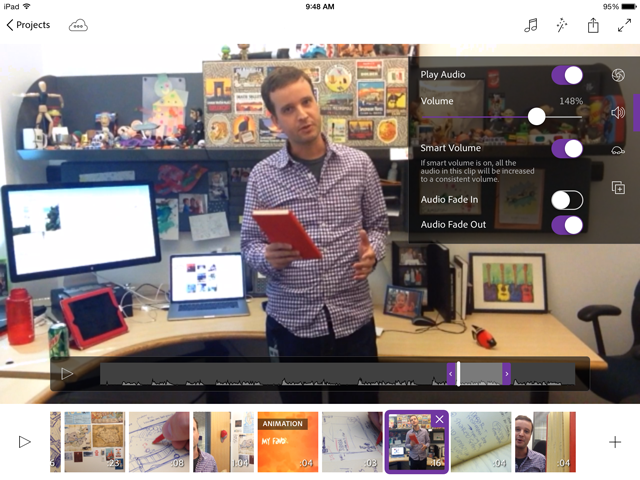
The new iOS app Adobe Premiere Clip is pictured below. You can check out an example, of a demo of Project Animal, AE-related tech in general pre-release.
April 4, 2014
Behind the Scenes of ‘Adobe and the Frog’
Film Riot and Adobe have a slick little web ad for the new Creative Cloud NAB 2014
reveal. It was edited in Premiere CC, with the CG character rendered in
After Effects CC using Element 3D, and color graded using Magic Bullet
Looks.
Details at Pro Video Coalition.
April 2, 2014
Sneak peeks of CC Next for NAB
Adobe revealed new features in the video apps in Creative Cloud and will showcase these next versions at the NAB 2014 show in Las Vegas next week (schedule). Highlights of the reveal features, additional details, videos, and links to product pages, team blogs, and 3rd-party previews are at PVC:
Creative Cloud NAB 2014 Reveal: Sneak peeks of what's coming
January 16, 2014
October 15, 2013
September 25, 2013
Audio standards and Adobe Loudness Radar
Audio standards and Adobe Loudness Radar at PVC follows up on a recent PVC article with additional background and tutorial links on a new tool in Adobe Creative Cloud.
September 11, 2013
September 8, 2013
Creative Cloud October update: over 150 new video features
...summarizes and collects information on the impressive update (PDF), from Adobe mainly. Check out the Motionworks video too. Read the rest at PVC in Creative Cloud October update - over 150 new video features.
Almost lost in the hoopla by me: the update to Photoshop CC to version 14.1, which includes Adobe Generator to extract image assets out of a Photoshop document.
July 11, 2013
Premiere Pro CC: 25 new features + bug fixes
Adobe announced 25 new updates to Premiere Pro CC, update 7.01, available less than a month after the initial release. These updates were developed in response to customer feedback and include new features that are designed around making repeated tasks easier and faster in timeline editing, viewing, navigation and media management. The update is recommended for all users and includes a number of bug fixes (including a multi-cam bug).
It's available as a download, if the Adobe CC app isn't updating. There's links and more at PVC: Premiere Pro CC: 25 new features + bug fixes.
June 18, 2013
Subscribe to:
Posts (Atom)