Mamoworld, home of Mathias Möhl and friends, has published a new quick tip tutorial (embedded below), Modifying Keyframes with KeyTweak. Mathias says that KeyTweak is a must-have when working with hundreds of keyframes, like in his stabilize motion tutorial. The new version is easier to use -- you can push around keyframes in the work area just using the Arrow buttons.
Mathias explains:
Although the new version of KeyTweak was published last December, I didn't have a tutorial about its new features (the new "local mode"), hence almost nobody discovered its potential so far. While the old version of KeyTweak (consisting only of the "global mode" of the new KeytTweak) had a somewhat confusing workflow (you needed to duplicate a property, delete all keyframes in it that you want KeyTweak to take care of etc), the new local mode is much more intuitive.
With a set of arrow buttons you just move around all keyframes in the work area, and also fade in/out those changes if you like. The old "global mode" remains still useful for properties that are not 2D, like transparency (local mode works only with 2d properties and mask shapes).
Showing posts sorted by date for query mathias. Sort by relevance Show all posts
Showing posts sorted by date for query mathias. Sort by relevance Show all posts
March 21, 2011

January 27, 2011
ExpressionTimeline: script to modify expressions
AE Scripts and Mamoworld now offer ExpressionTimeline, a new After Effects script that lets you combine and modify expressions without editing the code itself. This script makes it easier to:
- make expressions be active only for a certain period of time
- add more than one expression to a property
- fade expressions in and out smoothly
- transition smoothly from one expression to the next one
December 24, 2010
Leak object removal tutorial
Mathias Möhl of Mamoworld is full of cheer, seeing a growing market in leak object removal (spurred by Wikileaks) in his Tutorial: WikiLeak Removal, which shows you how to:Stephen Colbert had a fun comment in December 15 show opening: "TIME's person of the year is Mark Zuckerberg. Sorry Julian Assange, I guess you didn't violate enough peoples' privacy." For some background, see Is What WikiLeaks Does Journalism? Good Question at GigaOM. [update: the NYT added interesting points aside from any politics in Banks and Wikileaks, and CBS News posted How WikiLeaks Enlightened Us in 2010 by Joshua Norman.]
- Verify the leak
- Track the leak with Mocha
- Remove the leak with After Effects
For more info on object removal in AE, see Roto: removing unwanted objects, Rotoscoping tips, and other posts tagged roto. Here's Mathias:
December 15, 2010
Stabilize motion without zoom
Mathias Möhl has a new After Effects tutorial video (and project) on his Mamoworld website, Stabilize Motion Without the Need to Zoom, which reconstructs missing parts of the image from other frames (with the freedom to tweak and adjust not found in one-click solutions):
Things to learn in this After Effects tutorial:
A comment on the tutorial mentions an alternate method using the Echo effect to reconstruct missing areas; another option for minor adjustments is the YY_MorphShake plug-in by Andrew Yang, which stretches the edges of the layer to fill in empty spaces. See also Content-Aware Fill for clean plates + extending edges at AE Portal.
"In this tutorial you learn how to stabilize a shaky shot with the Mocha tracker and the MochaImport script. After stabilization, you usually need to zoom in a bit to get rid of empty areas that show up at the borders of the image. Instead of this, we use a clever technique to fill the missing parts at the borders such that there is no need for zooming any more. The technique uses frames before and after the current frame to fill in parts of the image that are missing in the current frame. Sounds complicated but works very well and is done with a few clicks using MochaImport.
Things to learn in this After Effects tutorial:
- Learn how to track in Mocha (I use Mocha Pro, but it also works with any other variant)
- Learn how to stabilize a shot with the MochaImport script.
- Learn how to smooth the camera movement with a simple expression.
- Learn how to fill in missing parts at the borders of the stabilized footage by inserting appropriate material from the frames before and after the current point in time."
A comment on the tutorial mentions an alternate method using the Echo effect to reconstruct missing areas; another option for minor adjustments is the YY_MorphShake plug-in by Andrew Yang, which stretches the edges of the layer to fill in empty spaces. See also Content-Aware Fill for clean plates + extending edges at AE Portal.
Here's Mathias:
November 30, 2010
Mamoworld: a new After Effects resource

Mamoworld is a new After Effects resource with free video tutorials and scripts by Mathias Möhl, who is already known for his AE scripts and tutorials on his previous blog AE Extensions and on AE Scripts (see previous AEP notes). The new site has 4 fresh tutorials and some older ones.
Mathias also provides new versions of his AE scripts on the new site. All scripts have both a German and an English user interface. The MochaImport interface has been updated with intuitive new features, for example with a way to work with a stabilized version of the footage in a precomp so that all changes performed there are automatically applied also to the original unstabilized one. This feature is also available for corner pin tracks without needing a third-party plug-in. Those that know Tracker2Mask, KeyTweak, and Chameleon (for color swatches) may want to take a look at their new features too.
Scripts aren't meant for scripting gurus, so duck in! By the way, see comments by Mathias on the various strengths of approaches to tracking in AE in Building an Airport Scene with MochaImport [updated].
Here's one of the new tutorials:
October 1, 2010
Color swatches in After Effects
 Update: Synthetic Aperture has since updated their software a few times, and AEScripts.com has a color swatch panel now.
An AE-List thread today explored options for color swatches in After Effects. Currently there's no filter for CS5 for this. The old Buena filter SwatchBuckler is gone, and the UI-heavy Synthetic Aperture Test Gear (pictured) isn't quite ready for 64-bit CS5.
Todd Kopriva and others had several suggestions, including several options for using Kuler, all listed in Select a color or edit a gradient in AE Help:
- Adobe provides the "Swatch You Want" script in a package of scripts for After Effects on After Effects Exchange. The Swatch You Want script imports and converts Adobe Swatch Exchange (.ase) files.
- Mathias Möhl provides a script, Chameleon – Adobe Kuler Color Theme Browser, at AE Scripts. He also provides a tutorial on AEtuts that demonstrates how to use Kuler with After Effects.
- Jorrit Schulte also provides a tutorial on the AEtuts that demonstrates how to make an animation preset for importing and working with Kuler color swatches.
- Jerzy Drozda, Jr. (Maltaannon) provides a video tutorial (and example project), Kuler Workflow, that shows how to copy and paste from the Adobe Kuler desktop application to bring color swatches into AE.
- The Mac system color picker plug-in Mondrianum let's you access Kuler swatches.
It seems like this may also be a job for Pixel Bender some day.
Update: colorLibrary from AEScripts.com helps you create, manage, and share color swatches with their UI script panel.
February 10, 2010
Rotoscoping tips
 Via Joost van der Hoeven is 6 great rotoscoping tips from Imagineer Systems by TheBlackbox.org:
- There is no such thing as a perfect matte. Rotoscoping is an art form that takes into account the background image, the movement of the object, and the new elements to be composited in the background.
- Try to start your shape at its most complex point in time, where it will need the most control points.
- Break a complex shape into multiple simple shapes. If you are rotoscoping a humanoid form and an arm becomes visible, consider rotoscoping the arm as its own element, rather than adding extra points on the body that will serve no purpose when the arm is obscured.
- Imagine you are the animator who created the shot. What would your dope sheet look like? No matter the medium, whether CG, live action or otherwise, most movements are rarely linear. They normally move in arcs; they normally accelerate in and out of stopped positions. Try and understand the mechanics behind how things are moving in your shot. This will help you to minimize keyframes.
- Watch and study the shot before you start working. Where are the changes in directions? These will normally have keyframes. Where are the starts and stops? Are there camera moves that can be stabilized to make your work easier?
- Don’t be afraid to trash your work and start over. Beginning roto artists often make the mistake of trying to fix a flawed approach by adding more and more keyframes. Experienced roto artists learn to quickly identify an inferior approach and are unashamed to trash their work and start over, often many, many times. It is very difficult to get a good matte without a conscious effort to keep the keyframes to a minimum.
 Rotoscoping, roto for short, has been more fully explained by Matt Silverman of Commotion Complete fame in The Art of Roto at Fxguide [updated 2011] and by Commotion's creator and ILM alumni Scott Squires in blog posts and movies at his Effects Corner blog. More recently, Fxguide's The Art of Wire Removal covered some of the same ground.
And from the same talent pool is a handy summary of tips in Confessions of a Roto Artist: Three Rules For Better Mattes (PDF) by Scott Stewart (now a movie director), who did the roto tape for the out-of-print Masters of Visual Effects:
 While still missing key features, there's plenty of rotoscoping done in AE, and many good After Effects tutorials. Sean Kennedy takes you through Rotoscoping Tools in After Effects, and Pete O'Connell (now found under Nuke) has a tutorial movie Rotoscoping in AE and a DVD, Advanced Rotoscoping Techniques for Adobe After Effects, at Creative Cow. Also, there are several tutorials involving rotoscoping with Imagineer Mocha & Mocha Shape, some noted in AEP's More mocha tracking & roto, as well as several by Mathias Möhl using his AE script MochaImport. Digital Tutors has a course for CS4 too, Rotoscoping Techniques in After Effects.
Todd Kopriva has a few more tips (from Pete O'Connell) in his Rotoscoping in After Effects and in After Effects Help. And of course there were previous posts here at AEP, tagged roto.
Update: The Art of Roto: 2011 by Mike Seymour at Fxguide is a super update to previous surveys of rotoscoping. It includes an interview with Scott Squires, who created Commotion (a desktop roto/paint/com tool) while at ILM.
December 11, 2009
More mocha tracking & roto
 A recent thread on the AE-List and an interview with Ross Shain at Motionworks reminds one that options for tracking and roto in After Effects can be a bit complicated.
While not simple, the 3rd party workflow from Imagineer Systems offers accuracy & more features, with mocha AE version 2 (version 1 was bundled with AE CS4) and a newer plug-in mocha shape for After Effects. Both are discounted this month along with many other digital media tools. Mocha for After Effects v2 adds:
- Exports of any resolution, per-point variable edge width roto shape data in the mocha shape format
- Allows users to export tracking data as After Effects Corner Pin with motion blur
Additional functionality and ease of use is offered by an After Effects script called MochaImport (streamlining the connection to CC Power Pin and Red Giant Warp), which is available at the price you name at AE Scripts. The script's creator, Mathias Möhl, has also provided several more training videos (see especially MochaImport 2.0 - New Features), which have been mentioned in previous AEP posts on mochaAE. Also, his post Mocha and Perspective Distortion clarified some confusion over tracking perspective distortion.
 Of course tracking and roto doesn't require 3rd party tools (Mocha, RE:Vision Effects PV Feather, etc.), and there's plenty of training around.
Plus there are several scripts to ease workflow issues, like TrackerViz, Tracker2Mask, and KeyTweak -- all available through AE Scripts. For an overview of appropriate uses of Mocha and the scripts, see comments (excerpts) by Mathias Möhl on his blog.
October 5, 2009
New AE scripts: SpellCheck & Chameleon (Kuler color themes)
 SpellCheck is a new AE script from Michael Cardeiro on AEScripts.com, which "goes through the currently selected composition, and any precomp contained within and checks every text layer for proper spelling."

Another new script on AE Scripts is Chameleon from Mathias Möhl. Chameleon lets you work with color themes from Adobe kuler in 3 ways:
- "Load color themes in After Effects either from color themes downloaded at the kuler website or via cut and paste from the kuler desktop application
- Apply any loaded color theme to your comp with just one click
- Dynamically link any color property within your comp to a color theme color. Once you load a new color theme, all linked color properties in your comp update accordingly."
Update: See the previous AEP post Palettes and Reusing Colors on his blog. Also, Mathias reminds us:
"If you work with kuler, the following tools might also be useful for you. The script Swatch you want from Jeff Almasol allows to load a single ase file in After Effects and Maltaannon has published an AE project file that allows to import color themes from Kuler desktop to After Effects. Both approaches are more lightweight and basic than Chameleon since they just allows you to pick the colors from the loaded theme manually."
August 25, 2009
Building an Airport Scene with MochaImport [updated]
 Mathias Möhl has 2 tutorials on Red Giant TV, showing how to building an airport scene and rotoscope a car (Part 1: Backplate & Part 2: Compositing). He uses his own script MochaImport, and RGS filters, so you get a discount on Magic Bullet Looks and Red Giant Warp.
You can watch the tutorials on iTunes or at RGTV, but here's a brief on the script:
Mocha Import explained in 3 Minutes from Mathias Möhl on Vimeo.
Update: Mathias briefly clarified the strengths of approaches to tracking in AE in comments on his blog:
I personally use Mocha + MochaImport now for almost all tracking tasks, since tracking is more easy, robust and acurate with Mocha than with the buildin AE tracker. However, if you want to avoid the overhead in the workflow (switching to a separate application for tracking, importing the footage there and so on) and track in directly in AE, both TrackerViz and Tracker2Mask are your best friends.
use *MochaImport*
for all kinds of tracking tasks you want to do with Mocha, including corner pinning, stabilization tasks, rotoscoping tasks (as I will show in the second part of the creative Cow tut) and for compositing of moving stuff (with the stabilize precomp and RG undistort precomp functions). For rotoscoping, the mocha Shape plugin is a good alternative.
use *Tracker2Mask*
for just one specific task: tracker-assisted rotoscoping. Before you start keyframing masks for hours, track a few points and let Tracker2Mask assist you in the keyframing process. Use it in combination with KeyTweak.
use Nab's *TrackerViz*
if you need the buildin AE tracker for anything else than rotoscoping. In particular handy is the function to average tracks which makes out of a bunch of good but not perfect tracks one rock-solid track.
use *KeyTweak*
to correct drifting tracks (if the drifting was not eliminated by averaging with TrackerViz) and to continue tracks of points that leave the screen (see my Postcard Tutorial for details).
Update 2: in his post, Mocha and Perspective Distortion, Mathias clarified some confusion:
"Both my Mocha Import explained in 3 Minutes video and my tutorial on Red Giant TV have caused some confusion concerning the question whether Mocha can track perspective distortion and in what cases Red Giant Warp is needed in addition. So here are the facts:
(1) Mocha AE can track perspective distortion, even without Red Giant Warp. This happens if you enable the shear and perspective options.
(2) If you tracked perspective distortion with Mocha, it only ends up in After Effects if you use the corner pin data from MochaAE and not the transform data.
Now, if you want to use the MochaImport script to create a stabilized precomp, you have two options: Either you do it with transform data, or you do it with Red Giant Warp and corner pin data. Hence, point (2) implies that
(3) If you want to create a stabilized precomp with MochaImport, you only get the perspective distortion with Red Giant Warp .
(4) If you just want to do a corner pin or want to use the Mocha Shape plugin, you get perspective distortion and don't need Red Giant Warp.
Take home message:
If you track with shear/perspective enabled, don't use the transform data to get the track into After Effects.
One question is left, I guess:
What if you have to use transform data for your task and have a clip with perspective distortion (e.g. if you want a stabilized precomp but don't have RG warp)?
Then do the track whithout shear and perspective enabled. The resulting track will not be as good as with shear and perspective enabled, but at least no shear/perspective information is thrown away during the export to transform data. Hence you will get in total a better result (but don't expect miracles - with shear/perspective enabled and corner pin data or the shape plugin the results will be much better)."
August 6, 2009
Creating a Tracked Head Wound
 Mathias Mohl has a new video tutorial on AETuts, Creating a Tracked Head Wound:
"In this tutorial Mathias shows that corner pin tracking can do much more than just replacing some pictures on a wall. We are going to compose a wound on a moving head and use the Mocha tracker in combination with his script MochaImport. Trust me, this is so much easier then creating a real head wound!"
Creating a wound with make-up might be easier for some -- see Indy Mogul for techniques. Mathis' scripts MochaImport, KeyTweak, and Tracker2Mask were mentioned previously in AEP posts Mocha Tutorials by Mathias Möhl and AE scripts MochaImport & Final Cut 2 After Effects.
August 2, 2009
AEScripts expands
 AEScripts.com is getting a face-lift and expansion that adds several top scripting authors and a shopping cart for purchases.
The only script not free is the new After Effects script Immigration. The idea is to make it easier for people to donate to script authors, and to aggregate top scripts in one place where you can donate to many authors at once with one purchase. When you add a script to the cart it puts in a suggested amount which can be edited down if desired. Bringing scripts to one place where they have been screened for quality will hopefully improve the whole experience of using scripts.
"AEScripts is a repository and marketplace of high-end scripts for Adobe After Effects. Scripts help enhance and automate otherwise tedious functions. They can also help improve workflows and provide automated operations. You will find scripts from the following top scripts writers from around the globe [links added]:
- Lloyd Alvarez (aescripts)
- Mathias Möhl
- NAB
- Paul Tuersley
- Jeff Almasol (redefinery)
- Sébasten Perier
July 21, 2009
Mocha Tutorials by Mathias Möhl
Via Jack Tunnicliffe on the AE-List is a brief introduction from Mathias Möhl on the basics of his AE script MochaImport, which simplifies the work with Mocha for After Effects. You can get more info, tutorials, and scripts at AExtensions.
Mathias also has 2 scripts for tracking and masks that could be used in combination with the TrackerViz script; see KeyTweak and Tracker2Mask: scripts with tutorials. If you like his work, please give Mathias a donation or tip to keep this sort of work coming. Be prepared you adjust your volume.
Mathias also has 2 scripts for tracking and masks that could be used in combination with the TrackerViz script; see KeyTweak and Tracker2Mask: scripts with tutorials. If you like his work, please give Mathias a donation or tip to keep this sort of work coming. Be prepared you adjust your volume.
Mocha Import explained in 3 Minutes from Mathias Möhl on Vimeo.
May 27, 2009
AE scripts MochaImport & Final Cut 2 After Effects XML
Via Sébastien Périer are 2 new scripts for After Effects: MochaImport from Mathias Möhl and the Final Cut 2 After Effects Script from Popcorn Island.
Mathias Möhl is the mind behind the Tracker2Mask & KeyTweak scripts (AEP backgrounder post). He doesn't post frequently to his blog AExtensions but his posts do present deep new features and include video tutorials. The latest script is MochaImport, which helps you apply the Mocha tracking data in After Effects in several ways. Here's tasks that can be done as one click operations, and the video tutorial:
 There's also a not too recent script, Final Cut 2 After Effects Script from Popcorn Island, which is another partial workaround to avoid the cost of Automatic Duck. The script -- designed for CS3 -- presents "a simple way to move sequences in Final Cut into Compositions in After Effects. Not only does it allow you to work faster, it also saves storage space. The normal work flow of rendering out from Final Cut and opening in After Effects causes one to create temporary files to pass back and forth between the programs. The Final Cut 2 After Effects script will allow you to bypass that and simply use the footage that has already been imported into Final Cut." The current version supports:
Update: Support for transfers using Premiere are in the Adobe Help doc Importing XML project files from Final Cut Pro and in the Tech Note, File Import Failure when you import a Final Cut Pro XML project into Premiere Pro CS4 (Windows), although there may be other issues involving alphas, pixel aspect ratios, or speed changes.
Mathias Möhl is the mind behind the Tracker2Mask & KeyTweak scripts (AEP backgrounder post). He doesn't post frequently to his blog AExtensions but his posts do present deep new features and include video tutorials. The latest script is MochaImport, which helps you apply the Mocha tracking data in After Effects in several ways. Here's tasks that can be done as one click operations, and the video tutorial:
- create corner pin
- create CC power pin
- create AE trackpoints from Mocha track
- stabilize footage
- move layers according to track
- create a precomp in which the footage is stabilized while maintaining the movement in the original composition.
There's also a not too recent script, Final Cut 2 After Effects Script from Popcorn Island, which is another partial workaround to avoid the cost of Automatic Duck. The script -- designed for CS3 -- presents "a simple way to move sequences in Final Cut into Compositions in After Effects. Not only does it allow you to work faster, it also saves storage space. The normal work flow of rendering out from Final Cut and opening in After Effects causes one to create temporary files to pass back and forth between the programs. The Final Cut 2 After Effects script will allow you to bypass that and simply use the footage that has already been imported into Final Cut." The current version supports:- Basic Editing Translation
- Segmented Clips
- Basic Keyframes
- Time Remapping
- Nested Sequences
- Multiple Frame Rates and Aspect Ratios
- Audio Channels
- Name Length Error Checking
- Support for PAL25 and 60
Update: Support for transfers using Premiere are in the Adobe Help doc Importing XML project files from Final Cut Pro and in the Tech Note, File Import Failure when you import a Final Cut Pro XML project into Premiere Pro CS4 (Windows), although there may be other issues involving alphas, pixel aspect ratios, or speed changes.
January 14, 2009
Premiere & CamStudio solution +screen capture

Premiere Pro doesn't interpret the alpha of the CamStudio 2.0 screen capture codec well. CamStudio is a free screen capture tool; the codec is a recent update. Joseph Labrecque has a solution beyond transcoding in After Effects -- the LZOCodec works with Premiere CS3 once you disable the alpha channel. The LZOCodec can be found at http://usuarios.lycos.es/lzocodec/.
By the way CamStudio seems to perform better than Microsoft's free Windows Media Encoder 9 and of course is far cheaper than Camtasia. Sean Kennedy prefers Easy Video Capture, which can be found among his list of screen recorders for Windows.
On the Mac, it seems that Snapz Pro has competition from cheaper and more recent apps like iShowU, Screenflick, and Screenflow. Plus there's Mouseposé for cursors highlighting, overlays of keystrokes, etc., and a new Mac utility Layers, which captures windows as layers in a Photoshop file.
Update: A roundup of apps and browser tools can be found at Screen Capture Tools: 40+ Free Tools and Techniques.
Update 2: Here's another roundup of Window tools from April 2010 35 Irresistible Free and Commercial Screen Recording Tools.
January 9, 2009
KeyTweak and Tracker2Mask: scripts with tutorials
An earlier post mentioned TrackerViz, a free script to work with tracking data that lets you animate masks using expressions and "average tracks together, correct drifting tracks, use averaged tracks to calculate rotation and scale, and it's the simplest, easiest way to apply tracking data to mask vertices EVER for After Effects!"
Now Mathias Möhl adds 2 scripts for tracking and masks, which can be used in combination with TrackerViz: KeyTweak and Tracker2Mask. There are also videos explaining them; here they have fullscreen controls, but you can get the HD versions if you watch at Vimeo.
Tracker2Mask allows for local modifications of masks and computes the movement of mask shapes based on the movement of track points so you won't need one track point for each mask point. An earlier tutorial explains the basics and shows how to animate speech bubbles. The 2nd tutorial shows how to rotoscope the shape of a moving car based on only four track points, though for simpler shapes often one track point is sufficient:
The other script by Mathias, KeyTweak, lets you quickly modify any keyframed property. You can modify a few keyframes by hand and KeyTweak will modify the keyframes in-between accordingly, to help modify drifting tracks, correct rotoscoping errors, or make non-uniform mask expansions. Like ones made using TrackerViz and Tracker2Mask. Here's the tutorial:
In a similar vein, recent videos by Aharon Rabinowitz might come in handy: Super Tight Junk Mattes (using Auto-Trace to refine garbage mattes) and RGTV Episode 4: Better Compositing Techniques (which leverages convenient Red Giant filters).
Update: Responding to a roto question Patrick Siemer and Chris Meyer mentioned these scripts later the same day on the AE-List, and pointed to further discussion and comparison on the AE Enhancers script forum; see Tracker2Mask: new tracker-assisted rotoscoping tool.
November 8, 2007
Light graffiti in AE
 Over at Creative Cow Aharon Rabinowitz has a video that gets you started in using "AE to simulate the popular light writing effect seen in recent Sprint commercials." "Light graffiti" got way more popular since PIPS:lab debuted in the late '90s or so -- especially with those Sprint commercials (more) which also seem to end with Trapcode Particular whisps of light. As Aharon says you don't need to use actual lights (like PIPS:lab or MAKE), you can just write-on, wiggle, and glow with or without something to track.
Andrew Kramer posted somewhat related tutorials, 33. Graffiti Writing and a light streaks technique with Trapcode Particular at Creative Cow some time ago.
 Light graffiti was also featured in the book Urban Calligraphy and Beyond and in recent articles like MAKE: Blog: Light graffiti, Painting with Light, Interview with LICHTFAKTOR: Light Graffiti Artists, and Architectural Light Graffiti: Projection Bombing Images on Urban Surfaces.
Update: Light Writing - Part 2 is up at Creative Cow.
August 25, 2007
Expressions & Scripting Resources for After Effects
Update: There's a new resource summary on PVC, Using and creating After Effects scripts.
Expressions are scripts, but not in the AE world, where scripts are supposed to refer to AE scripts as in the article above. Unfortunately, this cobbled list isn't always clear; note that the leading lights are good resources for both.
 Earlier, Todd Kopriva outlined scripting changes in After Effects CS6, plus a new scripting guide. And Jeff Almosul and Todd Kopriva detailed the Scripting changes in After Effects CS5 at Todd's Blog. See also AE CS5 Help on Scripts and Expressions.
 Jeff Almasol is gradually updating his redefinery scripts so they can be updated to work as dockable panels in CS3. These will include the DV Rebel Tools and ones for Mark Christiansen’s Studio Techniques book.
There's enough AE scripts and expressions floating around to make my head swim, and many of them have gestated at AE Enhancers, the uberforum for scripts, expressions, and presets. Many script and expressions can be freely used, distribute or modified. Here's a quick summary of scripting resources mostly mentioned in AEP posts tagged Pixel Bender, Expressions or Scripting...
 Motionscript by Dan Ebberts has both introductory and advanced stuff. It's a project-based resource for After Effects scripting and expressions (and there is a difference; for the user scripts are push button affairs). JJ Gifford's basic Expressions in After Effects is old but still attractive.
The Help system is a good resource; see the online version, Adobe AE LiveDocs, which has expressions help and examples. Adobe is offering a scripting guide for AE 8/CS3 at the Developer Center; see Todd Kopriva's outline of changes. See also the AE Help pages on Scripts and on Expressions. You can ask direct questions at the Adobe AE scripting forum.
 Other expression training can be found in books like Creating Motion Graphics With After Effects by Trish & Chris Meyer (Dan Ebberts likes the big bonus chapter on the DVD and contributes his own Scripting Overview chapter). They're also adding a 12-part series Deeper Modes of Expression on PVC, based on an extra in their book.
Lloyd Alvarez has an often-updated collection of scripts for AE, including BG Renderer CS3, at his domain AE Scripts that later expanded to add top scripting authors and a shopping cart for downloads. Most scripts are still free but the cart makes tipping easier. See also Lloyd Alvarez's AENY presentation on AE scripting. In 2009-2010, Lloyd had an ongoing course at fxphd, an Introduction to After Effects Scripting.
 redefinery from Jeff Almasol has a great script library along 'AE Scripting' fundamentals. Jeff Almasol is gradually updating his scripts so they can be updated to work as dockable panels in AE CS3. These will include the DV Rebel Tools and ones for Mark Christiansen’s Studio Techniques book.
XScriptorium, a new AE scripting resource, was launched in August 2008, and has been testing a revised interface at http://v2.xscriptorium.com. It's joined by a similar new website, After Effects Expressions Reference or AEER. Both aim to help organize and present the vast array of available scripts and expressions.
But wait there's more:
Update: Create Digital Motion posted Edit Ninja: Super Fast Video Sampling Workflow with After Effects Scripting. Here's a snippet: "Like to cut up and sample video? Sick of all that time-consuming scrubbing, slicing and rearranging in Vegas or Premiere? Well I’ve figured out a workflow using a collection of After Effects scripts which turns lots of tedious editing into a very quick process to output a series of video clips for your VJing pleasure. This technique uses the following After Effects scripts:
AEScripts‘ “Magnum - the Edit Detector”
Reverse Selected Layer Order
Precomp to Layer Duration
Redefinery’s RenderLayers, and ScriptLauncher, to speed things up even further."
Update: from the aether... Jonas Hummelstrand noted scripts which provide "needed-every-day-functionality:"
-- Lloyd Alvarez scripts "Zorro," "Throttler" and "BG Render"
-- Jeff Almosal scripts "KeyedUp," "ScriptsLauncher," "Statesman," and "CompositionSetter"
-- Dale Bradshaw’s & Paul Tuersley's camera rigging script
-- Dale Bradshaw’s Lower-thirds-generator
-- Paul Tuersley's TrackerViz
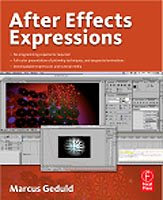 Update (December 2008): After Effects Expressions by Marcus Geduld is a new book on expressions in AE from Focal Press. As noted by Todd Kopriva, Focal Press have made a couple of excerpts of this book available for free. There's also a review of the book by Steve Douglas on Ken Stone's FCP, and you can see the author in action on at least 2 training videos; check out videos Making key frames loop in After Effects and The "wiggle" expression in After Effects.
Update: Todd Kopriva is updating the scripting guide for CS4, and posted a crib sheet with the new and changed items on his blog.
Update: Dr. WooHoo is involved with Flash panel and ExtendScript connections with AIR apps and CS4; see New SwitchBoard and PatchPanel tutorials…
Info on Adobe image processing archtecture and new plug-in format in CS4 can be found in previous articles on Pixel Bender, and at Kevin Goldsmith's blog.
Update: In Programmatic Animations in AE with Expressions & Scripting, Michael Coleman and Dan Ebberts (fullscreen) show tips and tricks with Scripting and Expressions in CS4. The parts on the video metadata pipeline were covered more full by Dan Ebberts in an article posted in early 2009 at Adobe, XMP metadata in Creative Suite 4 Production Premium.
Update: Sébastien Périer (Sebastien Perier for Google) has compiled a Top 10 list of After Effects workflow enhancing scripts, ones that he uses the most on a project basis. He also notes AE scripts and websites like AEER, or After Effects Expressions Reference and Final Cut 2 After Effects.
Update: AExtensions is a blog by Mathias Möhl (Mohl for Google), the mind behind the Tracker2Mask, KeyTweak, (AEP backgrounder post) and MochaImport scripts. He doesn't post frequently but posts present deep new features and include video tutorials.
Update: Satya Meka posted the tutorial Intro to Pixel Bender for Non-Programmers, and he likes the math explanations at BetterExplained.
Update: AEtuts started a video series by Frederik Steinmetz, Introduction To Writing Scripts For AE.
Expressions are scripts, but not in the AE world, where scripts are supposed to refer to AE scripts as in the article above. Unfortunately, this cobbled list isn't always clear; note that the leading lights are good resources for both.
.........................................................................................
Earlier, Todd Kopriva outlined scripting changes in After Effects CS6, plus a new scripting guide. And Jeff Almosul and Todd Kopriva detailed the Scripting changes in After Effects CS5 at Todd's Blog. See also AE CS5 Help on Scripts and Expressions.Jeff Almasol is gradually updating his redefinery scripts so they can be updated to work as dockable panels in CS3. These will include the DV Rebel Tools and ones for Mark Christiansen’s Studio Techniques book.There's enough AE scripts and expressions floating around to make my head swim, and many of them have gestated at AE Enhancers, the uberforum for scripts, expressions, and presets. Many script and expressions can be freely used, distribute or modified. Here's a quick summary of scripting resources mostly mentioned in AEP posts tagged Pixel Bender, Expressions or Scripting...
Expressions & Scripting Resources for After Effects
Training and scripts can be found at:
Motionscript by Dan Ebberts has both introductory and advanced stuff. It's a project-based resource for After Effects scripting and expressions (and there is a difference; for the user scripts are push button affairs). JJ Gifford's basic Expressions in After Effects is old but still attractive.The Help system is a good resource; see the online version, Adobe AE LiveDocs, which has expressions help and examples. Adobe is offering a scripting guide for AE 8/CS3 at the Developer Center; see Todd Kopriva's outline of changes. See also the AE Help pages on Scripts and on Expressions. You can ask direct questions at the Adobe AE scripting forum.
Other expression training can be found in books like Creating Motion Graphics With After Effects by Trish & Chris Meyer (Dan Ebberts likes the big bonus chapter on the DVD and contributes his own Scripting Overview chapter). They're also adding a 12-part series Deeper Modes of Expression on PVC, based on an extra in their book.
See also The DV Rebel Guide, as well as in video training like After Effects Pro: Professional Features by Total Training. Adobe After Effects Studio Techniques by Mark Christiansen trumps these in the latest version of the book, which features a chapter written by Dan Ebberts.
Creative Cow has a wide variety of expressions tutorials, and forum habited by Dan Ebberts.
Video Copilot has tutorials that include scripting.
Harry Franks added a free intro video Expressions 101 to accompany his Toolfarm training videos.
These sites provide expressions and scripts but not so much training:
Lloyd Alvarez has an often-updated collection of scripts for AE, including BG Renderer CS3, at his domain AE Scripts that later expanded to add top scripting authors and a shopping cart for downloads. Most scripts are still free but the cart makes tipping easier. See also Lloyd Alvarez's AENY presentation on AE scripting. In 2009-2010, Lloyd had an ongoing course at fxphd, an Introduction to After Effects Scripting. redefinery from Jeff Almasol has a great script library along 'AE Scripting' fundamentals. Jeff Almasol is gradually updating his scripts so they can be updated to work as dockable panels in AE CS3. These will include the DV Rebel Tools and ones for Mark Christiansen’s Studio Techniques book.
nabscripts from Charles Bordenave has a good number (English and French). He even has something to help you translate scripts into your own language; this script supports English, French, German, Italian and Spanish.
Dr. Woohoo specializes in AE<-->Flash integration where Adobe leaves off.
More valuable scripts and expressions can be found at: Creative Workflow Hacks who links to Armored Squirrel, colinbraley.com, crgreen.com, Leapfrog Productions, nabscripts, Peter Torpey. Cool scripts by Jeff Almasol are also in The DV Rebel's Guide by Stu Maschwitz.XScriptorium, a new AE scripting resource, was launched in August 2008, and has been testing a revised interface at http://v2.xscriptorium.com. It's joined by a similar new website, After Effects Expressions Reference or AEER. Both aim to help organize and present the vast array of available scripts and expressions.
But wait there's more:
- After Effects Expression Controls is a 3-parter among others in the podcast series by Aharon Rabinowitz.
- Dave van Brink of QuickTime Music fame (and qt_tools) also has AE scripting nuggets at his blog, omino pixel blog.
- Chris Hatton and Michael Cardeiro have some cool tricks and scripts too.
- The AE Scripts blog was started by Anders Sundstedt.
- The Chad & Todd Podcast noted The SECRET Demo Palette in After Effects!
Update: Create Digital Motion posted Edit Ninja: Super Fast Video Sampling Workflow with After Effects Scripting. Here's a snippet: "Like to cut up and sample video? Sick of all that time-consuming scrubbing, slicing and rearranging in Vegas or Premiere? Well I’ve figured out a workflow using a collection of After Effects scripts which turns lots of tedious editing into a very quick process to output a series of video clips for your VJing pleasure. This technique uses the following After Effects scripts:
AEScripts‘ “Magnum - the Edit Detector”
Reverse Selected Layer Order
Precomp to Layer Duration
Redefinery’s RenderLayers, and ScriptLauncher, to speed things up even further."
Update: from the aether... Jonas Hummelstrand noted scripts which provide "needed-every-day-functionality:"
-- Lloyd Alvarez scripts "Zorro," "Throttler" and "BG Render"
-- Jeff Almosal scripts "KeyedUp," "ScriptsLauncher," "Statesman," and "CompositionSetter"
-- Dale Bradshaw’s & Paul Tuersley's camera rigging script
-- Dale Bradshaw’s Lower-thirds-generator
-- Paul Tuersley's TrackerViz
Update (December 2008): After Effects Expressions by Marcus Geduld is a new book on expressions in AE from Focal Press. As noted by Todd Kopriva, Focal Press have made a couple of excerpts of this book available for free. There's also a review of the book by Steve Douglas on Ken Stone's FCP, and you can see the author in action on at least 2 training videos; check out videos Making key frames loop in After Effects and The "wiggle" expression in After Effects.Update: Todd Kopriva is updating the scripting guide for CS4, and posted a crib sheet with the new and changed items on his blog.
Update: Dr. WooHoo is involved with Flash panel and ExtendScript connections with AIR apps and CS4; see New SwitchBoard and PatchPanel tutorials…
Info on Adobe image processing archtecture and new plug-in format in CS4 can be found in previous articles on Pixel Bender, and at Kevin Goldsmith's blog.
Update: In Programmatic Animations in AE with Expressions & Scripting, Michael Coleman and Dan Ebberts (fullscreen) show tips and tricks with Scripting and Expressions in CS4. The parts on the video metadata pipeline were covered more full by Dan Ebberts in an article posted in early 2009 at Adobe, XMP metadata in Creative Suite 4 Production Premium.
Update: Sébastien Périer (Sebastien Perier for Google) has compiled a Top 10 list of After Effects workflow enhancing scripts, ones that he uses the most on a project basis. He also notes AE scripts and websites like AEER, or After Effects Expressions Reference and Final Cut 2 After Effects.
Update: AExtensions is a blog by Mathias Möhl (Mohl for Google), the mind behind the Tracker2Mask, KeyTweak, (AEP backgrounder post) and MochaImport scripts. He doesn't post frequently but posts present deep new features and include video tutorials.
Update: Satya Meka posted the tutorial Intro to Pixel Bender for Non-Programmers, and he likes the math explanations at BetterExplained.
Update: AEtuts started a video series by Frederik Steinmetz, Introduction To Writing Scripts For AE.
Update: Le freelance saucisse is an AE expressions resource in French with interesting and challenging examples. Google Chrome will translate it automatically for your convenience.
FeltTips returned with a few tutorials on expressions, After Effects Random Expression Shenanigans and Quick After Effects Expressions #1 - Camera Targetter.
Lester Banks unearthed a 16-tutorial series on expressions by Arun Latvia on YouTube.
AE Scripts and Mamoworld now offer ExpressionTimeline, a new After Effects script that lets you combine and modify expressions without editing the code itself.
iExpressions from Mamoworld combines the power of After Effects expressions with the convenience of effect plug-ins. They allow you to use expressions without writing any code -- each iExpression comes with an interface to control everything using adjustable parameters. iExpressions seems like something out of Stu Mashwitz blog on the potential of a nodes property panel, but it's just script UI for each expression. iExpressions, available on AE Scripts, ships with over 60 iExpressions in six different categories: Audio, Linking, Movement Modifier, Physics Simulations, Source Text, and Wiggles (links to demo movies).
Subscribe to:
Posts (Atom)