There's a new tutorial at VFX Haiku, Simple Compositing Techniques with Adobe After Effect, which takes a look at a few tips and tricks that author Kert Gartner used to make pixel art look like it’s part of a filmed plate.
Simple Compositing Techniques with Adobe After Effects from Kert Gartner on Vimeo.
March 31, 2011

Fairytale Lighting in After Effects
In Fairytale Lighting in After Effects (below), the prolific Harry Frank shows you how to "how to take a regular, run-of-the-mill shot and turn it into something beautiful and moody, straight out of a fairytale. You'll learn how to set up a down-and-dirty 3D track, add volumetric light and dust to a live action shot, and then finish it with some simulated camera lens blur."
Harry generously notes some alternatives to Red Giant and Trapcode effects he used. But wait, there's more:
Red Giant QuickTip #39: Fairytale Lighting in After Effects from Red Giant Software on Vimeo.
Harry generously notes some alternatives to Red Giant and Trapcode effects he used. But wait, there's more:
- Tilt-shift blurring alternatives to MB Looks can be found at AE Portal.
- Replacing Shine will require a bit of extra work with the built-in Light Burst effect; Harry's previous tip and an alternative can be found in 3D volumetric lights with Shine or Lightburst.
- Dust particles can be generated with AE's built-in tools; Eran Stern offers a free project that creates floating dust using CC Particle World. Additional perspective can be found in 'Light Transmission' + 'Natural Light Effects' by Trish and Chris Meyer.
Red Giant QuickTip #39: Fairytale Lighting in After Effects from Red Giant Software on Vimeo.
March 30, 2011
DV Rebel Tools for free
 Note: Red Giant released Colorista Free, which is pretty much Colorista 1.
~~~~~~~~~~~~~~~~~~~~~~~~~~~~~~~~~~~~~~~~~~~~~~~~~~
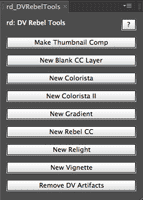
Prolost is celebrating the release of e-versions of The DV Rebel’s Guide (review) by giving away updated versions of the DV Rebel Tools scripts included with the original edition of the book. For many more details, see Rebel's Guide on your iPad or Kindle, DV Rebel Tools For Free.
Here's Stu's tutorial for DV Rebel Tools and a recent color correction session that also features their use (and still hoping for Colorista Free):
Forget Madge, here's (old) Ballmer
This was suggested after following a link to the famous words of Madge... Soak up a big taste of Steve Ballmer, who's given so much over the years:
March 29, 2011
Compositing and Color in AE and Premiere with RGS

He covers keying, compositing, color correction, and visual effects in After Effects and Premiere. In this tutorial he features uses of Red Giant tools along with plenty of other tips.
After Effects A-Z: Brightness & Contrast

Beyond that we can note that in Photoshop, Brightness & Contrast is much improved, though those improvements haven't trickled down to Afters Effects and Premiere. In AE the effect even seems different than the Legacy option in Photoshop, thought it hardly matters since you're better off with Levels or Curves anyway. For a good illustrative look at limitations (using the waveform levels monitor in Premiere), see Color Correction 1: Brightness & Contrast by Andrew Devis.
For an in-depth intro to controlling color in AE with the standard Adobe tools, see Adobe After Effects CS5 Visual Effects and Compositing Studio Techniques by Mark Christiansen. It's really the best place to learn how to use these tools in AE, and builds the foundations for mastering procedural mattes for compositing.
If you need a free option, happily there's videos at Lynda.com from Photoshop CS4 One-on-One: Advanced by Deke McClelland, with a whole section that covers the basics of Level, Curves, and related effects in detail. See also the free infographics Levels Quick Reference Guide (thanks for the picture) and Curves Quick Reference Guide by John Dickinson, as well as some useful tutorials at Cambridge in Colour.
To go a bit deeper see AE Portal references Waveform, vectorscope, and basic color correction and White balance + more with Color Finesse.
For an in-depth intro to controlling color in AE with the standard Adobe tools, see Adobe After Effects CS5 Visual Effects and Compositing Studio Techniques by Mark Christiansen. It's really the best place to learn how to use these tools in AE, and builds the foundations for mastering procedural mattes for compositing.
If you need a free option, happily there's videos at Lynda.com from Photoshop CS4 One-on-One: Advanced by Deke McClelland, with a whole section that covers the basics of Level, Curves, and related effects in detail. See also the free infographics Levels Quick Reference Guide (thanks for the picture) and Curves Quick Reference Guide by John Dickinson, as well as some useful tutorials at Cambridge in Colour.
To go a bit deeper see AE Portal references Waveform, vectorscope, and basic color correction and White balance + more with Color Finesse.
The 100th Monkey and the future of post
Is it April Fools already? The Editblog on PVC notes opposing "expert" opinions on the future of post-production and a movie edited on Final Cut by a chimp or some monkey with ESP.
Reports don't go far beyond YouTube, so you knows if "JT" really did it:
Reports don't go far beyond YouTube, so you knows if "JT" really did it:
Subscribe to:
Posts (Atom)