Showing posts sorted by relevance for query tilt shift. Sort by date Show all posts

December 17, 2008

Tilt-shift photography meme

John Nack has been posting items about Tilt-shift photography for a couple of years, and the meme has been hitting strong lately with application of the technique in video. Tilt-shift photography's miniturized scale model look and stop-motion feel is right at the point of cliché -- there's even a new iPhone app that creates tilt-shift photos which was reported today at Wired.

Smashing Magazine's 50 Beautiful Examples Of Tilt-Shift Photography is the definitive survey of photos and video from a Flickr pool and elsewhere.

The New York Times has had a few items too, including a talking slideshow by Vincent Laforet (see picture at left), who has already moved on famously to DSLR video using the Canon 5D MKII. Others posting a stream of items on the trend include Wired and Boing Boing.

There's also a number of articles on Faking tilt-shift with Photoshop (the real thing even with a Lensbaby is not cheap). The basic approach is simple and can be done easily in After Effect or Premiere:
  • Select picture with somewhat elevated viewpoint
  • Blur outside focal area with filters like Lens Blur or Compound Blur with mask or gradient (you'll need a soft touch on your gradient)
  • Increase contrast & saturation, then maybe sharpen
  • Adjust frame rate for a stop-motion look
Here are some other articles that discuss their method:

Update
01/06/09:adds a comment on the AE-List, "Trouble with a mask approach is that, while the blur looks good at the edge and the sharp area stays sharp, the intermediate blur is a cross-dissolved composite of blurred and non-blurred which looks "unnatural", especially at large blur amounts.

I prefer using the "Depth Map Layer" in Lens Blur, which uses a separate gradient layer to modulate the blur effect based on pixel value. You'll have to fiddle a bit with focal distance and iris radius, but you can get a convincing Tilt-shift with this approach.

Compound Blur can do the same thing and renders more quickly, but without the ability to repeat edge pixels, and the blur is a slightly-less natural gaussian style, rather than the more accurate lens blur. If you use a ramp to create your gradient, make sure to precompose the effect or the blur filters won't see it."

In the same thread, Trish Meyer added a tip for changing the frame rate: "you'll render faster by putting the original movie in a precomp, lowering the frame rate, and turning on the Preserve Frame Frame option in Comp Settings Advanced."

Update 2: see Michael Vitti on selective focus in Comments.

Update 3: It seems like the tilt-shift photgraphy and tilt-shift-faking pages at Wikipedia have improved. Also, Keith Loutit has a Vimeo channel with some good examples that shouldn't be overlooked; below is Helpless:

November 1, 2010

Another Tilt Shift effect tutorial

James Zanoni posted a Tilt Shift effect tutorial and project file, using the ramp effect, expressions, and the Lens Blur effect. The expression used in this tutorial is: thisComp.layer(“top”).effect(“Ramp”)(“End of Ramp”). This follows up his earlier Vintage 8-mm Film Effect Tutorial.

For more tilt-shift, click the tag, and check out 40+ Best Examples of Tilt-Shift Photography and Tutorials at DenzoMag.

July 20, 2009

Maltaannon's Tilt Shift

Maltaannon posted a video tutorial and preset in Tilt Shift. The real genius behind his approach is creating a free Preset, teaching people to stretch their troubleshooting skills with a video walkthrough, and creating a commercial opportunity by linking the whole effort to a filter that does something similar (and more), Magic Bullet Looks.

More on tilt shift effects can be found in older AEP posts Tilt-shift photography meme and Fake the tilt-and-shift look using After Effects.

April 10, 2009

Fake the tilt-and-shift look using After Effects

In the latest edition of Digital Arts, Sam Hampton-Smith shows how to recreate the trendy tilt-shift lens effect in After Effects. Eventually this link will work, but for now you'll have to look at a hard copy: Fake the tilt-and-shift look using After Effects.

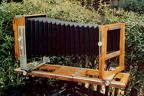
I'm sure a free AE tutorial will show up soon, but for now the outline re-described in the earlier post (and comments) Tilt-shift photography meme should do fine, if you have a soft touch on your gradient for the Lens Blur, Compound Blur or such filters. 2D Depth of Field, a 2006 video from VideoCoPilot, comes close but is missing something since it had other goals. According to a thread on the AE-List, further understanding can be gained by learning about view cameras, and by extension the Scheimpflug principle for changing the “plane of sharp focus.”

Update: Topher Welsh has a tutorial for AE, though it's not the first one:


Update 2: Maltaannon, Vailancio Rodrigues, and AE Tuts added Tilt-Shift tutorials for After Effects; this link connects the rest of the other info on this effect.

February 20, 2009

Dollhouse opening uses tilt-shift

Catching up with the DVR... the new Joss Whedon Fox TV series Dollhouse has opening credits that use some tilt-shift; for background see Tilt-shift photography meme (Zoic didn't seem to do the titles but did do the Dollhouse Mind Wipe effects):


Plus another time-shift item, The Simpsons get new titles (Idents.TV has some better viewing options):

August 12, 2009

FCP ShrinkRay: free Mac tilt-shift effect

CrumplePop and Toolfarm and are making CrumplePop ShrinkRay, a Mac-only "tilt-shift miniaturization" effect for Final Cut, free through August 19, 2009. CrumplePop effects seem to be based on Master Templates (FCP 6+); you drag and drop a template onto your timeline, fiddle with a few controls, and the template does the rest.

Resources for doing tilt-shift effects in After Effects were mention in these previous posts. Here's the demo:

March 31, 2010

Motion Theory expands tilt-shift for March Madness

Motion Theory social media outreach mentioned their work on March Madness ad spots that feature digital head replacement (for John Wooden) and a nice touch of a tilt-shift like effect to create miniatures (below).


Update: for more sports mograph, see Graphics Mafia, and for another miniatures treatment see Psyop Sprints to the End Zone.

March 31, 2011

Fairytale Lighting in After Effects

In Fairytale Lighting in After Effects (below), the prolific Harry Frank shows you how to "how to take a regular, run-of-the-mill shot and turn it into something beautiful and moody, straight out of a fairytale. You'll learn how to set up a down-and-dirty 3D track, add volumetric light and dust to a live action shot, and then finish it with some simulated camera lens blur."

Harry generously notes some alternatives to Red Giant and Trapcode effects he used. But wait, there's more:


Red Giant QuickTip #39: Fairytale Lighting in After Effects from Red Giant Software on Vimeo.