Showing posts sorted by date for query jorrit. Sort by relevance Show all posts

March 29, 2011

Pseudo or custom effects in After Effects

Jesse Toula has a new tutorial, Creating Pseudo Effects for AE, a full intro and update on custom effects:
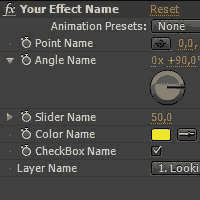
"Pseudo Effects, sometimes called 'custom effect controls' and 'custom expression controls' allow you to put all of your controls into a single 'effect'. You can set your own defaults and value ranges so that users can use the reset button to return to the defaults you chose. There are many more advantages to using Pseudo Effects, and this tutorial will go over all of them as I walk you through creating one from scratch. The creation of these controls is done in an .XML file, so for those of you how do not feel comfortable writing your own code, or just want to speed up the process, I also end the tutorial by showing you a way of creating all of the XML without doing any programming by hand."

Custom effects are similar to Animation presets and to the more specific but limited examples in the Behaviors Presets in AE. "Pseudo effects" is the name originally given by Charles Bordenave (aka nabscripts at AE Scripts), who posted an "Effect Creator" script at AEnhancers in 2006.

Maltaannon popularized and deployed custom effects in a variety of ways starting around 2007. See his What CustomEffects are for an introduction to his tutorials and products.

AEtuts had a series on custom effects in late 2009, along with others posted since. You can wade through the search results at AEtuts (or Google) for all the posts. Here's a smattering of some other custom effect resources:

  • Eran Stern has a Creative Cow AE podcast, Markers Leaks, an introduction to his preset and Custom Effect which he uses to trigger actions using layer markers inside of Adobe After Effects.

March 17, 2011

Tutorial gap: water drops, stereoscopic 3D, paper cutouts


With so many tutorials, scripts, and filters now available, it's easy to skip over tutorials when screening if you're busy or otherwise distracted. Some of these are pointed out regularly by Todd Kopriva on AdobeAE Facebook and by Lester Banks.

Anyway, AEtuts has had some good tutorials recently. Here's just a few:

February 1, 2011

AE Plug-in Matchnames

Update August 2016: After Effects Plugin Match Names from David Torno is the most updated article available (PDF download and script to contribute).

Update: redefinery posted Effect Match Names Reference (for AE CC (12.1)).
____________________________________________________________

David Torno published a long list of After Effects plug-in matchnames for scripters and expression artists on the AE I Owe You Facebook page:

"Nothing exciting, but might be handy. While the list is not 100% complete, under 1200 right now, I would like to get every single current plugin made for AE in this list at some point.

I can pass along a script I made to export matchname info for plugins. Basically if you don't see the plugins you are looking for on the list AND you have them installed and you are interested in adding to this list, let me know."

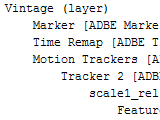
What is a matchName? Under the hood, every object or property has a unique matching ID. Here's a description from AEnhancers:

'matchName will give you After Effects' internal name for any given layer or property type, so you can figure out what kind of layer or property you are dealing with. For example, a layer might also be an "ADBE Camera Layer", an "ADBE Light Layer" or an "ADBE Text Layer", all fairly self explainatory really.

So an "ADBE AV Layer" is basically any kind of layer that might contain audio or video, in fact any kind of layer that isn't a Camera, Light or Text layer.'

Several years ago Jeff Almasol posted an Effect Match Names Reference for AE 7 at his Redefinery. Jeff's rd: Gimme Props script "dumps the name and matchName of the property hierarchy of the selected layers, in selected order. Use this information to retrieve the internal matchName for a property that you want to access in your scripts."


Also, some recent AE scripts offer matchname services; see 'Knowledge at your fingertips' for After Effects, ExpressionUniversalizer to translate expressions, and ft-Toolbar.

You can see matchname use in action in a tutorial at AEtuts+, Learn How to Create a Light Rays Custom Effect from Scratch by Jorrit Schulte.

December 19, 2010

Rotoscoping Depth Mattes With CameraTracker

Jorrit Schulte posted Rotoscoping Depth Mattes With CameraTracker last month on AEtuts:

"In this tutorial, we’re going to look at creating a 3D depth matte from Real footage. We’ll matchmove the footage with The Foundry’s plug-in CameraTracker, and create 3D layers that match the Footage to get a '3D model' of the scene. Then you will learn what you can do with this depth matte after you create it; create realistic fog, fake DOF and a rotoscoped matte."

Related techniques can be found in After Effects Rack Focus: tutorial and preset and with the Digieffects Depth Cue plug-ins and tutorials noted in Sharpen Depth of Field with One Click (there's many more at Digieffects). Here's a preview Jorrit's work:

October 1, 2010

Color swatches in After Effects

Update: Synthetic Aperture has since updated their software a few times, and AEScripts.com has a color swatch panel now.

An AE-List thread today explored options for color swatches in After Effects. Currently there's no filter for CS5 for this. The old Buena filter SwatchBuckler is gone, and the UI-heavy Synthetic Aperture Test Gear (pictured) isn't quite ready for 64-bit CS5.

Todd Kopriva and others had several suggestions, including several options for using Kuler, all listed in Select a color or edit a gradient in AE Help:

  • Adobe provides the "Swatch You Want" script in a package of scripts for After Effects on After Effects Exchange. The Swatch You Want script imports and converts Adobe Swatch Exchange (.ase) files.
  • Jorrit Schulte also provides a tutorial on the AEtuts that demonstrates how to make an animation preset for importing and working with Kuler color swatches.
  • Jerzy Drozda, Jr. (Maltaannon) provides a video tutorial (and example project), Kuler Workflow, that shows how to copy and paste from the Adobe Kuler desktop application to bring color swatches into AE.
  • The Mac system color picker plug-in Mondrianum let's you access Kuler swatches.
It seems like this may also be a job for Pixel Bender some day.

Update: colorLibrary from AEScripts.com helps you create, manage, and share color swatches with their UI script panel.

September 22, 2010

Creating an EKG in After Effects

In Stay On Pulse: Creating A Shape-Driven Electrocardiogram at AEtuts, Carlos Batllo shows you how to make a static EKG with a Shape layer and Repeater.

There are a number of other tutorials for making something similar, many with entirely different approaches to making EKGs, which themselves come with different types of displays. Here's a few of the other tutorials:

July 23, 2010

Pie Chart, a custom effect preset for AE

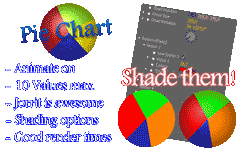
Via @aetuts is Pie Chart, a custom effect preset by Jorrit Schulte. It creates pie charts and has a variety of animation and shading options.

For similar stuff, see previous post Charts and graphs in After Effects.

July 6, 2010

A 3D deck of cards in After Effects

Jorrit Schulte has a new After Effects video tutorial on AEtuts, Control A 3D Deck of Cards Like Magic:

In this tutorial we’ll be creating a Card deck that unfolds and a chosen card that rises up. We’ll be creating lots of expressions and i will show you an handy trick that will show another image on the front and backfacing of a layer

November 26, 2009

Deinterlacerator: an After Effects Custom Effect

Fix Interlaced Footage With Deinterlacerator! – Custom Effect by Jorrit Schulte on AE Tuts shows you how to adjust various slider thingies in ways that might not have occurred to you. While using a 3rd party filter is much easier, this tutorial will exercise your AE muscles. You'll have to compare the benefits of various methods yourself.

November 23, 2009

From AE expression controls to custom filter

Create Your Own Custom Effects! by Momcilo Stojkovic is the opener for a week of custom effects at AE Tuts. This text tutorial shows you how to modify and reimport PresetEffects.xml, so you can group and save expression controls as a unique filter/preset in After Effects.

Throughout the week we'll see more on the use of these and other effects capsules. Here's what on order next at AE Tuts:
  • 'We then have another tutorial from Momcilo using what you've just learned to Create A Custom Vignette Effect. This will just be practical example of how you can use CE's to save you time on stuff you find yourself doing over and over again...
  • Next, there will be a 3D Layer Distributor tutorial. This awesome little CE from Rob Schofield will allow you to spread out your layers in 3d space with ease.
  • Make Jack Bauer proud with this "24" Title Opener Tutorial by Jorrit Schulte where you can download his CE and he'll show you step by step how to use it "Your Way"!
  • Also from Jorrit, you can download his free Deinterlacerator CE to redeem your old DV footage stricken with scan-line syndrome.
  • We've collecting together a "Microwave-Ready" Roundup where you can browse through a number of Free Presets and CE's packaged up and ready for you to use.