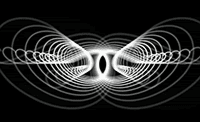
Red Giant Software and John Dickinson have a new Final Cut Pro motion graphics
tutorial that uses Trapcode Shine, Starglow and 3D Stroke.
You can find a quick rundown of the new-old Trapcode filters in
the review I did a few months ago for
SF Cutters. In short, though similar filters (or Replicators or Behaviors) can be found in AE and Final Cut Studio, Trapcode's Shine, Starglow, and 3D Stroke offer more control, unique features, and probably faster results than the alternatives. The
Trapcode website has numerous additional tutorials and examples for the same filters using AE.
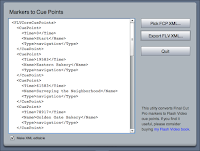 While not a problem for Premiere and AE users, Final Cut Pro markers don't work well as cue points in a Flash video file, while the UI for scrubbing and setting cues in Adobe's Flash CS3 Video Encoder is unwieldytiring of this, John Skidgel built an AIR utility to convert FCP XML to FLV XML, which you can import into Flash CS3 Video Encoder. You can pick up the app and check out the walk-through at Free AIR application: Convert Final Cut Pro Markers to Flash Video Cue Points.
 John has also made available a few more tutorials from his Focal Press book Producing Flash CS3 Video: Techniques for Video Pros and Web Designers.


